FT-252 OperaTing Manual6
Battery Charging
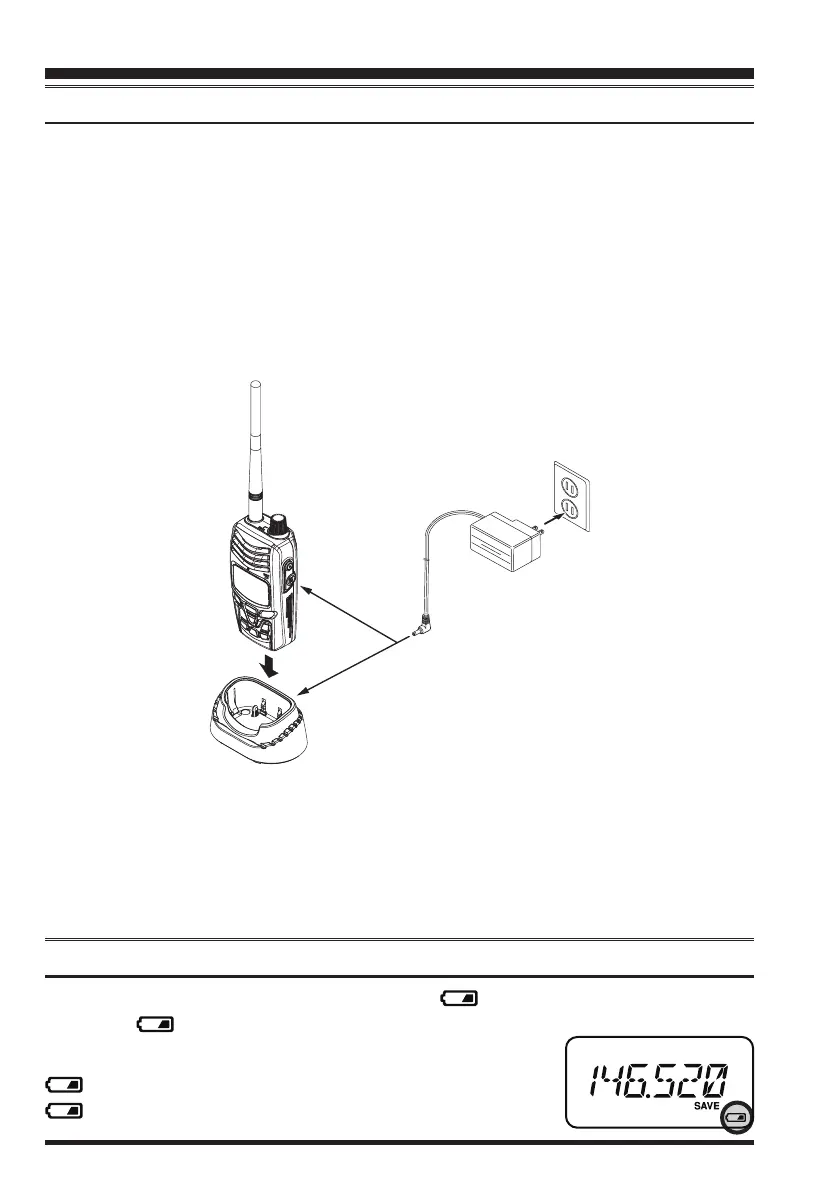
If the battery has never been used, or its charge is depleted, it may be charged by con-
necting the
SAD-11B
or
PA-48
AC Wall Charger, as shown in the illustration, to the
EXT DC
jack. If only 12 ~ 14 Volt DC power is available, the optional
SDD-11
DC/DC
Converter (with its cigarette lighter plug) or
E-DC-6
DC Cable may also be used for
charging the battery.
The display will indicate “
CHRG
”, while the battery is being charged. When charging is
completed, the “
CHRG
” indication disappears from the display.
A fully-discharged pack will be charged completely in 5 hours. Disconnect the
SAD-
11B
or
PA-48
from the
EXT DC
jack and the AC line outlet.
Installation of Accessories
Important Note
The
SAD-11B
and
PA-48
is not designed to power the transceiver for operation (re-
ception or transmission).
Please be advised that the
SAD-11B
and
PA-48
may contribute noise to TV and ra-
dio reception in the immediate vicinity, so we do not recommend its use adjacent to
such devices.
Low Battery Indication
When the battery charge is almost depleted, a “ ” icon will appear on the display.
When the “ ” icon appears, it is recommended that you charge the battery soon.
No Icon: Sufcient Operating Battery Power
: Lower Battery Power
(Blinking): Prepare to charge (or replace) the Battery
CD-57
(option)
honbun_130314.indd 6 2013/03/14 17:44:39


 To Next Page