FT-252 OperaTing Manual32
Scanning
Preferential Memory Scan
The
FT-252
also allows you to set up a “Preferential Scan List” of channels which you
can “ag” within the memory system. These channels are designated by a blinking “
”
icon when you have selected them, one by one, for the Preferential Scan List.
When you initiate memory scanning, beginning on a channel with the blinking “
” icon
appended, only those channels bearing the blinking “
” icon will be scanned. If you
initiate scanning on a channel which does not have the blinking “
” icon appended, you
will scan all channels including those with the blinking “
” icon appended.
Here is the procedure for setting up and using the Preferential Scan List:
1. Recall the Memory Channel which you wish to add to the Preferential Scan List.
2. Press the
[
SET/ATS
]
key to enter the Set mode.
3. Rotate the
DIAL
knob or press the
[
p
]
/
[
q
]
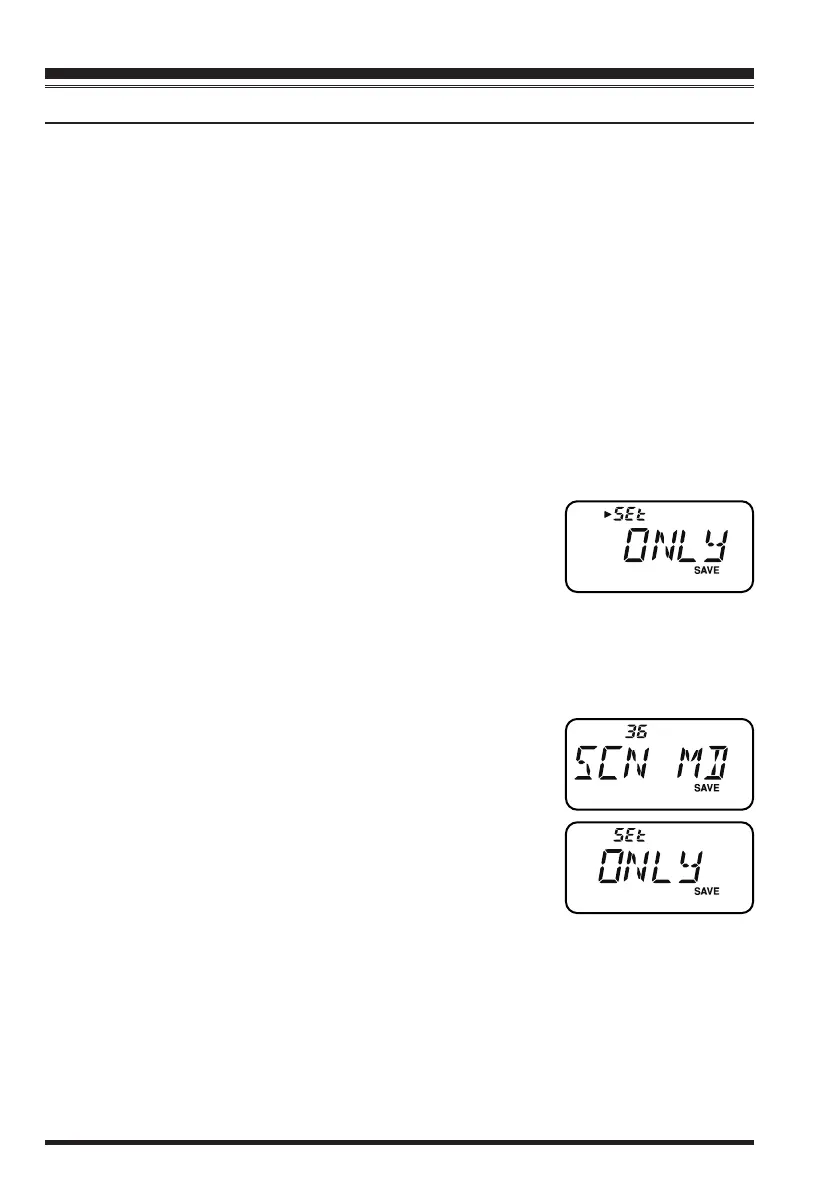
key to select Set Mode Item 38:
SKIP
.
4. Press the
[
SET/ATS
]
key momentarily enter the “Skip” channel-selection mode.
5. Rotate the
DIAL
knob or press the
[
p
]
/
[
q
]
key to select
“
ONLY
”.
6. When you have made your selection, press the
PTT
switch to save the setting and exit to normal operation.
7. To remove a channel from the Preferential Scan List, just repeat the above proce-
dure, rotating the
DIAL
knob to select “
OFF
” in step 5 above.
To initiate Preferential Memory Scan:
1. Press the
[
SET/ATS
]
key to enter the Set mode.
2. Rotate the
DIAL
knob or press the
[
p
]
/
[
q
]
key to select
Set Mode Item 36:
SCN MD
.
3. Press the
[
SET/ATS
]
key momentarily to enable adjust-
ment of this Set Mode Item.
4. Rotate the
DIAL
knob or press the
[
p
]
/
[
q
]
key to select
“
ONLY
”.
5. Press the
PTT
switch to save the setting and exit to nor-
mal operation.
6. Now, press and hold in either the
[
p
]
or
[
q
]
key for one second to initiate the Pref-
erential Memory Scan. Only the channels which have the blinking “
” icon append-
ed to the channel number will be scanned.
7. To cancel the Preferential Memory Scan, just repeat the above procedure, rotating
the
DIAL
knob or press the
[
p
]
/
[
q
]
key to select “
MEM
” in step 4 above.
Memory Scanning
honbun_130313.indd 32 2013/03/13 19:48:00



 To Next Page