15
English
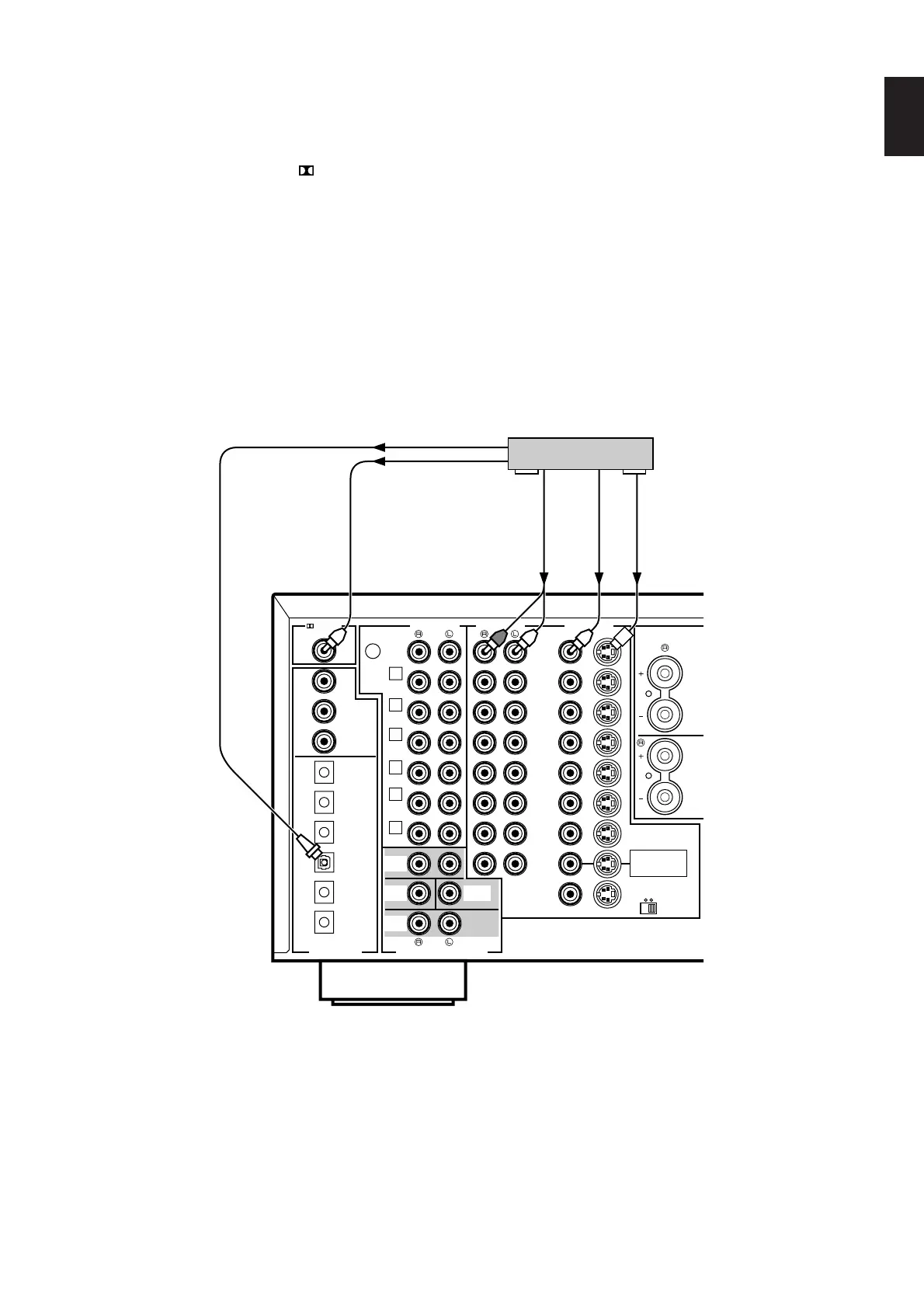
If your LD player has a DOLBY DIGITAL (AC-3) RF signal
output terminal, connect it to this unit’s DIGITAL (AC-3) RF
SIGNAL input terminal. Audio signals encoded with the Dolby
Digital (AC-3) are input to this unit by this connection.
* To play back an LD source with the Dolby Digital decoded,
set the input mode of LD to “AUTO” or “AC-3 RF”. (Refer to
page 41 for details.)
It is also necessary to connect the LD player to this unit’s
OPTICAL digital audio signal input terminal and/or analog
audio signal input terminals regardless of the DOLBY DIGITAL
(AC-3) RF signal connection, for playing back an LD source
with the Dolby Pro Logic Surround or the DTS decoded, or in
normal stereo (or monaural).
Note
DOLBY DIGITAL (AC-3) RF audio input signal cannot be
recorded by a tape deck, MD recorder or VCR. To record an
LD source, the LD player must be connected to the OPTICAL
digital audio signal input terminal and/or analog audio signal
input terminals of this unit.
m Connecting to DOLBY DIGITAL (AC-3) RF output of the LD player


 To Next Page
 Loading...