RX-V559/HTR-5950/DSP-AX559
20
RX-V559/HTR-5950/
DSP-AX559
When there is a history of protection function:
The FL display appears as shown below depending on the
type of the protection function.
プロテクション履歴がある場合:
プロテクションの種類によって下記の表示が現れます。
スピーカーをショートさせた時などが原因で、プ
ロテクションが働いたことを示します。
The protection function worked due to ex-
cessive current through the amplifier.
Causes could be a short at the speaker ter-
minal or a defect in the amplifier. The pro-
tection function activates immediately to
turn off the power, with no history display at
turn-on, if the amplifier is defective.
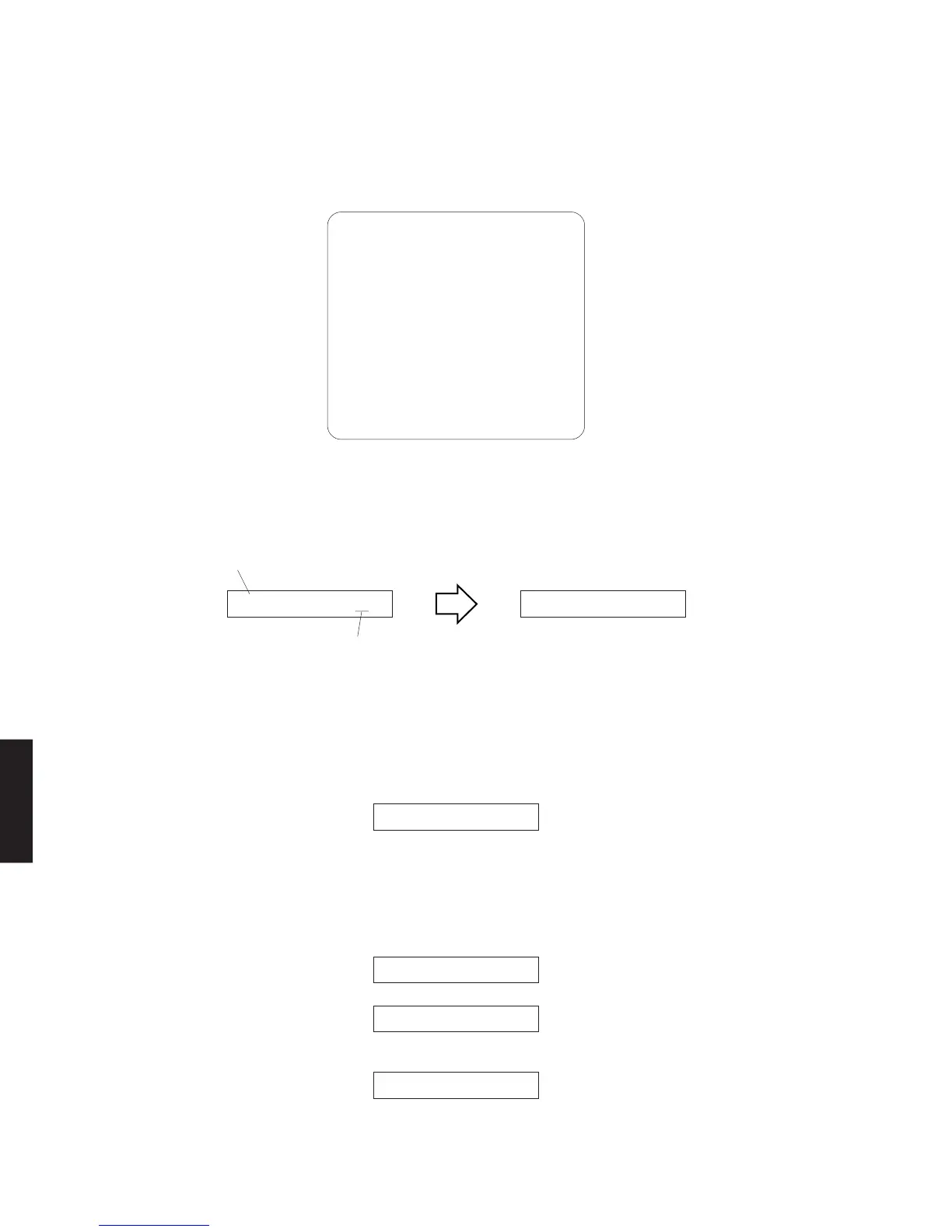
● ダイアグ起動時の表示
モニターを接続してある場合は、モニターの画面に図のようにダ
イアグメニューが表示されます。
本体FLディスプレイには、オープニング(プロテクション履歴/
バージョン)が表示され、数秒後にダイアグメニュー表示(1.
ANALOGBYPASS)となります。
• Display provided when DIAG started
When the monitor is connected, DIAGNOSTIC MENU ap-
pears on its screen as shown in the figure.
On the FL display of the main unit, an opening message
(including the version and the protection history) appears
for a few seconds followed by the diagnostic menu display
(1. ANALOG BYPASS).
Opening message / オープニング表示 DIAG menu display / ダイアグメニュー表示
When there is no history of protection function: プロテクション履歴が無い場合:
電源電圧による原因で、プロテクションが働いた
ことを示します。異常状態のままパワーオンする
と、約1秒後にプロテクションが掛かり、電源が
切れます。
The protection function worked due to a
defect or overload in the power supply. If
the power is turned on with the abnormality
unsolved, the protection function works in
about 1 second to turn off the power.
アンプの故障でスピーカーに直流電圧が掛かるな
どが原因で、プロテクションが働いたことを示し
ます。異常状態のままパワーオンすると、約3秒
後にプロテクションが掛かり、電源が切れます。
The protection function worked due to a DC
voltage appearing at the speaker terminal.
A cause could be a defect in the amplifier. If
the power is turned on with the abnormality
unsolved, the protection function works in
about 3 seconds to turn off the power.
PS1 PRT:000 A
PS2 PRT:000 A
or
1.BYPASS
2.RAM THR
3.PRO LOGIC
4.SP SET
5.XCH INPUT
6.MIC CHECK
7.VFD CHECK
8.MAN
,
L TEST
9.PRESET
10.AD CHECK
11.VC STATUS
12.XM TEST
13.DOCK TEST
[14.Net]
[15.DAB]
16.IF STATUS
17.DSP BUS
18.SWF C. OFF
19.PRT SET
20.PRT HIST
21.SOFT SW
22.VER/SUM/P
23.TI BOOT
DC PRT:000 A
I PROTECT A
After a few seconds
数秒後
NO PROTECT A 1.ANALOG BYPAS
Version (1 alphabet)
バージョン(英 1 文字)
When there is no protection history
プロテクション履歴が無い場合



 To Next Page
 Loading...