Maintenance
67
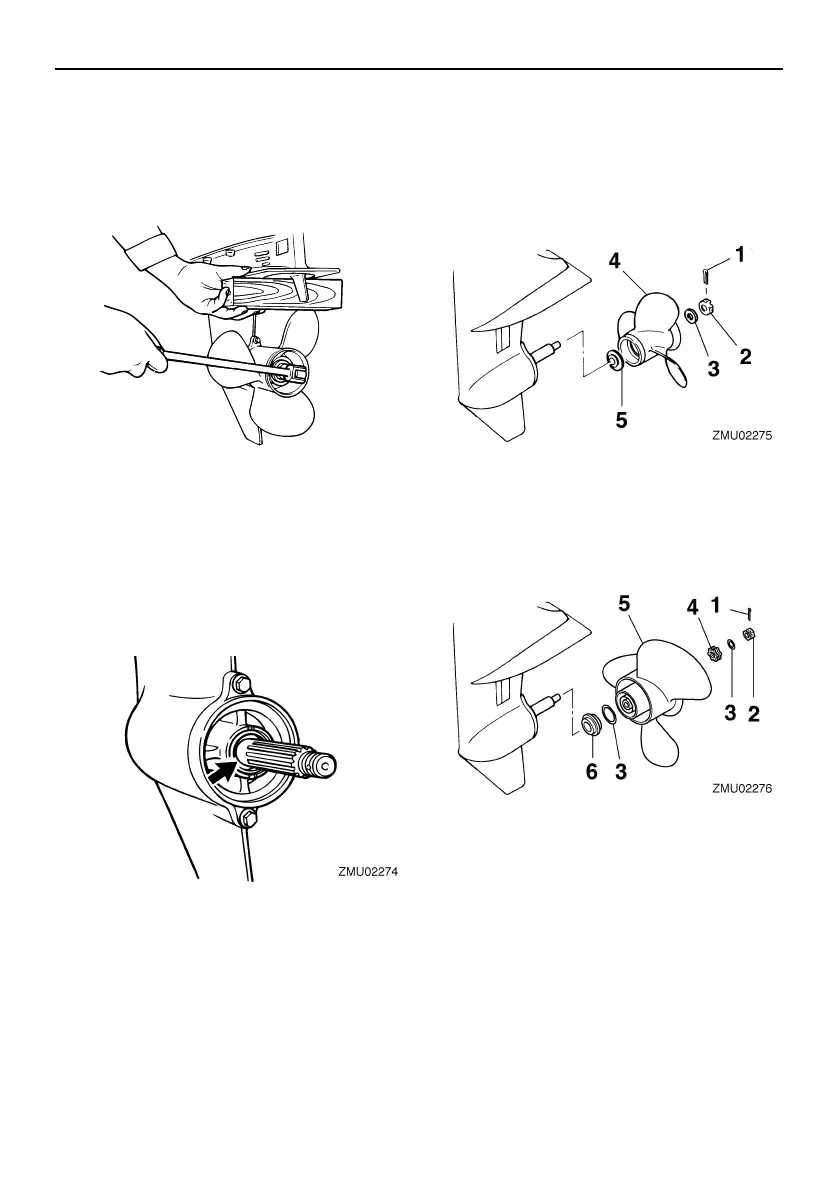
Do not use your hand to hold the propeller
when loosening or tightening the propeller
nut. Put a wood block between the anti-cavi-
tation plate and the propeller to prevent the
propeller from turning.
Checkpoints
Check each of the propeller blades for ero-
sion from cavitation or ventilation, or other
damage.
Check the propeller shaft for damage.
Check the splines for wear or damage.
Check for fish line tangled around the pro-
peller shaft.
Check the propeller shaft oil seal for dam-
age.
EMU30663
Removing propeller
EMU29198
Spline models
1. Straighten the cotter pin and pull it out
using a pair of pliers.
2. Remove the propeller nut, washer, and
spacer (if equipped). WARNING! Do not
use your hand to hold the propeller
when loosening the propeller nut.
[EWM01891]
3. Remove the propeller, washer (if
equipped), and thrust washer.
1. Cotter pin
2. Propeller nut
3. Washer
4. Propeller
5. Thrust washer
1. Cotter pin
2. Propeller nut
3. Washer
4. Spacer
5. Propeller
6. Thrust washer
U60R79E0.book Page 67 Wednesday, December 18, 2013 1:32 PM


 To Next Page