CRX-E320/NX-E700
11
CRX-E320/
NX-E700
FF
FF
F (OPEN/CLOSE)
WW
WW
W /
DD
DD
D (PLAY/PAUSE)
AA
AA
A (STOP)
TT
TT
T /
EE
EE
E (SKIP-/SEARCH-)
RR
RR
R /
YY
YY
Y (SKIP+/SEARCH+)
FF
FF
F (OPEN/CLOSE)
WW
WW
W (PLAY)
DD
DD
D (PAUSE)
AA
AA
A (STOP)
TT
TT
T (SKIP-)
YY
YY
Y (SKIP+)
TIME/INFO
RANDOM
Panel key
Panel key
• Function list of remote control keys.
• Function list of panel keys.
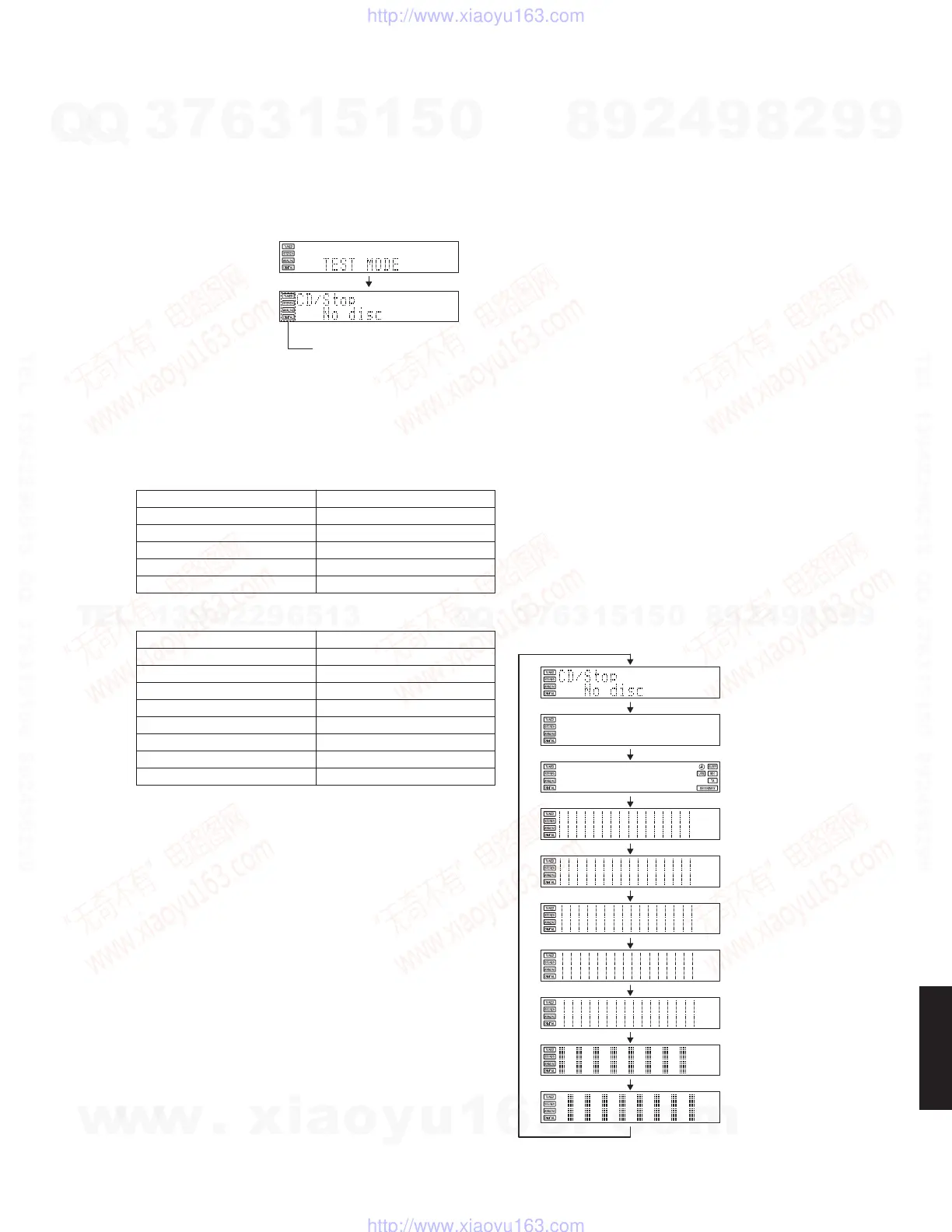
*1 Check FIP display
The display condition varies as shown below accord-
ing to the “TIME/INFO” key of the remote control.
■ TEST MODE
Operation and FIP display of the CD mechanism unit are checked.
• Starting Test Mode
a. Connect the power cable to the AC power outlet.
b. Press the “STANDBY/ON” key while simultaneously pressing “
WW
WW
W /
DD
DD
D
” (PLAY/PAUSE) and “
AA
AA
A
” (STOP) keys of the
main unit.
c. TEST mode is activated and “TEST MODE” flashes for about 2 seconds.
d. When using the input source other than [CD] for the main unit, press the “CD” key of the remote control to set the
input source as [CD].
* While the TEST mode is at work, it is not possible to change the input source even by pressing the
“INPUT” key of the main unit.
• Canceling Test Mode
Press the “STANDBY/ON” key of the main unit and disconnect the power cable from the AC power outlet.
Starting TEST mode
2 seconds
While the TEST mode is activated, the indicator remains ON constantly.
Tray open/close.
Playback/Pause.
Stop.
Move traverse reverse.
Move traverse forward.
Tray open/close.
Playback.
Pause.
Stop.
Move traverse reverse.
Move traverse forward.
Check FIP display. (*1)
Spindle servo on/off.
Function
Function
Initial display
Segments off
Icon (right)
Pattern 1
Pattern 2
Pattern 3
Pattern 4
Pattern 5
Pattern 6
Pattern 7
(Indicator remains ON constantly.)
w
w
w
.
x
i
a
o
y
u
1
6
3
.
c
o
m
Q
Q
3
7
6
3
1
5
1
5
0
9
9
2
8
9
4
2
9
8
T
E
L
1
3
9
4
2
2
9
6
5
1
3
9
9
2
8
9
4
2
9
8
0
5
1
5
1
3
6
7
3
Q
Q
TEL 13942296513 QQ 376315150 892498299
TEL 13942296513 QQ 376315150 892498299
http://www.xiaoyu163.com
http://www.xiaoyu163.com


 To Next Page