Instrument and control functions
4-9
4
5. Push the “SELECT” button until
the multi-function display exits the
backlight setting mode.
EAU1234M
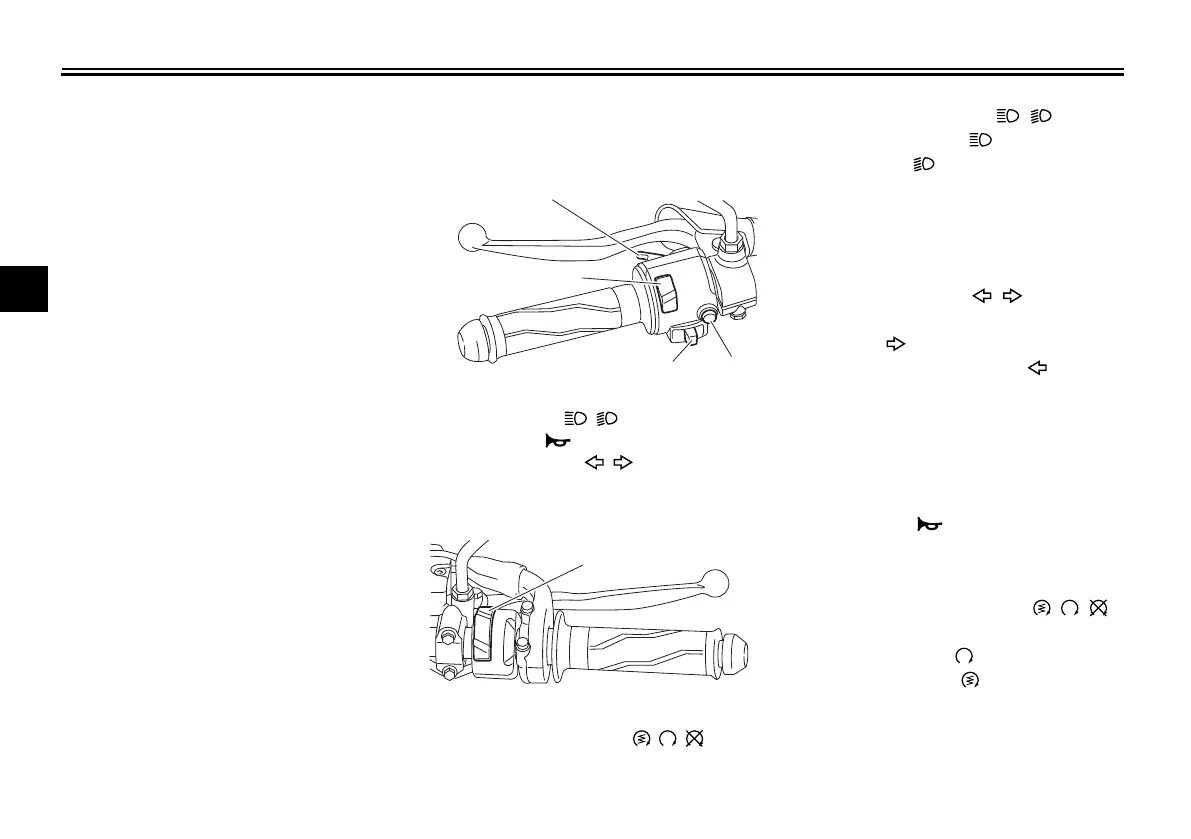
Handlebar switches
Left
Right
EAU54202
Dimmer/Pass switch “ / /PASS”
Set this switch to “ ” for the high
beam and to “ ” for the low beam.
To flash the high beam, push the
switch down towards “PASS” while the
headlights are on low beam.
EAU12461
Turn signal switch “ / ”
To signal a right-hand turn, push this
switch to “ ”. To signal a left-hand
turn, push this switch to “ ”. When
released, the switch returns to the cen-
ter position. To cancel the turn signal
lights, push the switch in after it has re-
turned to the center position.
EAU12501
Horn switch “ ”
Press this switch to sound the horn.
EAU68270
Start/Engine stop switch “ / / ”
To crank the engine with the starter,
set this switch to “ ”, and then slide
the switch toward “ ”. See page 6-2
for starting instructions prior to starting
the engine.
1. Pass switch “PASS”
2. Dimmer switch “ / ”
3. Horn switch “ ”
4. Turn signal switch “ / ”
1. Start/Engine stop switch “ / / ”
UB1VE0E0.book Page 9 Tuesday, September 3, 2019 1:19 PM



 To Next Page