40 RM1x SEQUENCE REMIXER
BASIC CONCEPT
rev send
cho send
dry
reverb
return
chorus
return
send chorus to reverb
DRY LINE
PAN
reverb
pan
chorus
pan
OUTPUT
thick line indicates a stereo signal
rev send
cho send
dry
rev send
cho send
dry
rev send
cho send
dry
variation part
part 3
part 16
Variation can be used only by one part
part 1
part 2
VAR
VAR
VAR
VAR
variation on/off
variation on/off
variation on/off
variation on/off
PAN
volume expression
PAN
volume expression
PAN
volume expression
PAN
volume expression
REVERB
CHORUS
PAN
(pages 69, 120) (pages 64, 120)
The stereo location of the effect output is determined by the
Effect submode settings Reverb Pan (pages 72, 121) and Cho-
rus Pan (pages 71, 121).
A bus line called Send Chorus To Reverb (pages 71, 121) con-
nects the chorus effect to the reverb effect. By using this bus
line you can connect the chorus effect and reverb effect in
series.
6. Effect block
❏ How the effects work
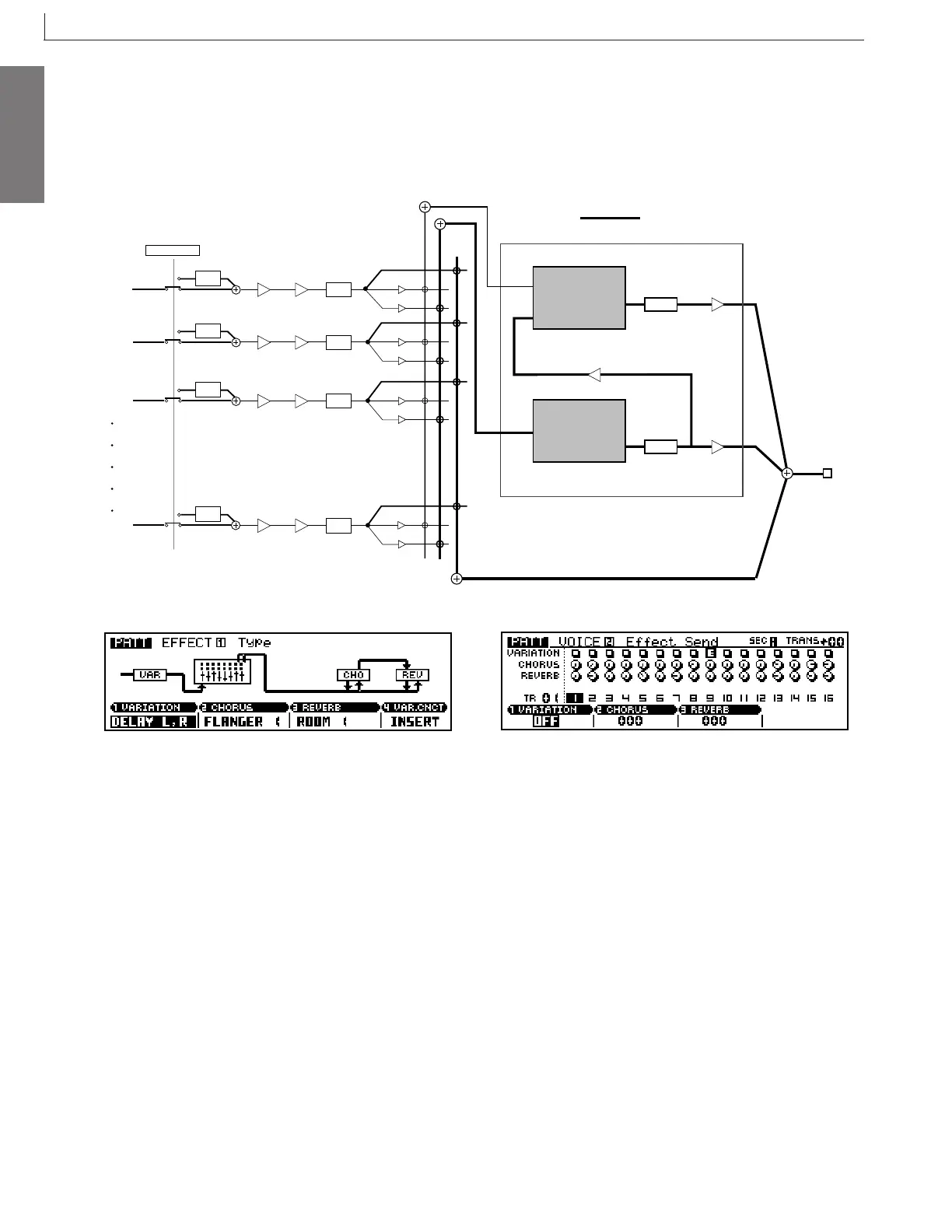
• Variation = Insertion
When Variation connection is set to Insertion, the three
effects will be connected as shown in the diagram below.
Of the 16 parts of the tone generator block, the signals of the
part specified by the Voice submode Variation on/off (pages
64, 120) will be input to the variation effect, and the variation
effect will be applied here.
The signals of all tone generator parts including the above-
mentioned part will be sent to the reverb effect and the chorus
effect according to the Voice submode settings Reverb Send
Level (pages 64, 120) and Chorus Send Level (pages 64, 120).
Here you can adjust the depth of the effect for each part.



 To Next Page