4-7
4
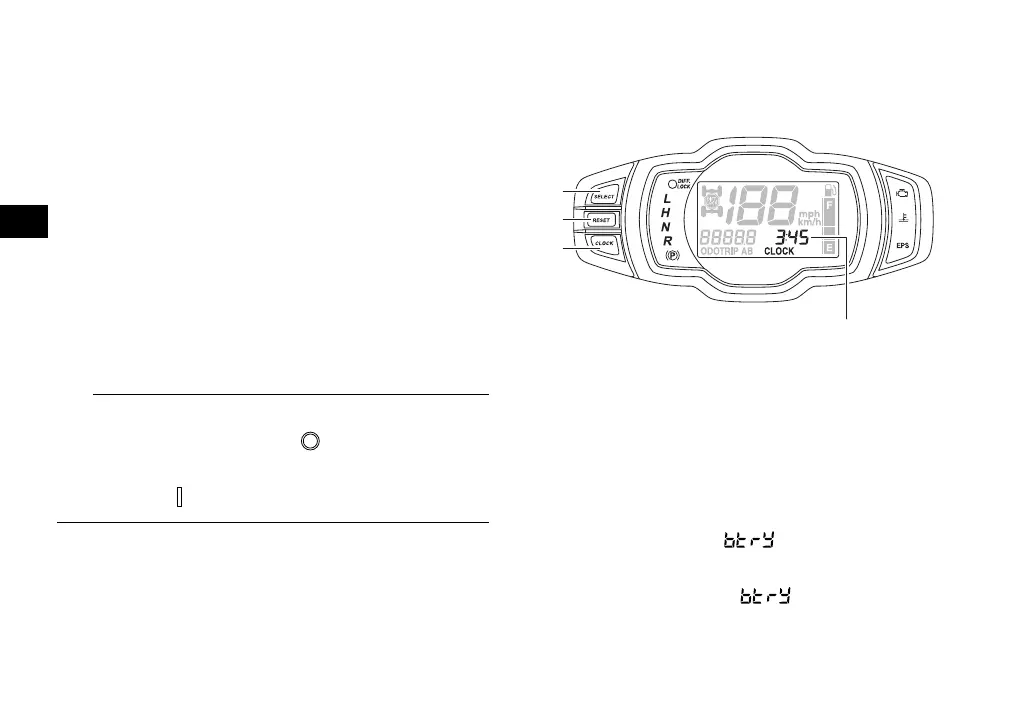
Pushing the “SELECT” button switches the
display between the odometer mode “ODO”
and the tripmeter modes “TRIP A” and “TRIP
B” in the following order:
ODO → TRIP A → TRIP B → ODO
To reset a tripmeter, select it by pushing the
“SELECT” button, and then push the “RE-
SET” button for at least three seconds. The
tripmeters can be used to estimate the dis-
tance that can be traveled with a full tank of
fuel. This information enables you to plan fu-
ture fuel stops.
To switch the display between “mph” and
“km/h”, turn the key to “ ” (off), then push
and hold the “SELECT” button while turning
the key to “ ” (on).
Clock, hour meter and voltage display
modes
Pushing the “CLOCK” button switches the
display between the clock mode “CLOCK”,
the hour meter mode “HOUR”, and the volt-
age display mode “ ” in the following or-
der:
CLOCK → HOUR → → CLOCK
1. “SELECT” button
2. “RESET” button
3. “CLOCK” button
4. Clock/Hour meter/Voltage display
UBN57AE0.book Page 7 Tuesday, November 24, 2015 1:42 PM





 To Next Page