25
OPERATION
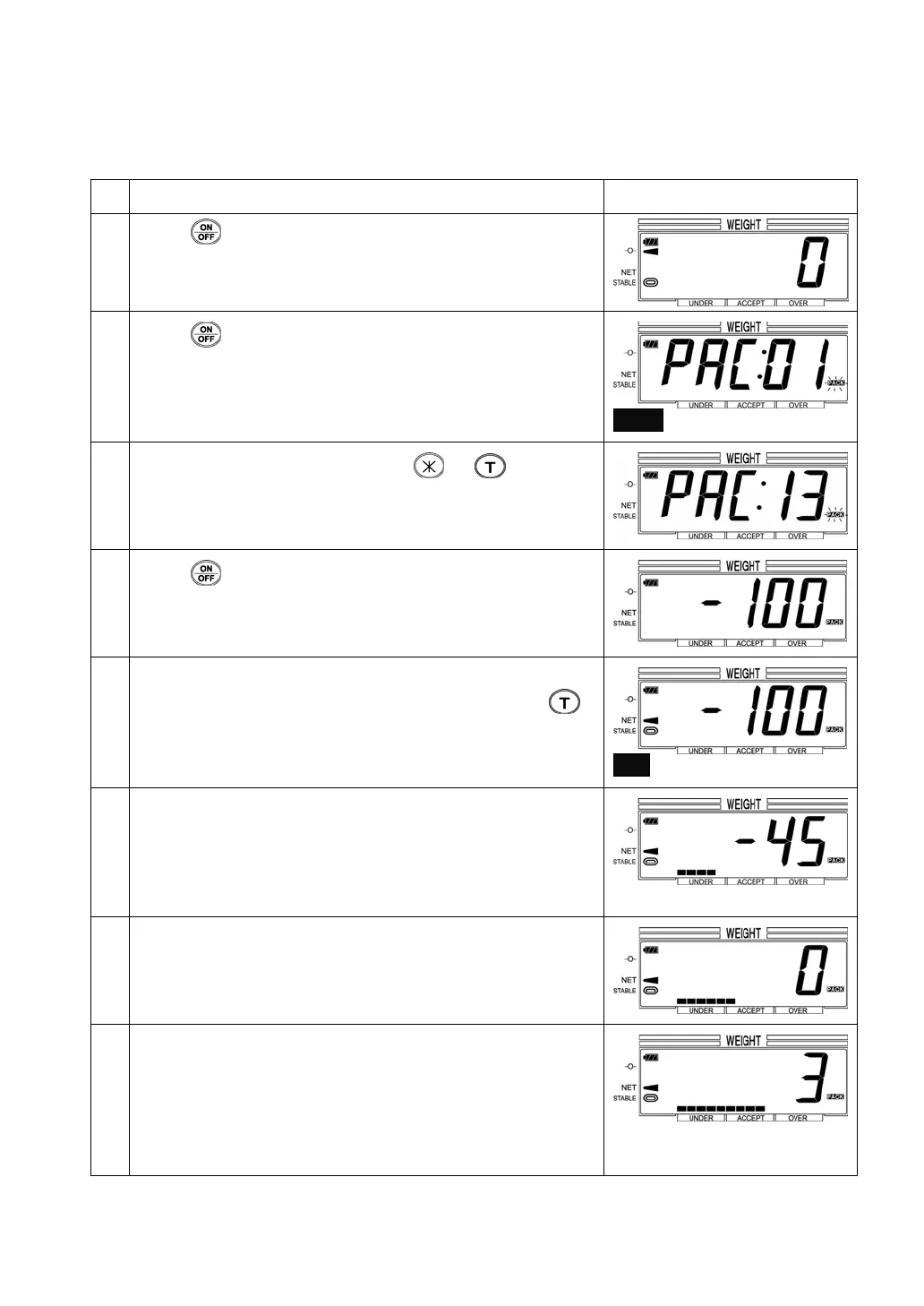
e.g.) Recall the Item No. 13 (the target weight =100g , the allowable weight = 5g)
Operation Display
1
Press
to turn on the scale.
2
Press
briefly to recall the stored item No.
PACK blinks.
3
Chose the item number by pressing
or .
e.g.) Items No. = 13
4
Press
to start the fixed weighing.
e.g.) Target weight = 100g
5 Place the container if necessary.
In case of parameter No. 06=000 (
Auto-tare OFF), press .
In case of parameter No. 06=001 (
Auto-tare ON), the weight of
container is tared off automatically.
NET indicator lights up.
6 Place the item on the pan. The display shows the weight to
the target weight as a negative number. The present level
of weight is shown in the bar chart.
e.g.) When the present weight is 55g for the target weight of
100g, the display shows “- 45”.
7 Place the items on the pan until the display shows “0”.
The bar charts move to the lowest position of acceptable
weight.
8 When the weight is heavier than the target weight, the display
shows the range of overweight.
e.g.) In case of placing the items for 103g at Target wt =
100g, Allowable wt = 5g, the display shows “3”.
The bar charts move to the upper range of acceptable wt.


 To Next Page
 Loading...