22
FIXED WEIGHING FUNCTION
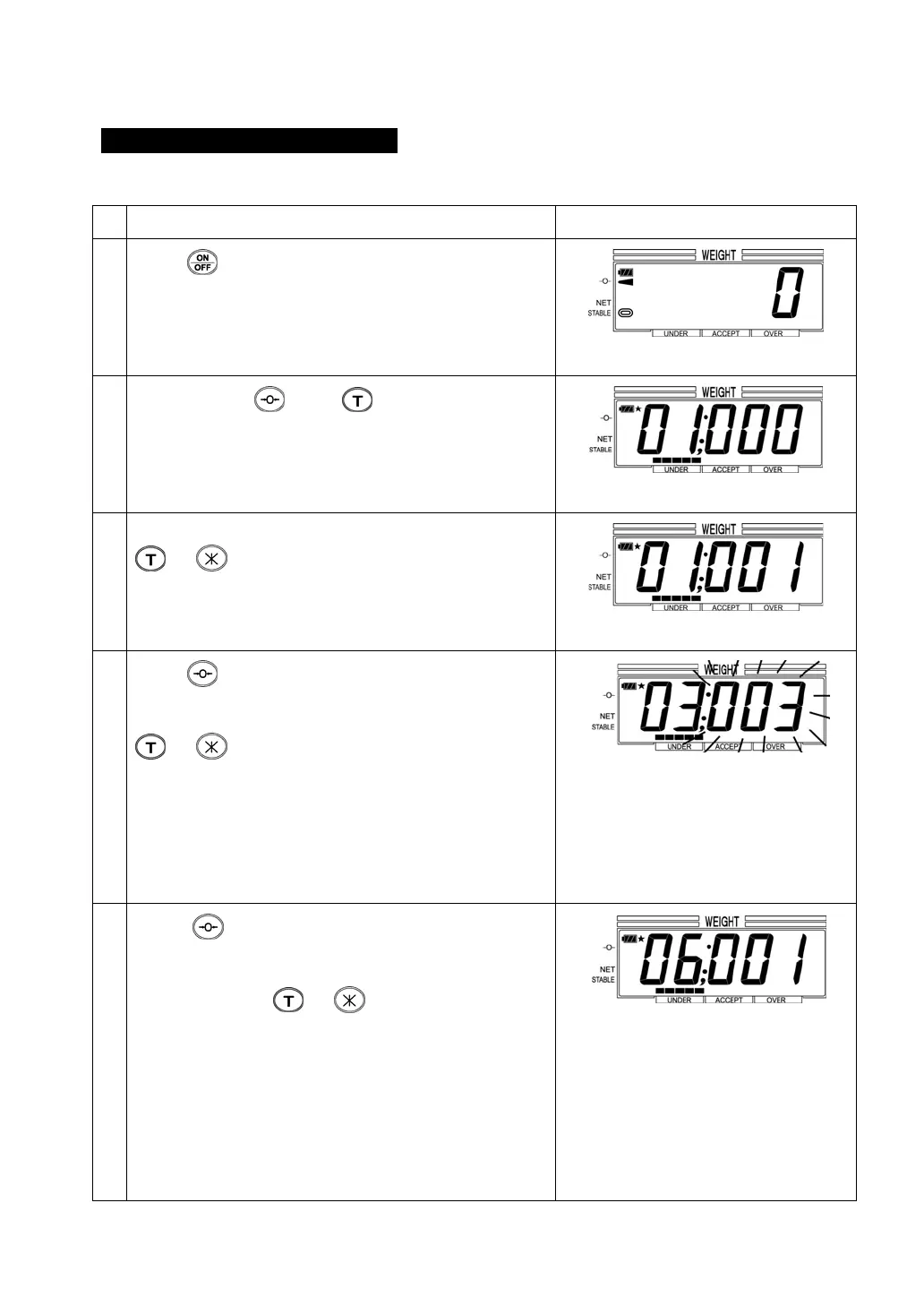
PRE-SETTING
Operation Display
1
Press
to turn on the scale.
2
While pressing
, press to enter
the pre-setting mode.
3 Set the value 001 (Fixed weighing function) by pressing
or .
4
Press
twice. The display goes to the parameter
No. 03 (Buzzer setting). If you would like to sound the
beep at acceptable weight, enter “003” by pressing
or .
000 No sound
001 Beep at under weight
002 Beep at over weight
003 Beep at acceptable weight
004 Beep at under & over weight
5
Press
3 times. The display goes to the
parameter No. 06 (Auto-Tare setting). If you would
like to tare the weight of container automatically, enter
“001” by pressing
or .
000 Auto-tare OFF
001 Auto-tare ON


 To Next Page
 Loading...