ENGINE OPERATION
JH Series Operation Manual 89
YANMAR E-key
By registering the key, the key
authentication function is enabled when
the system power is turned on.
Note: To register the key, the system
version must support YANMAR
E-key and the YANMAR E-key
function must be enabled at initial
settings.
• If you lose your key, contact an
authorized dealer or distributor.
• If you are traveling to a country that has
not obtained radio wave certification, you
need to perform a Key reset to disable
the YANMAR E-key.
Key registration
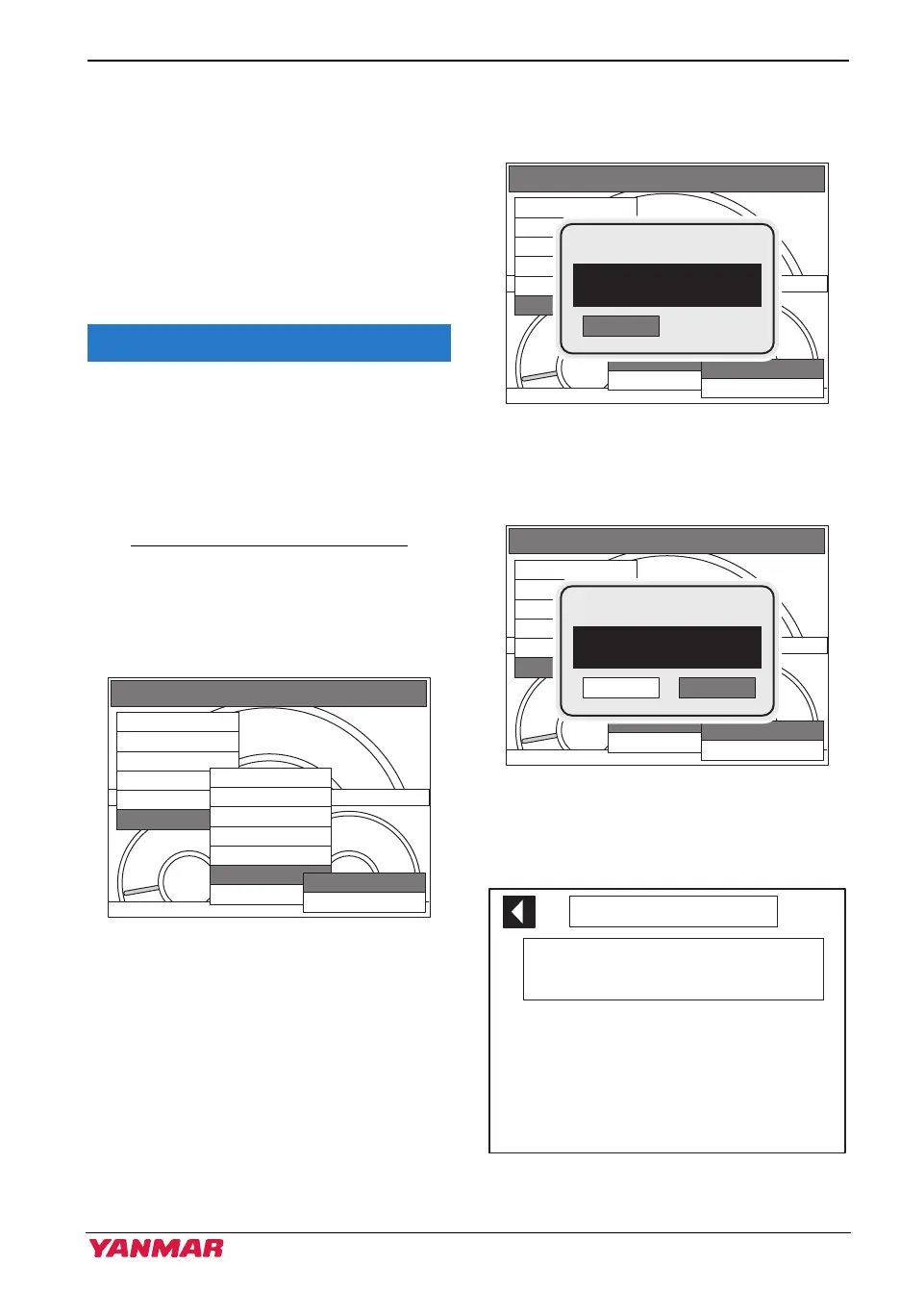
1. Select “YANMAR E-key-ON” from the
MAIN MENU.
Figure 25
Figure 31
2. Confirm the pop-up screen and select
OK. (For two or more engines, turn on
all switch panels)
Figure 26
Figure 32
3. Confirm the pop-up screen and select
OK.
Figure 27
Figure 33
4. When the key registration screen is
displayed, the switch panel lamp blinks.
Figure 28
Figure 34
OIL PRESSURE COOLANT TEMP
00
0
MAIN MENU
Alarms/DIAGs
Display
Engine speed
Monitor settings
Synchro
Utility
Station protect
Sys on by ID
Start by ID
Owner ID change
User alarm
YANMAR E-key
View
ON
OFF
OIL PRESSURE COOLANT TEMP
00
0
MAIN MENU
Alarms/DIAGs
Display
Engine speed
Monitor settings
Synchro
Utility
Station protect
Sys on by ID
Start by ID
Owner ID change
User alarm
YANMAR E-key
View
ON
OFF
NOTICE!
OK
PLEASE TURN ON
ALL POWER
142300-00EN
OIL PRESSURE COOLANT TEMP
00
0
MAIN MENU
Alarms/DIAGs
Display
Engine speed
Monitor settings
Synchro
Utility
Station protect
Sys on by ID
Start by ID
Owner ID change
User alarm
YANMAR E-key
View
ON
OFF
NOTICE!
CANCEL OK
REGISTRATION
NEW KEYS
Move the keys closer to the blinking key
mark on the switch panel.Up to 10 keys
can be registered.
:Key 2 -- :Key 7 --
:Key 3 -- :Key 8 --
:Key 4 -- :Key 9 --
:Key 1 -- :Key 6 --
:Key 5 -- :Key 10 --
Set Key
142302-00EN
3JH40_4JH45_4JH57_4JH80_4JH110_EN_OPM.book 89 ページ 2022年9月22日 木曜日 午後6時17分



 To Next Page