Yanmar
®
600 Control Panel Operation and Troubleshooting
463-3000-09 Initial - 16-May-2008 11
Display Menu
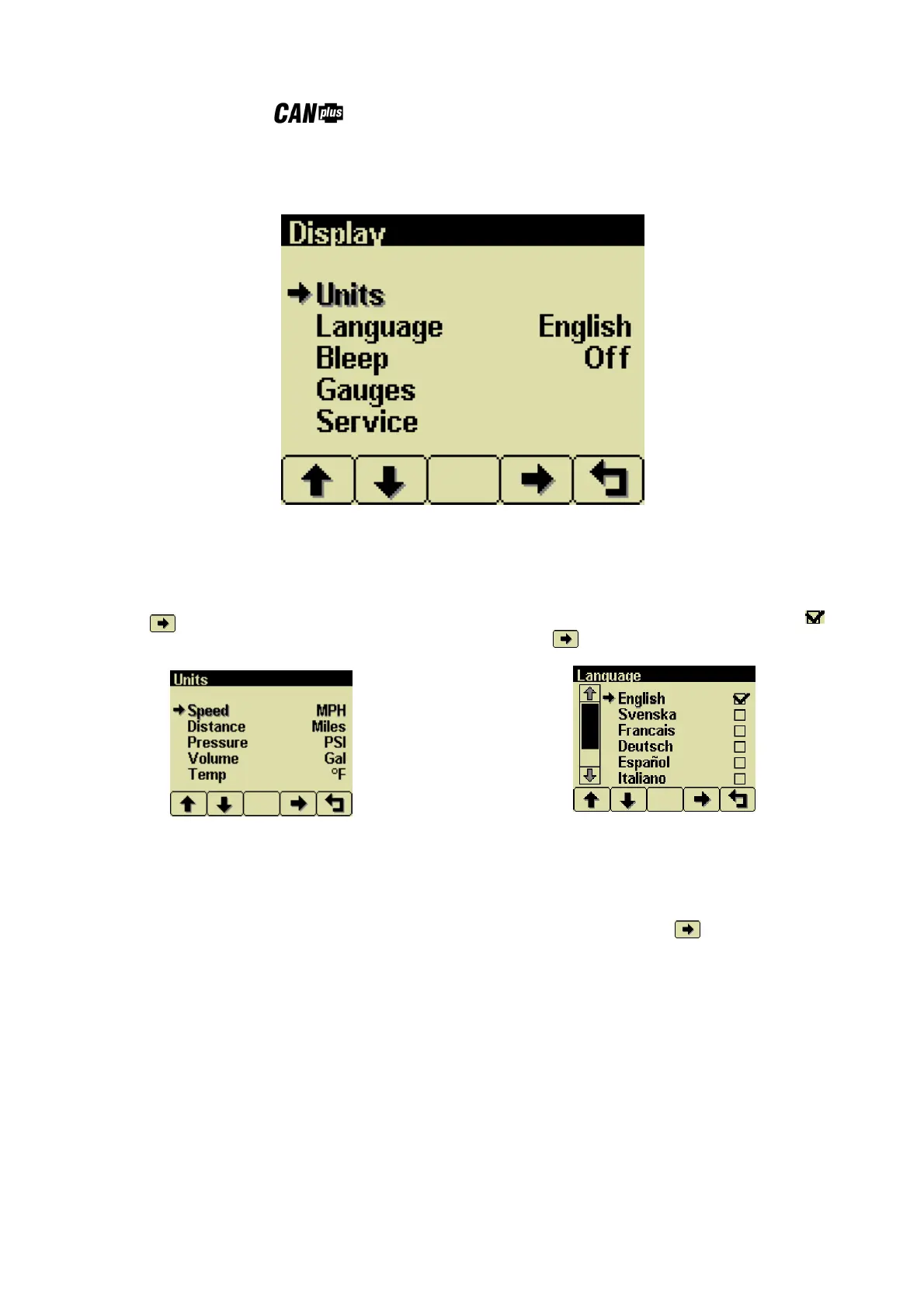
The Display Menu allows the user to configure items affecting how information is displayed.
Units Menu
This menu allows the user to set the units used for
speed, distance, pressure, volume and
temperature independently.
Button 4 cycles through the available values
for the selected item.
Speed MPH (miles per hour)
km/h (kilometers per hour)
Knts (knots)
Distance Miles
km (kilometers)
NM (nautical miles)
Pressure PSI (pounds per square inch)
bar (barometric units)
kPa (kilopascals)
Volume Gal (US gallons)
IGal (Imperial gallons)
Liters
Temperature °F (Fahrenheit)
°C (Celsius).
Language Menu
This menu allows the user to choose between
English, Swedish, French, German, Spanish,
Italian, Dutch and Portuguese. The currently
selected value is indicated by the check mark .
Button 4 selects the highlighted value.
Button Beep
The soft buttons emit an audible beep when this
item is On. Button beep is disabled by setting this
item to Off. The audible beep still sounds when
an alarm occurs. Button 4 cycles between On
and Off.


 To Next Page