Yanmar
®
600 Control Panel Operation and Troubleshooting
14 463-3000-09 Initial - 16-May-2008
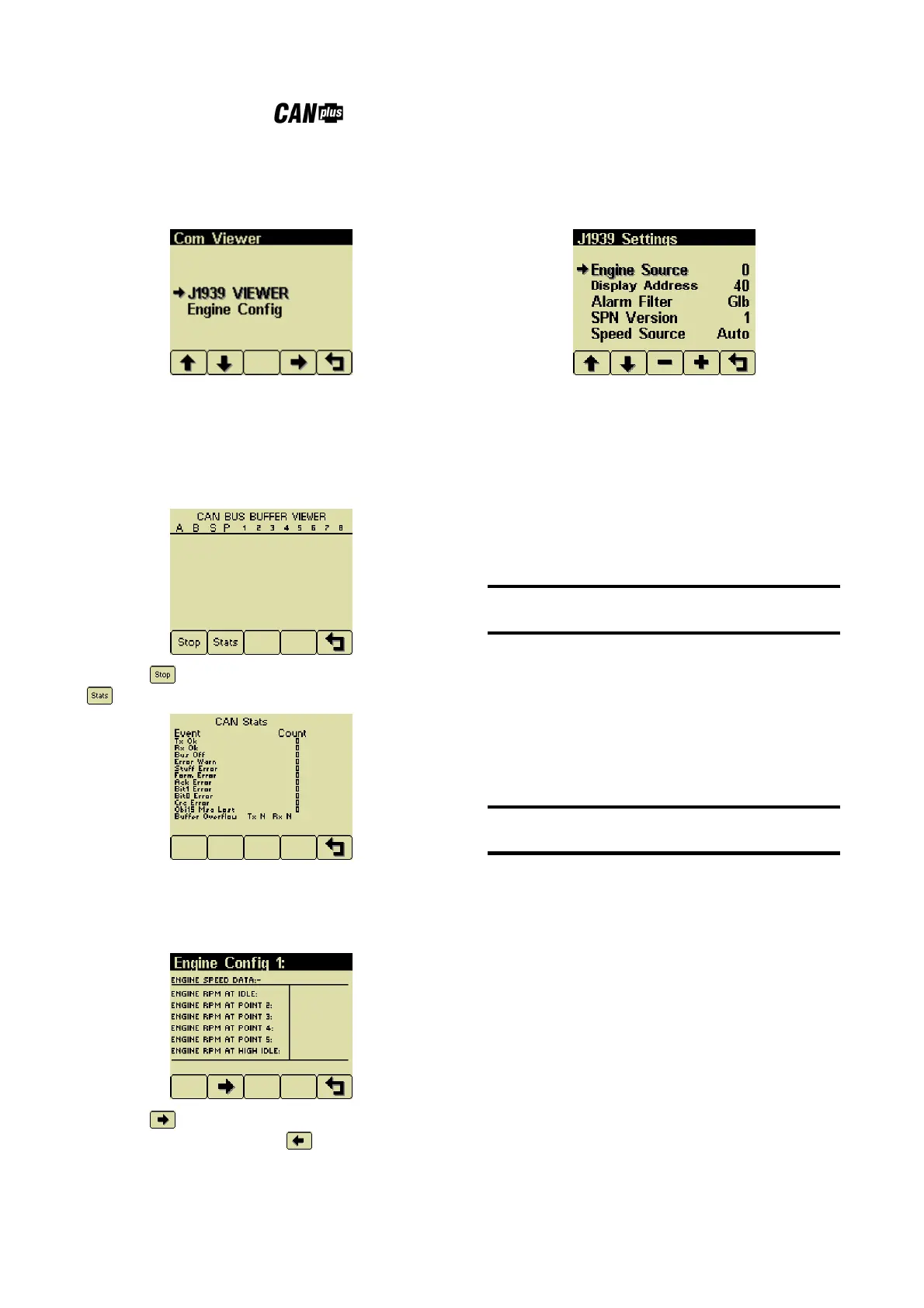
Com Viewer
Displays CANbus data received and engine
configuration transmitted by the ECU.
J1939 Viewer
This screen provides a hexadecimal dump of the
messages received on the CANbus. This viewer
displays the raw data. To see the decoded data
use the Db Viewer.
Button 1 freezes the display while button 2
shows CANbus data statistics screen.
Engine Config
This screen displays the engine configuration
information received from the ECU.
Button 2 selects the next page of engine
configuration while button 1 selects the
previous page.
J1939 Settings
This screen allows adjustments specific to the
J1939 data link.
Engine Source
Selects which source the display listens to for
gauge data. Every device on a J1939 network has
a unique address (in the range 0-254) to which
the display can choose to listen. The display
listens to a single data source; usually the ECU at
address 0.
Note
Incorrectly configuring the Engine Source address
will result in no data available for display.
Display CAN Add
As mentioned previously, every device has a
unique address and the display is no different. The
default display address is 40, the recommended
address for single engine setups.
Note
Incorrectly configuring the Display Address can
result in data collisions on the CANbus.
Alarm Filter
This setting specifies whether the display will
display alarms from all sources (Glb or global) or
only the source address specified in the Engine
Source setting (Src or source).
SPN Version
Selects the default SPN (Suspect Parameter
Number) conversion method version to 1, 2 or 3.
Version 4 is automatically detected, but older
engines that use conversion method 1, 2 or 3
requires setting this parameter correctly.


 To Next Page