Yanmar
®
600 Control Panel Operation and Troubleshooting
463-3000-09 Initial - 16-May-2008 17
Throttling Menu
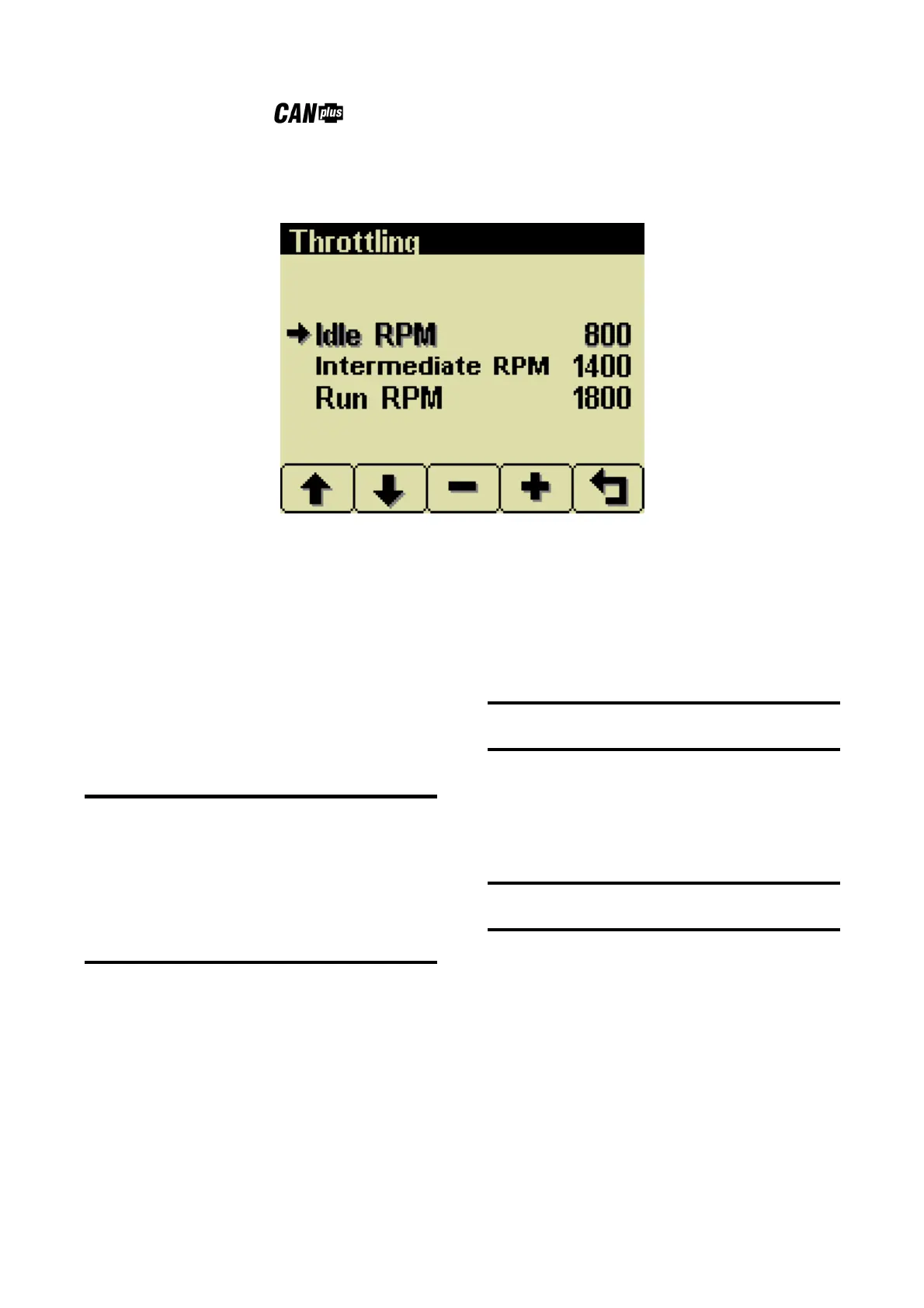
The throttling menu allows the user to configure throttle control.
The throttling menu allows programming the automatic start/stop throttle profiles as shown in the following
diagram.
Idle RPM
Selects the RPM the control system will request for
idle speed. Idle can be set to compensate for
parasitic loads such as hydraulic pumps or
compressors. Idle RPM is the low speed setting of
the optional two state or three state throttle
switches.
Note
The minimum engine speed is set by the ECU.
Requesting a lower speed causes the engine to
run at the ECU minimum speed.
RPM limits are programmed into the
panel to limit the requested speed.
Changing the panel Minimum Requested RPM
and Maximum Requested RPM requires using the
CANplus Configuration software.
Intermediate RPM
Selects the RPM the control system will request for
intermediate speed.
Note
Intermediate RPM is the middle setting of optional
three state throttle switches.
Run RPM
Selects the RPM the control system will request for
run speed.
Note
Run RPM is the high speed setting of the optional
two state or three state throttle switches.


 To Next Page