28
Operation
Calibration menu
Push the
Cal
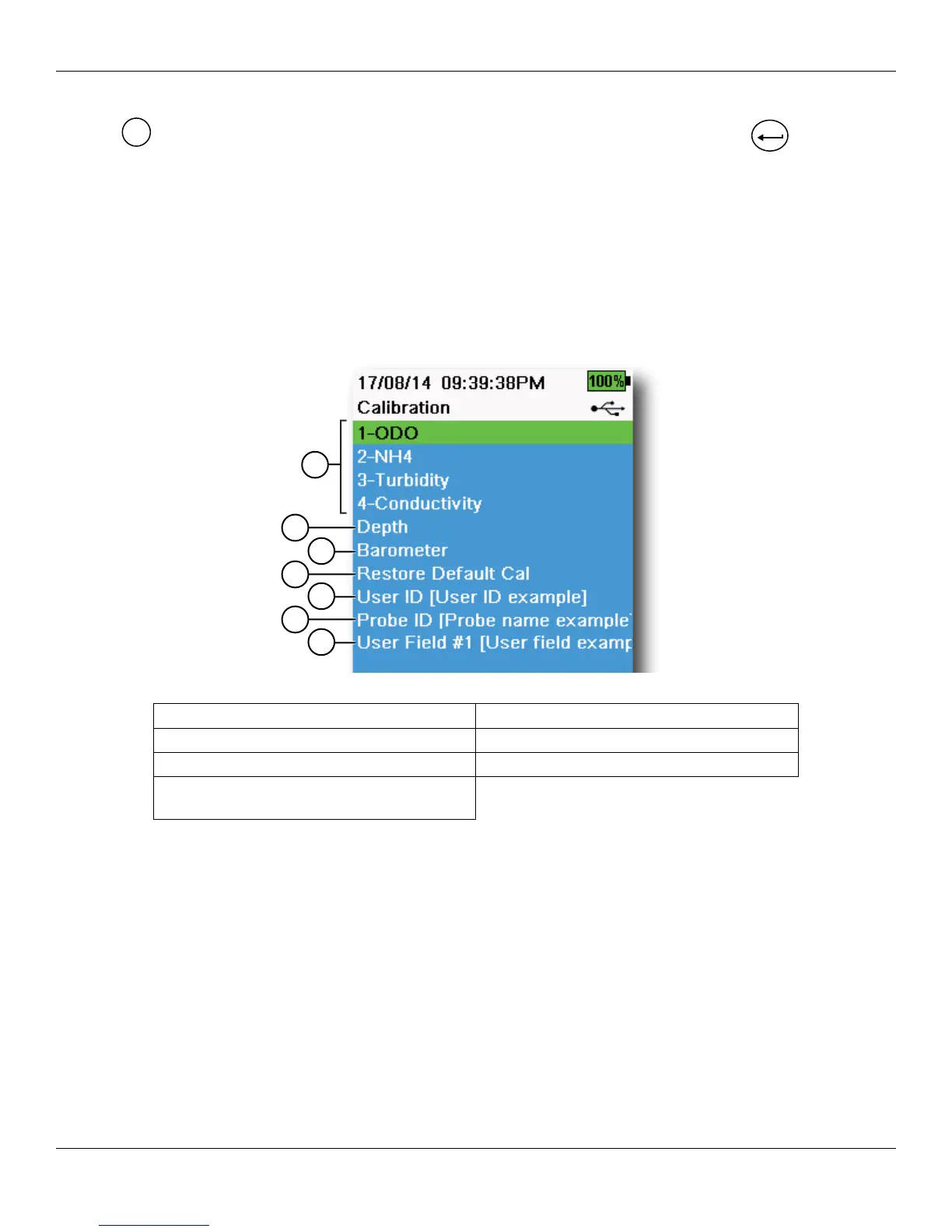
key to access the Calibration menu (Figure 35). Highlight a sub-menu then push the
ENTER
key to view
sub-menu options.
Pre-defined or user-selected parameters are noted within brackets ([]). See Alpha/numeric entry on page 14.
Refer to the Calibration section for sensor specific calibration procedures (Calibration on page 33).
NOTE: Attached sensors are listed according to the bulkhead port in which they are installed.
NOTE: User ID, Probe ID, and User Field #1 and #2 must be enabled in the GLP menu to appear in the Calibration
menu (GLP Options on page 18).
Figure 35 Calibration menu
1 Sensors connected to bulkhead 5 User ID
2 Optional Depth sensor calibration 6 Probe ID
3 Barometer calibration 7 User Field #1
4 Restore Default Calibration - restores all
calibrations to factory default
6
7
5
4
2
3
1




 To Next Page