29
Operation
Files menu
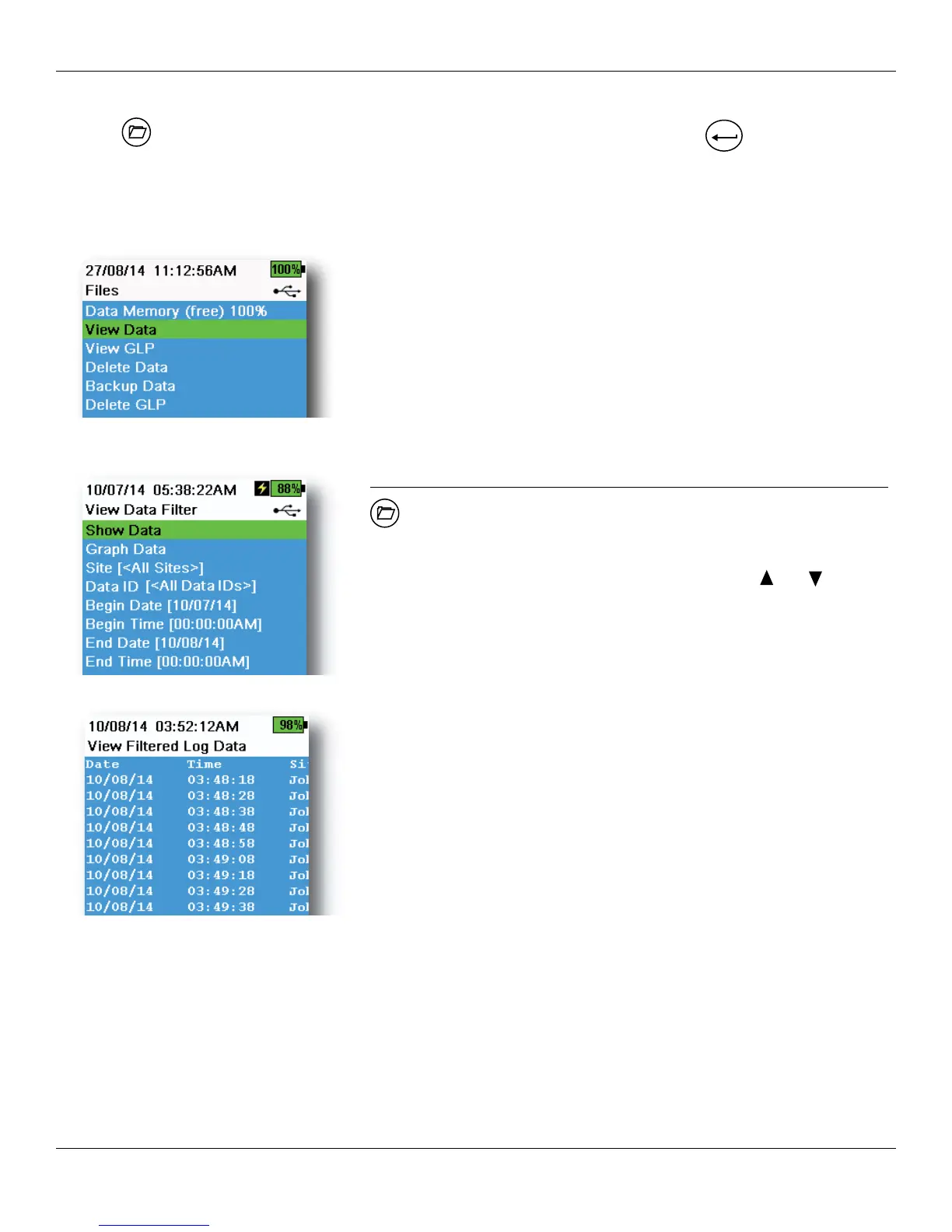
Push the key to access the Files menu (Figure 36). Highlight a sub-menu then push the
ENTER
key to view sub-
menu options.
Use the Files menu to view, delete or backup logged data or the GLP file. Data can be filtered by a specific date and
time range and by user-created site and Data ID lists (Logging on page 29).
Figure 36 Files menu
Data Memory (free) % shows the remaining memory available. Download
or delete data to free available internal memory.
Figure 37 View Data Filter
Figure 38 View Filtered Log Data
View Data Filter
→ View Data
Enter the desired filter criteria, then select Show Data or Graph Data to
view the tabular or graphical data. If necessary, use the and arrow
keys to scroll through the data (Figure 37 and Figure 38).
Site: View data from one site or all sites.
Data ID: View data from one ID or all IDs.
Begin/End: View data within specific date and time ranges.




 To Next Page