53
Maintenance and storage
Cable, bulkhead, and connectors
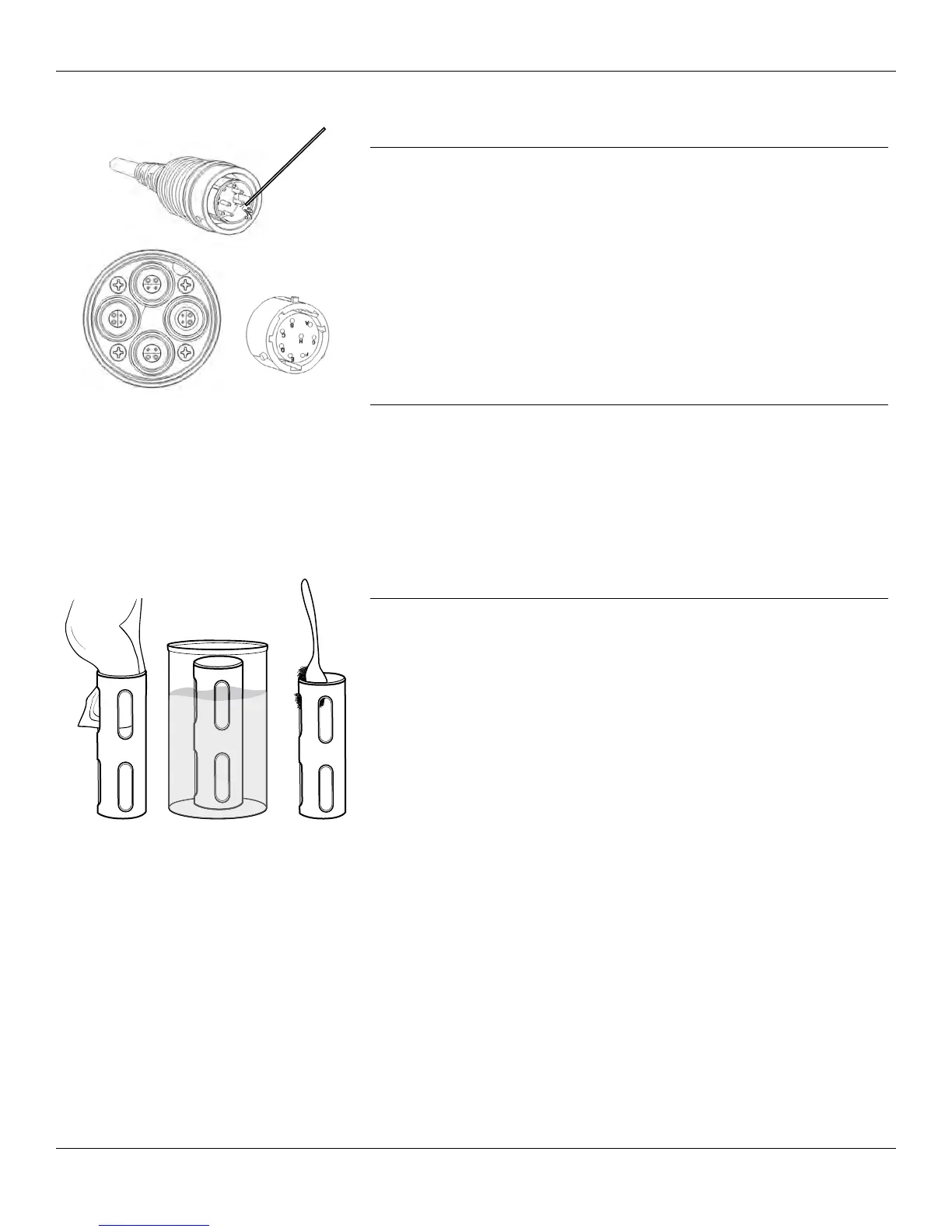
Figure 57 Cable, bulkhead, connector
maintenance
Cable, bulkhead, and connector maintenance
Wipe the bulkhead cable with a cloth dampened with a mild solution of
clean water and dish soap.
NOTICE: Install sensors or port plugs so that the bulkhead ports
do not get wet when cleaning. Exposure to water can
cause damage or corrosion to the bulkhead connectors
not covered by the warranty.
Inspect the bulkhead ports and cable connectors for contamination. If
dirty or wet, clean it with compressed air (Figure 57).
Cable, bulkhead, and connector storage
Clean the connectors and bulkhead cable. Install the connector covers
and the bulkhead port plugs when not in use (Port plugs on page 10).
Sensor guard
Figure 58 Sensor guard maintenance
Sensor guard maintenance
Remove minimal bio-fouling with a cloth soaked in a mild solution of
clean water and dish soap (Figure 58).
Remove heavy bio-fouling by soaking the guard in a with a solution of
clean water and dish soap. Soak in vinegar to remove hard growth and
deposits.
Use a plastic scrub brush to remove any remaining bio-fouling. Rinse the
sensor guard with clean water.
NOTICE: Do not sand or polish the guard. Removal of the guard
coating can affect turbidity readings.




 To Next Page