37
Calibration
Dissolved oxygen
ODO calibration requires the current “true” barometric pressure. Make sure that the barometer is reading accurately
and recalibrate the barometer as necessary.
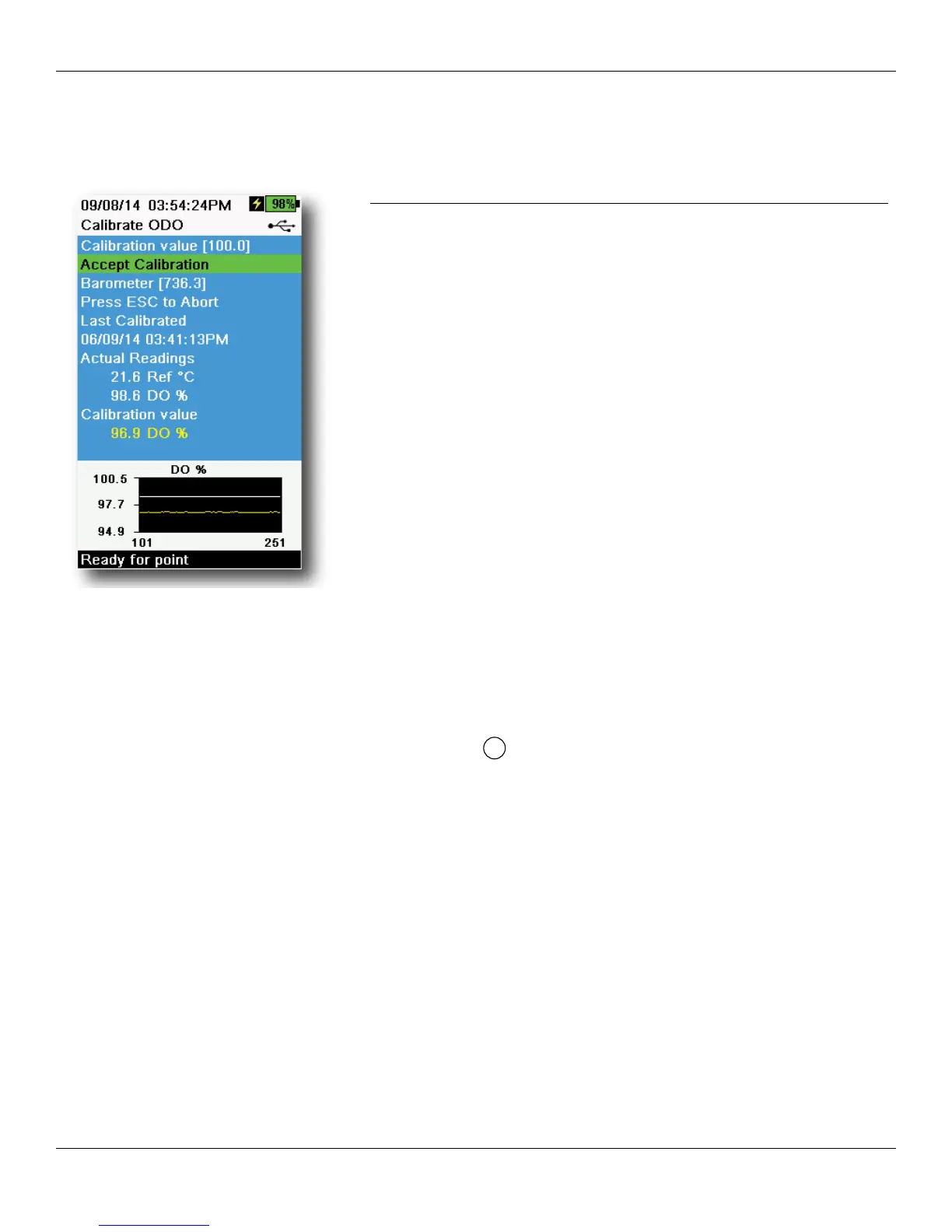
Figure 47 Calibrate ODO %
ODO% and ODO% local - water saturated air calibration
NOTE: This method calibrates the instrument’s DO% measurement
or DO% Local measurement if DO% local is enabled in the
sensor setup menu.
NOTE: Calibrating in DO% or DO% local automatically calibrates
the mg/L and ppm measurement. There is no reason
to calibrate both parameters. For both ease of use and
accuracy, we recommend that you calibrate DO% or DO%
Local and not mg/L.
1. Place a small amount of clean water (1/8 inch) into the calibration
cup.
2. Make sure there are no water droplets on the ODO sensor cap or
temperature sensor.
3. Attach the sensor guard to the bulkhead and carefully place
the guard/sensor into the calibration cup. Partially tighten the
calibration cup to the bulkhead.
NOTE: Do not fully tighten the calibration cup to the bulkhead.
Atmospheric venting is required for accurate calibration.
NOTE: Make sure the ODO and temperature sensors are not
immersed in water.
4. Turn the instrument on and wait approximately 5 to 15 minutes for
the air in the storage container to be completely saturated with
water.
5. Push the
key, then select ODO. Select DO%. This will calibrate
the instrument’s DO% measurement or DO% Local measurement
if DO% Local is enabled in the sensor setup menu.
6. Observe the actual measurement readings for stability (white line
on graph shows no significant change for 40 seconds), then select
Accept Calibration (Figure 47). “Calibration successful!” will be
isplayed in the message area.
NOTE: If you see a calibration error message, verify the barometer
reading and inspect the sensor cap. Clean and/or replace
the sensor cap as needed.




 To Next Page