41
Calibration
Depth
NOTE: This calibration option is available only if your bulkhead is equipped with a depth sensor. The depth
sensor is located where the cable connects to the bulkhead (Figure 59 on page 54).
For the calibration, make sure that the depth sensor is clean and in air, not immersed in any solution. For highest
accuracy, keep the bulkhead still and in one position while calibrating.
NOTE: Cables 10 m and longer are supplied with a weight that can be attached to the sensor guard for sampling
at water depths 10 m and greater.
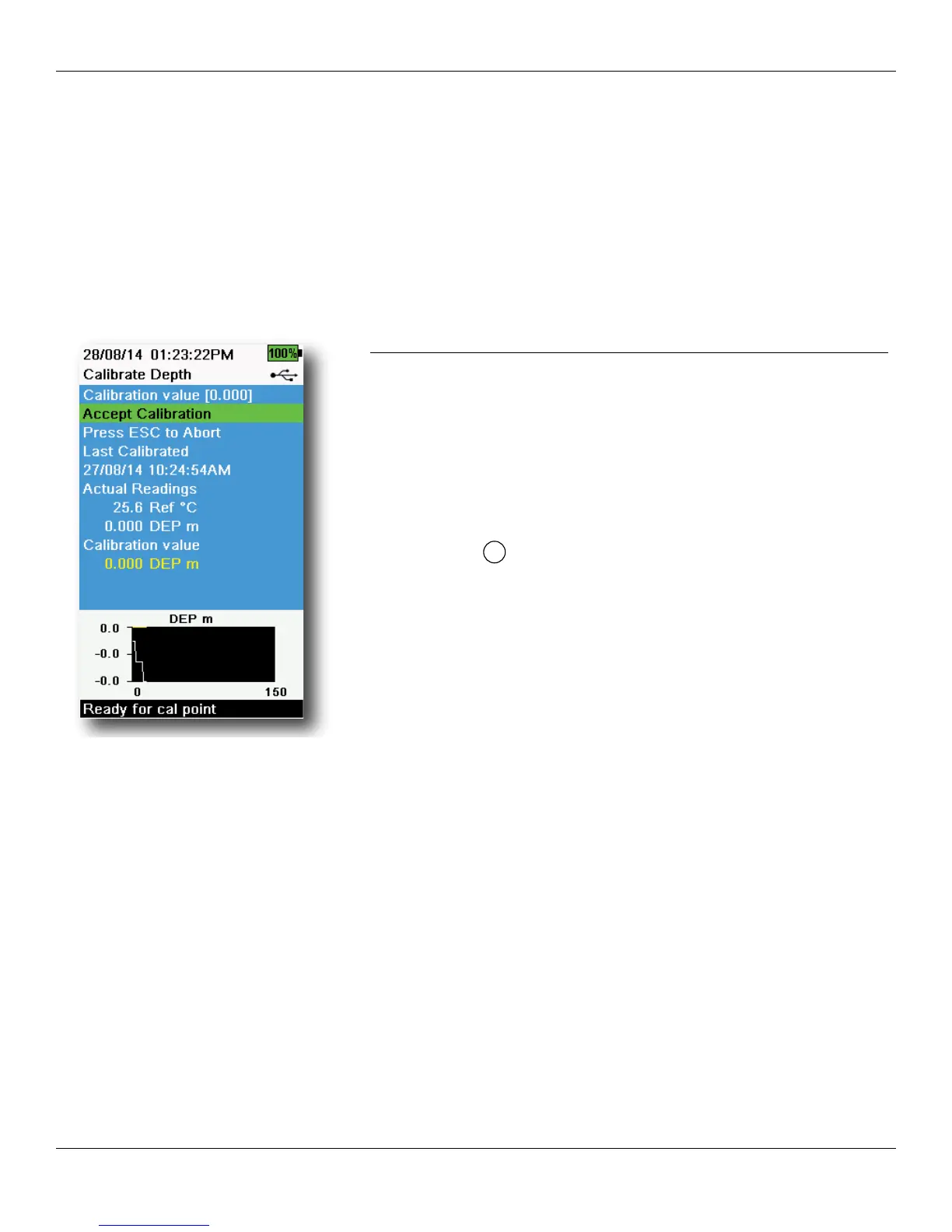
Figure 53 Calibrate Depth
Depth calibration
1. If applicable, enter the depth offset, altitude, and latitude (Figure
29 Setup Depth on page 25).
NOTE: Depth offset allows you to set the depth measurement
to something other than zero. If the depth offset is used,
the depth measurement will be adjusted by the offset
after calibration. Enter the altitude and latitude of your
sampling location to increase the accuracy of your depth
measurement.
2. Push the
key, then select Depth.
3. Observe the actual measurement readings for stability (white line
on graph shows no significant change for 40 seconds), then select
Accept Calibration (Figure 53). “Calibration successful!” will be
displayed in the message area.




 To Next Page