GSM/CDMA/WCDMA/4G(LTE) MOIP Gateway
YX Technical department ~ 26 ~
Take the value in screenshot as an example, the callee ID is 0086xxxxx, we specify 0086 as the
callee prefix,strip 4 digits and add 0,when dial 0086123456789,the gateway will strip 0086 and add
0 call 0123456789.
Callerld Hidden
Callerld Hidden:Enable or disable caller ID hidden.Your carrier must support that function.
Dial prefix:Use the dial prefix you set when enable caller ID hidden.
7.7 Mobile Setting
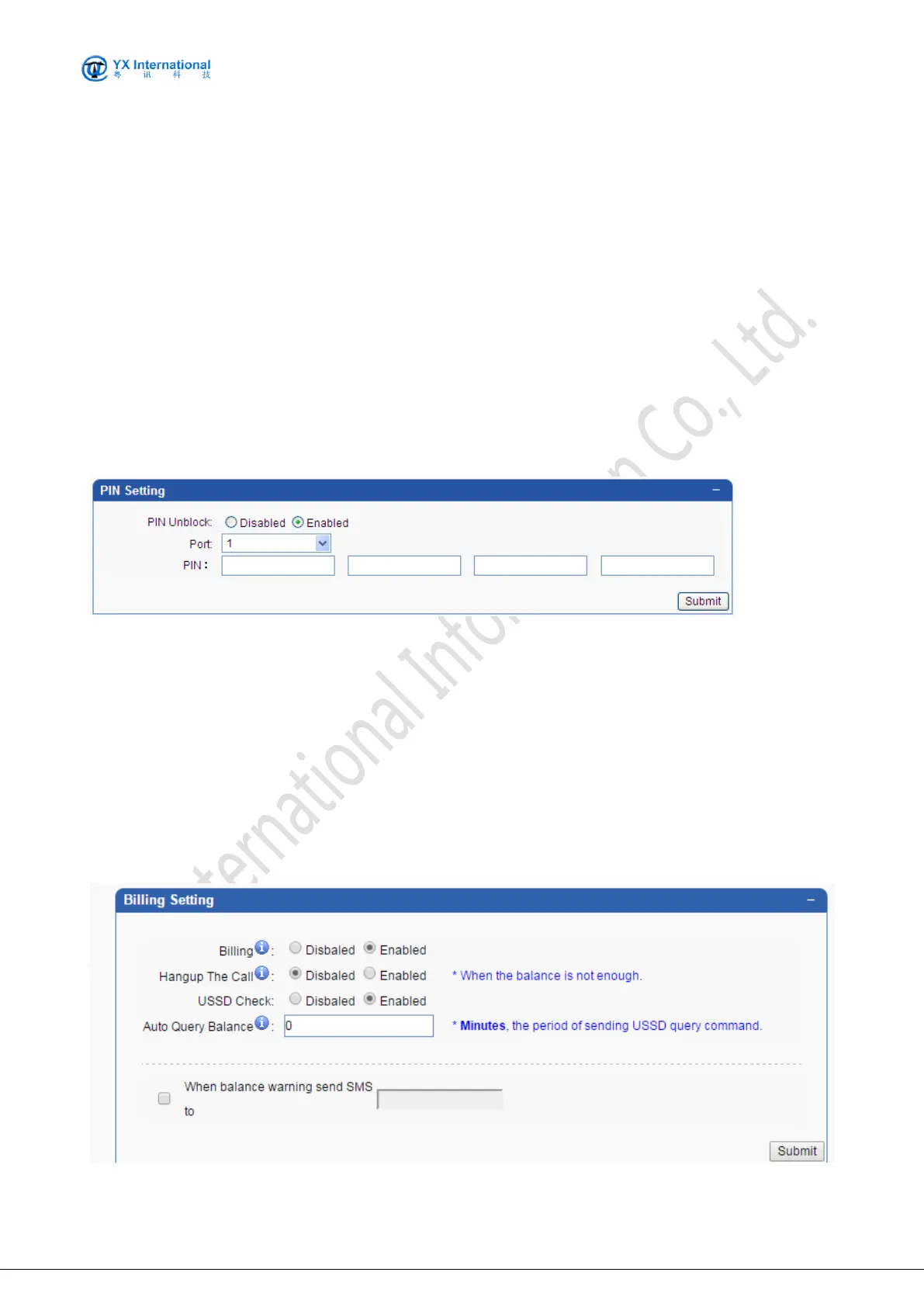
7.7.1 PIN Setting
The screenshot below shows the operation mode to set globally for PIN settings
Fields are specified as following:
PIN Unblock: Specify whether enable the pin unblock.
Port: starts from 1 to 64
PIN: Specify the PIN for card A/B/C/D/(more) of the port
7.7.2 Billing Setting
The screenshot below shows the operation mode to set MOIP billing. A smart billing server for
mobile port is embedded in MOIP Gateway.


 To Next Page