
 Need help?
Do you have a question about the YX MOIP Series and is the answer not in the manual?
Explains the function of a MOIP Gateway in routing SMS between IP and mobile networks and its use cases.
Defines key terms and acronyms used in the MOIP Gateway manual, such as MoIP, SMS, IMEI, and USSD.
Provides a summary of the YX series MOIP Gateway, highlighting its multi-functional and high-performance design for SMS and internet data services.
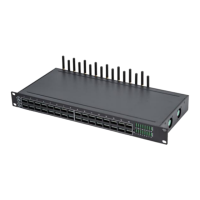
Showcases the physical appearance of the YX series MOIP Gateway hardware units.
Lists advanced features like SIM Bank, VPN support, and intelligent SIM card switching rules for enhanced gateway operation.
Details technical specifications including channel capacity, frequency bands, SMS protocols, hardware ports, and operating parameters.
Outlines mobile-specific functionalities such as SMS handling, AT command support, USSD operations, and PIN management.
Covers essential maintenance tasks like configuration backup, software upgrades, and remote management system access.
Guides users through the network setup requirements and illustrates the network topology for connecting the MOIP Gateway.
Specifies the default IP addresses for the WAN and LAN ports of the MOIP Gateway.
Provides step-by-step instructions for physically connecting the MOIP Gateway, including antenna, SIM card, and network cables.
Explains the function and meaning of various LED indicators on the MOIP Gateway for status monitoring.
Guides on configuring computer's IP address and accessing the MOIP Gateway's web interface for initial setup.
Details how to set up WAN connections using Static IP, Dynamic IP, or PPPoE for internet access.
Displays real-time SIM status, including call state, duration, balance, network, and signal intensity.
Provides detailed call statistics for analysis, such as total calls, connected calls, failed calls, and call durations.
Shows the SIP and module status for each port, including registration status and IMEI information.
Presents overall system status, including WAN/LAN connection details, hardware/software versions, and running time.
Monitors internet traffic statistics per card, showing data flow, last hour traffic, and last visit URL.
Displays IP network media and traffic data, including codec, transmission rates, and packet counts.
Provides statistics on SMS operations, including sent, received, and success/failure rates.
Shows inter-calling statistics like port state, duration, incoming/outgoing calls, and success/failure counts.
Configures network parameters, including VPN settings and management of web/telnet ports for gateway access.
Manages SIP call features, such as forbidding incoming GSM calls and enabling automatic call answering.
Enables configuration of port-specific settings, including USSD operations and base station management.
Handles USSD operations, allowing AT commands, USSD queries, and manual call initiation.
Sets basic configuration and operations for base stations connected to the gateway ports.
Configures hardware properties for each port, including SIM binding, input/output volumes, and restart operations.
Sets global parameters for base stations, including maximum channels, signal thresholds, and switch periods.
Configures base station selection, white/black lists, and operations for each port.
Manages IMEI switching conditions and allows direct input of IMEI for each SIM card slot.
Configures dynamic IMEI generation and custom ranges for assigning multiple IMEIs to ports.
Sets up prefix translation rules for GSM to IP and IP to GSM calls, modifying dial numbers.
Configures SIM card PIN settings, enabling or disabling PIN unblock and specifying the PIN for each SIM.
Enables and configures billing features, including call hang-up on low balance and USSD balance checks.
Manages caution and invalid balances for billing, defining thresholds for balance queries and automatic locking.
Configures keywords for USSD/SMS queries to check SIM card balances and status with different providers.
Defines tariff rates for outgoing calls based on destination prefixes, used for billing purposes.
Configures automatic sending of USSD commands based on duration or schedules for tasks like package activation.
Displays USSD command history, port status, and responses, enabling monitoring and manual sending of USSD commands.
Schedules SMS messages for sending at specified times or intervals to defined recipients.
Monitors SIM card online time and enforces usage limits, with options to drop calls or lock SIMs.
Checks accumulated SMS counts, locking SIMs if a set threshold is reached, with USSD query options.
Checks accumulated SMS failures, locking SIMs after a specified number of failures, with USSD query options.
Checks consecutive SMS failures, locking SIMs after a specified sequence of failures, with USSD query options.
Configures SIM pool settings for remote SIM management via a SIMBANK or SIM pool server.
Enables and configures port inter-calling features, including SMS notifications and call duration controls.
Sets conditions for port inter-calling, such as device online time, consecutive calls, and total call durations.
Manages SIM card numbers by querying them via USSD/SMS or manually entering them for each port.
Configures automatic recharge settings for SIM cards, requiring an external recharge server.
Configures status notification settings to send device status updates to a specified URL at defined intervals.
Configures internet access conditions, URL browsing, and APN settings for different mobile carriers.
Manages all aspects of SMS operations, including receiving, sending, control, and integration with SMS servers.
Displays received SMS messages in an inbox, showing port, sender, time, content, and allows viewing message details.
Configures SMS sending parameters and forwarding protocols such as GSM, SIP, and HTTP.
Allows scheduling SMS messages for automated sending and manual sending, with options for recipients and content.
Controls SMS sending limits per port and time period (day/month), with options to switch SIM upon reaching limits.
Configures the SMPP protocol for SMS forwarding, including client/server setup, SMS reports, and data list management.
Registers the device with an SMS server (EIMS/IMFS) for network SMS business, requiring MAC address and server credentials.
Configures prefix routing rules for SMS numbers to ensure compliance with SIM card sending policies.
Configures the flash frequency and behavior of SIM card slot LEDs for various states like lock, balance, and registration.
Provides tools for network debugging, including auto-ping, manual ping tests, and packet capture for network diagnostics.
Configures logging parameters, including log file size, module selection, and sending logs to a server.
Manages log files by exporting, viewing, and deleting them from the device storage.
Manages system user accounts, allowing addition, editing, and deletion with different privilege levels.
Configures device parameters such as alias, auto reboot schedules, and scheduled reboots for system maintenance.
Sets the device's time zone and time server for accurate time synchronization and logging.
Configures remote management connectivity to an ERM Server for centralized device monitoring and control.
Configures SNMP protocol for network management, including listener ports, community names, and trap server settings.
Manages user roles and assigns permissions for various system functions, controlling access to features.
Provides functionality for system updates, configuration backups, and restoring the device to factory default settings.
Manages saving configuration changes and rebooting the gateway to apply modifications effectively.
Details HTTP API commands for sending and receiving SMS messages, including URL formats and parameters.
Specifies the HTTP URL format for sending SMS, including parameters for port, recipients, content, and character set.
Provides the HTTP URL format for receiving SMS, specifying parameters for SMS ID and the number of messages to retrieve.
Details HTTP API commands for sending USSD requests, including URL formats and handling of USSD content.
Specifies the HTTP URL format for sending USSD commands, including parameters for username, password, port, and USSD content.
Explains the format of HTTP responses for USSD commands, detailing the code, reason, and USSD content.
 General
| Category | Gateway |
|---|---|
| Type | MOIP Gateway |
| Protocols | SIP, RTP |
| Audio Codecs | G.711, G.729, G.722 |
| MOIP Channels | 4, 8 |

 To Next Page
