GSM/CDMA/WCDMA/4G(LTE) MOIP Gateway
YX Technical department ~ 38 ~
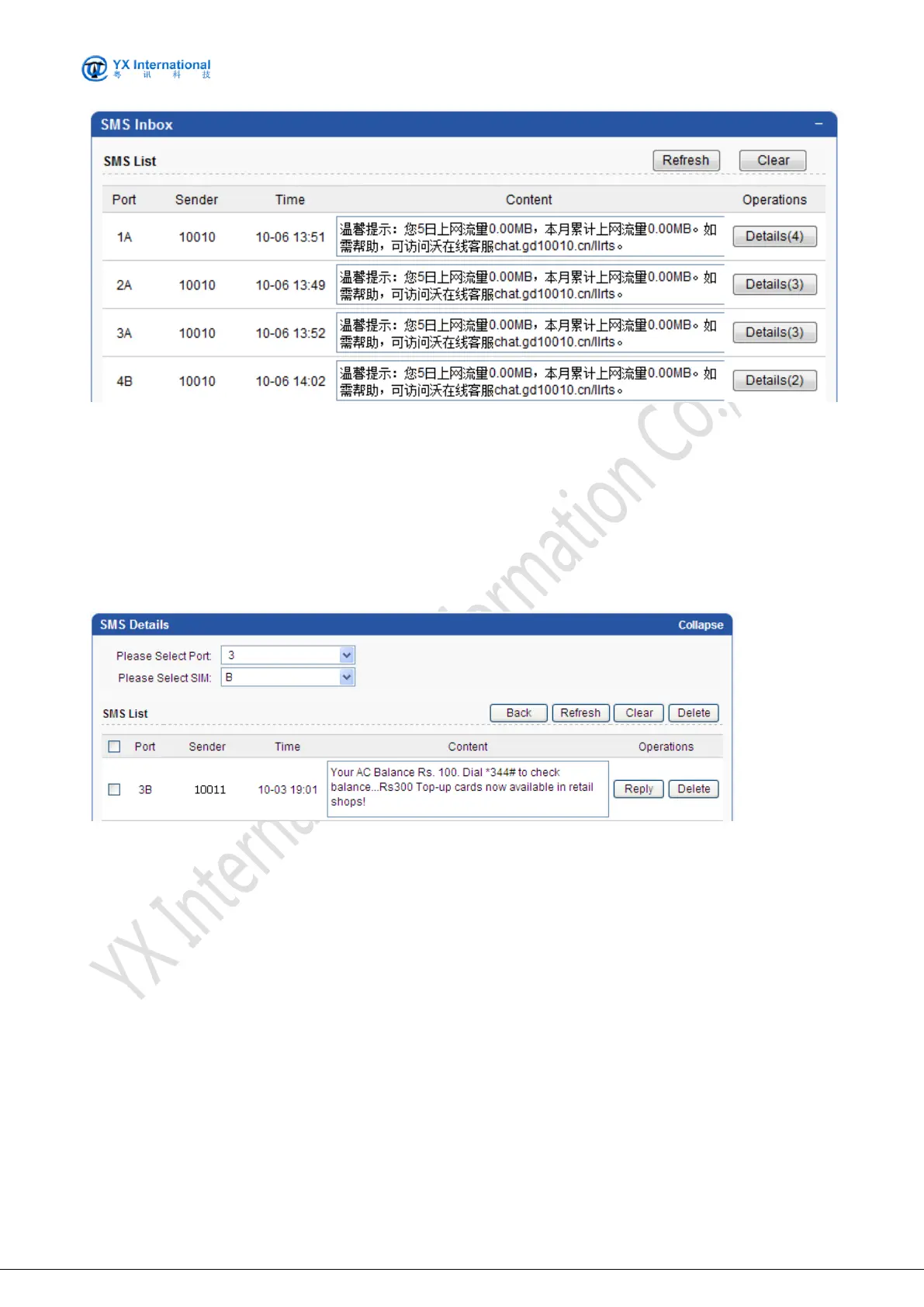
Fields are specified as following:
Port No: The MOIP Gateway mobile port. Each port contains one or four card slots. Port No
starts from 1 to 64.
Sender: Specify the sms sender.
Time: Specify the sms receive time.
Content: Specify the sms content.
Operations: Click the Detail button to get more detail about the specify port.
The screenshot below shows the operation mode to get sms details.
Fields are specified as following:
Please Select Port: Specify the port.
Please Select SIM: Specify the sim.
Port: Specify the port.
Sender: Specify the sms sender.
Time: Specify the sms receive time.
Content: Specify the sms content.
Back: Back to the SMS content web page.
Refresh: Refresh the web page.
Clear: Clear the sms.
Reply: Reply the sms
Delete: Delete the corresponding sms.


 To Next Page