GSM/CDMA/WCDMA/4G(LTE) MOIP Gateway
YX Technical department ~ 50 ~
Remote Management is used to manage the MOIP Gateways located in other physical locations.
Network must be available for the gateway to communicate with ERM Server, When the registration
is complete, you can access your device from the ERM server at any time/address.
YX ERM Server(You can register directly through the registration button to register and follow the
prompts to use)
domain name: MOIP.yx19999.com
IP: 43.249.30.126
Registered address: http://goip.yx19999.com:808/erm/registry.jsp
Login address:http://goip.yx19999.com:808/erm/login.jsp
ERM user manual:http://goip.yx19999.com:808/erm/help/help.html
The configuration fields are specified as following:
Enable ERM: Specify whether enable ERMS registration or not. Option values are
Enabled/Disabled.
ERM Server IP: Specify the ERM Server address.
ERM Server Port: Specify the ERM server port.
Account: Specify the account which create in the ERM.
Password: Specify the password which create in the ERM.
Status: Specify the registration status.
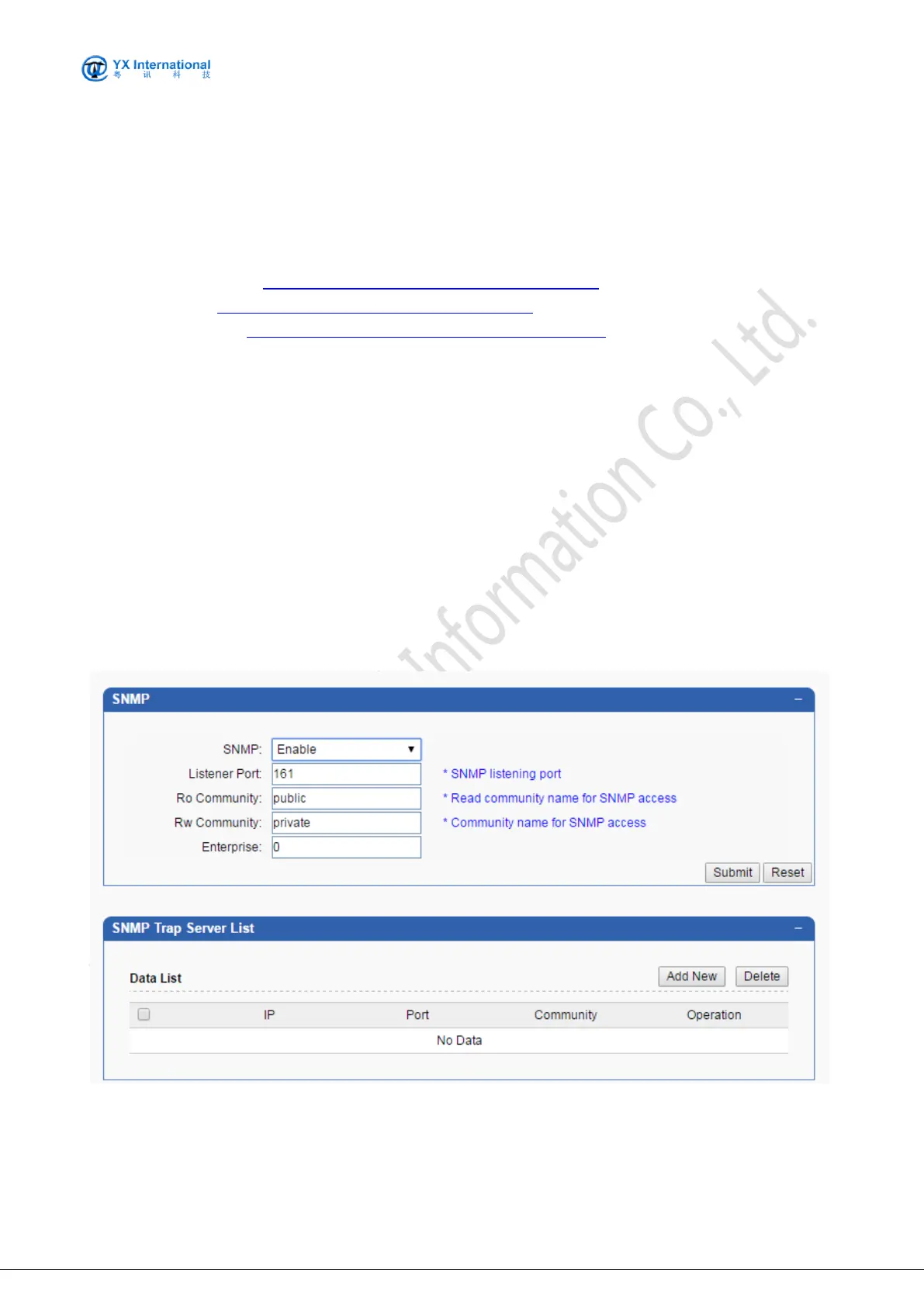
9.5.5 SNMP
This is the connection configuration for the SNMP protocol, which you can configure if you have an
SNMP server


 To Next Page