GSM/CDMA/WCDMA/4G(LTE) MOIP Gateway
YX Technical department ~ 52 ~
System Update
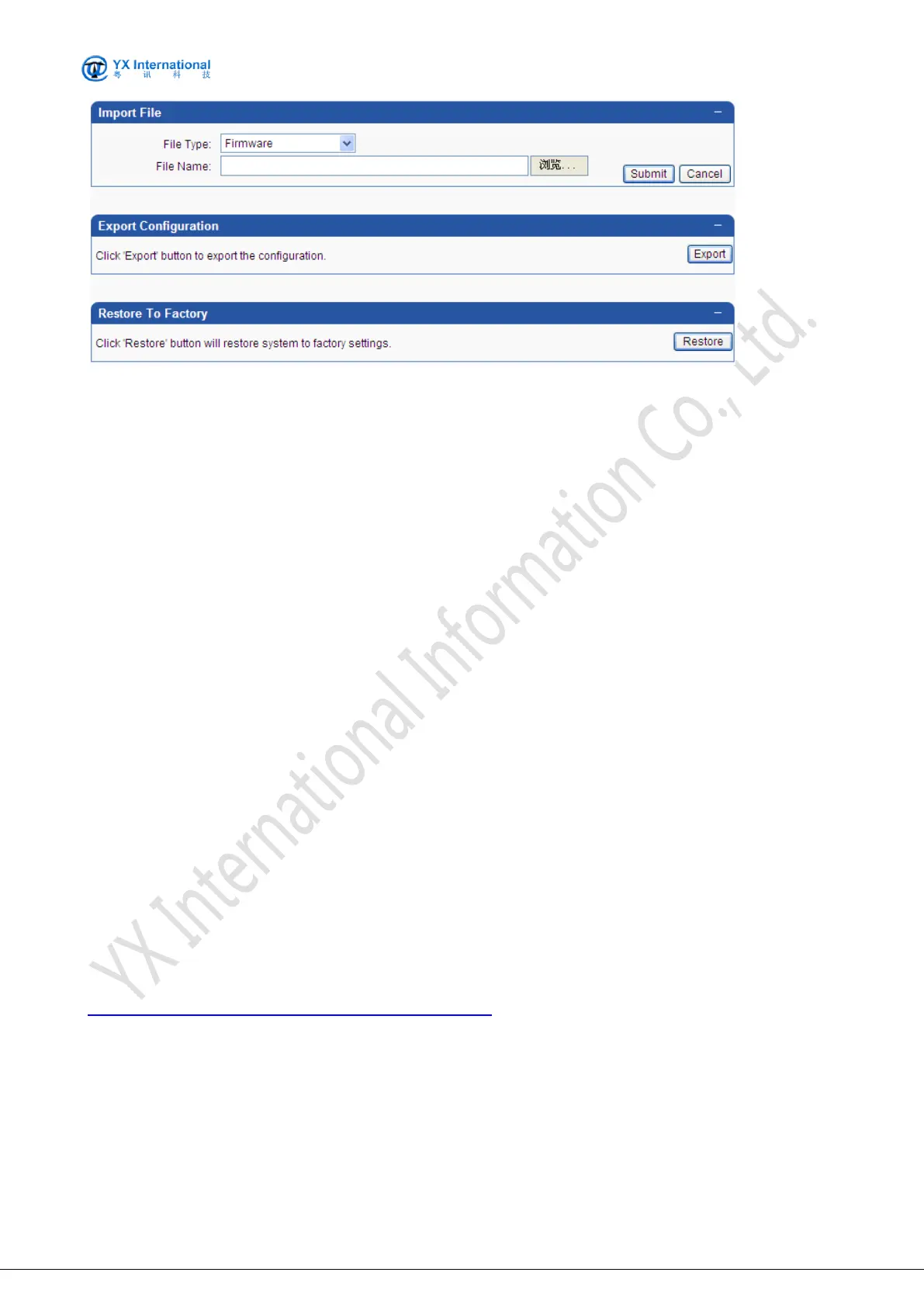
The content for system update includes:
firmware
configuration
ramfs
kernel
uboot
debug tools
voice prompt
voice cfg
mac file
lic file
customized
The configuration fields are specified as following:
File Type: Specify the content to update. Option values are listed above.
File Name: Specify the content file name. Click button Browser and then select the target file
from the popped file selection window.
Export Configuration
Click ‘Export’ button to export the configuration
Restore To Factory
System restore is used to restore the system to default settings. A message box will be popped
for the confirmation of restore.
Firmware Version Down(Or Contact Your Account Manager)
YX Series MOIP/SIMBANK Lastest Firmware Version
9.8 Save & Reboot
Generally, any modification should require the reboot of MOIP Gateway to bring the modification
into effect. However, single Save without Reboot is also frequently used to save the modifications
which will be effective on next reboot of MOIP Gateway.


 To Next Page