3D Microscopy
Axiovert 100/135/135 M Monitor version
B 40-022-4 e 09/98 27
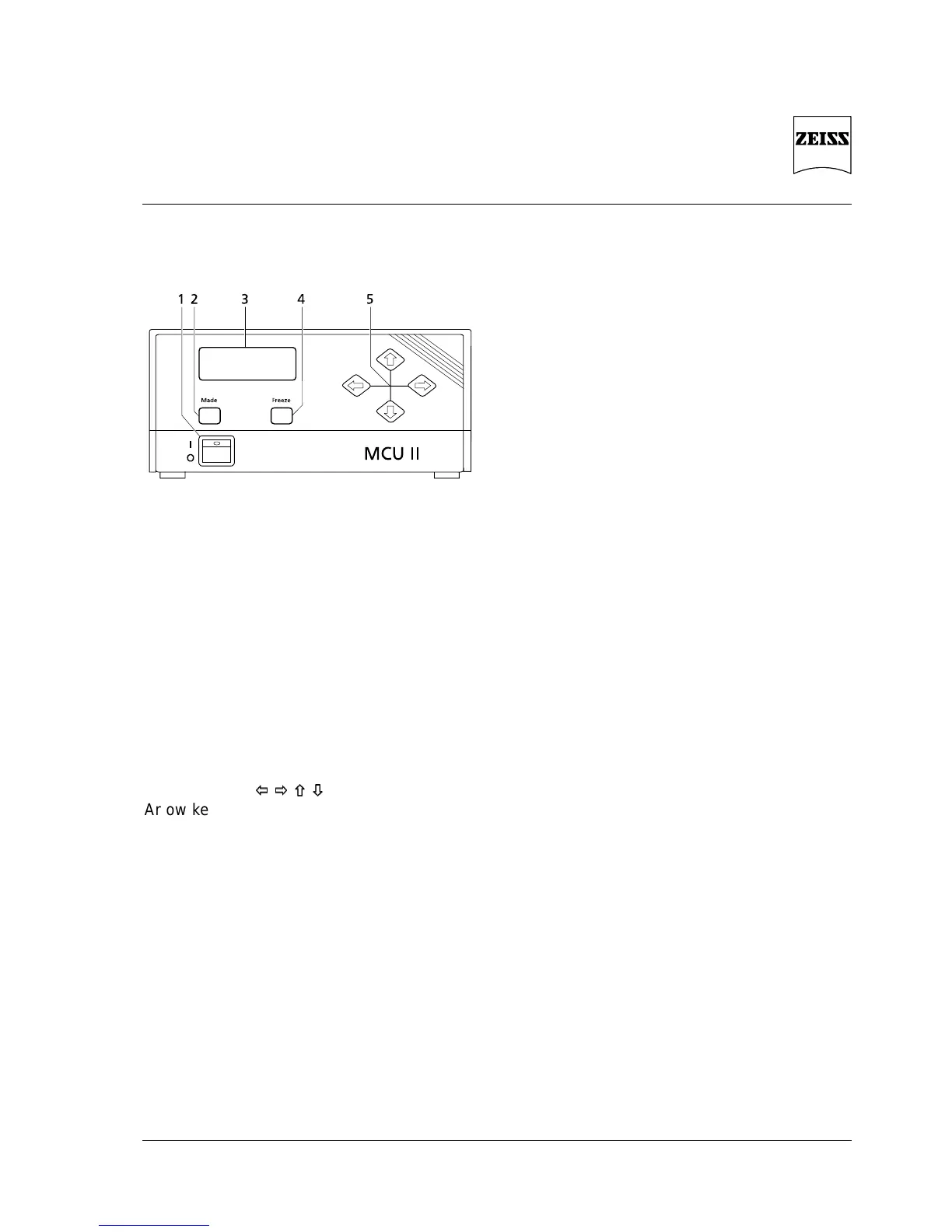
3.2 MCU II Control Unit
1 Line switch
2 Menu change
3 Menu display (LCD)
4 Storage key for current image
5 Arrow keys for parameter control in the menu
Fig. 13 MCU II controls, front
3.2.1 Controls
Fig. 13
LCD-Display
Display of menu options
Control keys
Arrow keys for options and settings within the
menus
Mode
Key for menu change
Freeze
Key for storage of the current image;
the stored image is constantly made available
at the video ports
3.2.2 Basic settings for 3D microscopy
USER MENU User 1
RESET MENU Scope LC AB <BA>
(corresponds to stereo/
pseudostereo change)
White set Set Lock
R-B 50 %
Integration Mode: Auto
Time: 20 ms
Clock: Normal
Camera menu Enhance High
AGC On
AIT Off
Exposure Measure Integral
Level 50 %
MCU control Gain: 80 %
Offset: 50 %
Color: 50 %
Hue: 50 %
Red: 50 %
Blue: 50 %
Memory In Frame
Memory Out 100 Hz
Frame
Stereo/Pseudostereo
Reset ...











 To Next Page