
 Need help?
Do you have a question about the Zeiss Crossbeam 350 and is the answer not in the manual?
Explains text conventions and link types used in the manual.
Details signal words, symbols, and their meanings for hazards.
Lists related manuals and documentation for further reference.
Provides contact information for ZEISS headquarters and service.
Describes the intended applications and operational limits of the microscope.
Outlines requirements for safe operation, personnel, and maintenance.
Summarizes potential hazards and recommended safety precautions.
Details safety features like cover panels, main switch, and EMO button.
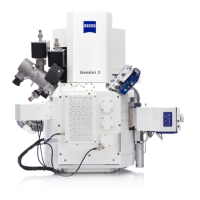
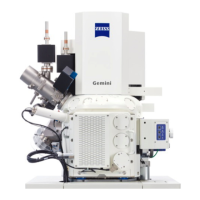
Provides an overview of the main components of the workstation.
Describes key hardware components like the vacuum system and columns.
Lists and describes optional detectors and accessories available for the system.
Describes the SmartSEM GUI, its elements, and graphical controls.
Details the SmartFIB GUI, its elements, and graphical controls.
Step-by-step guide for energizing and starting the microscope and software.
Basic procedures for acquiring an initial image using the SE detector.
Explains how to select gun modes and adjust probe current.
Details how to select apertures and column modes for optimal results.
Guides on selecting and setting up various detectors for optimal imaging.
Explains how to use the Variable Pressure (VP) mode for specific samples.
Procedures for finishing work sessions and shutting down the system.
Instructions for emergency shutdown in critical situations.
Describes the scope of preventive maintenance performed by ZEISS.
Outlines the recommended intervals for device maintenance.
Lists consumables and chemicals that require periodic replacement.
Provides a table of common problems, causes, and suggested measures.
Addresses issues related to the overall system and CAN communication.
Covers troubleshooting for chamber-related issues like stage initialization.
Addresses troubleshooting for column-related issues like bakeout.
Details checks for circuit breakers and potential electrical problems.
Discusses maintenance for detector components, like lubrication.
Covers troubleshooting for the FIB column, such as ion source issues.
Procedures for putting the microscope out of operation for extended periods.
Guidelines for safe transport and storage of the microscope and its components.
Instructions for disposing of consumables and the microscope unit.
Provides detailed technical specifications for electron optics and FIB column.
Lists requirements for location, electrical supplies, and environmental conditions.
States compliance with EC Directives and harmonized standards.
Lists parts and tools classified as consumables with their part numbers.
Lists spare parts available for replacement, including part numbers.
Lists necessary tools and accessories for operating and maintaining the system.
 General
| Accelerating Voltage (SEM) | 0.1 - 30 kV |
|---|---|
| Accelerating Voltage (FIB) | 0.5 - 30 kV |
| Max Stage Load | 5 kg |
| Type | Focused Ion Beam - Scanning Electron Microscope (FIB-SEM) |
| Electron Source | Schottky field emitter |
| Ion Source | Liquid Metal Ion Source (LMIS), Ga+ |
| Stage Type | Motorized stage |
| Detectors | BSE |
| Maximum Sample Size | 100 mm diameter, 45 mm height |











 To Next Page