p/n 4000087299 v.I
load up the configuration from system A and enter the "Migrate Configuration" wizard from the
Tools menu.
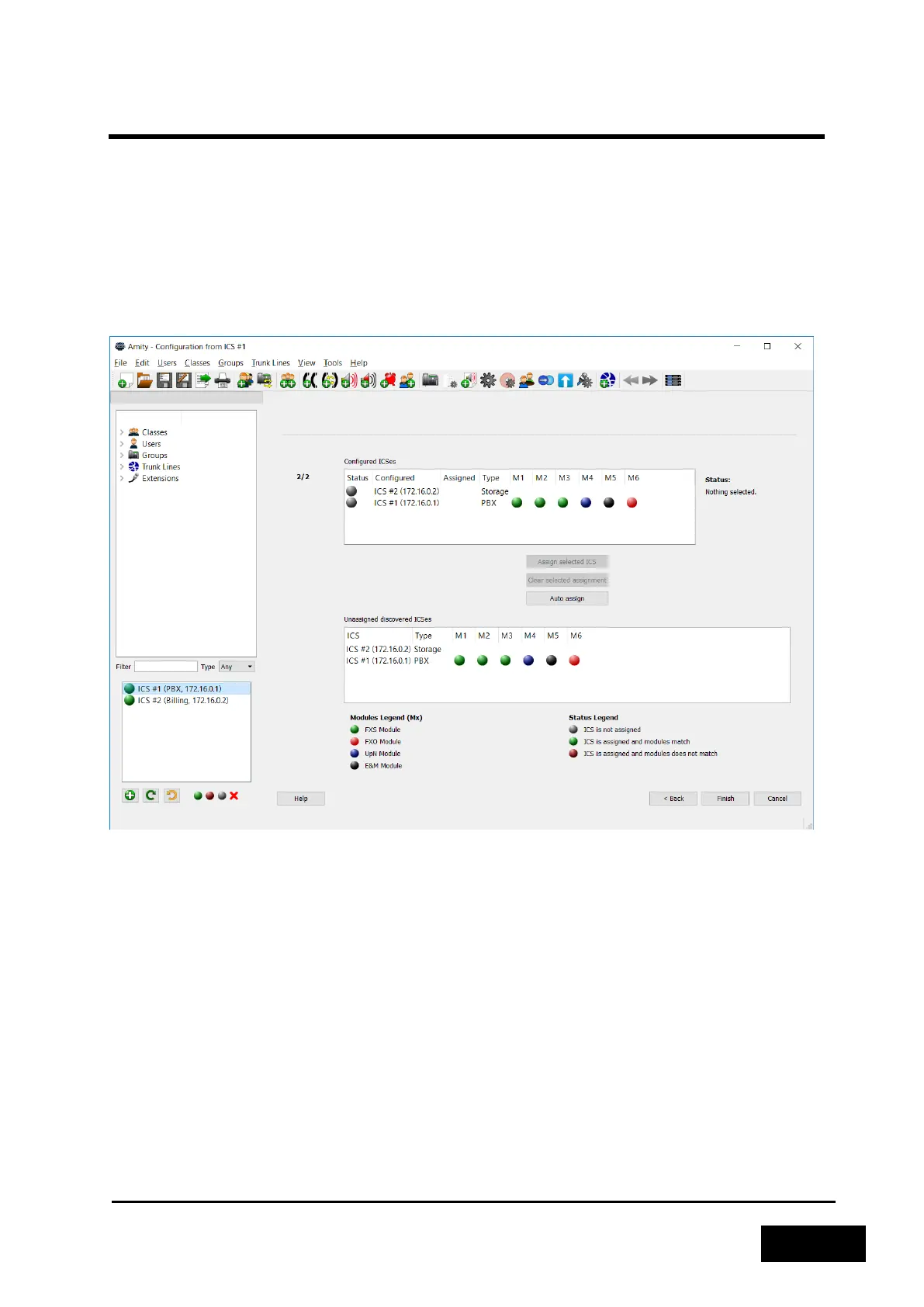
In the Migrate Configuration wizard you are presented with the view of the current system as well as
the view of the system in the loaded configuration. The system in the configuration can be seen
under "Configured ICSes" (Phontech 6200 units) and the connected system can be found under
"Unassigned discovered ICSes". The lists in both views display the IP addresses of the units as well as
the modules that are or have been inserted in them.
Figure 2-55 - Unassigned ICSes in Migrate Configuration
If the configured and discovered systems are identical in the module configuration you can press the
"Auto assign" button found between the two views. This will try to automatically match the modules
of the configured ICSes and the discovered ones so they map up perfectly.
If the modules do not match, but you still want to use the configuration anyways you must manually
assign which discovered ICS in system B that should take over the role of a configured ICS in system
A. To do this you first click the discovered ICS in the bottom view and then click the configured ICS
you want it to take the role of in the top view and then click the "Assign selected ICS" button to
assign it. The selected discovered ICS should then disappear from the bottom view. Do this for all
configured Phontech 6200 Units.
Only Phontech 6200 units of the same type can be assigned to each other.



 To Next Page