onnection
1. How to connect
2. How to use
Insert a video tape into the VCR and press PLAY on the VCR.
(Refer to the VCR owner’s manual.)
Select the AV 1 input source on the TV using the INPUT
button on the remote control.
If connected to AV IN2, select AV 2 input source.
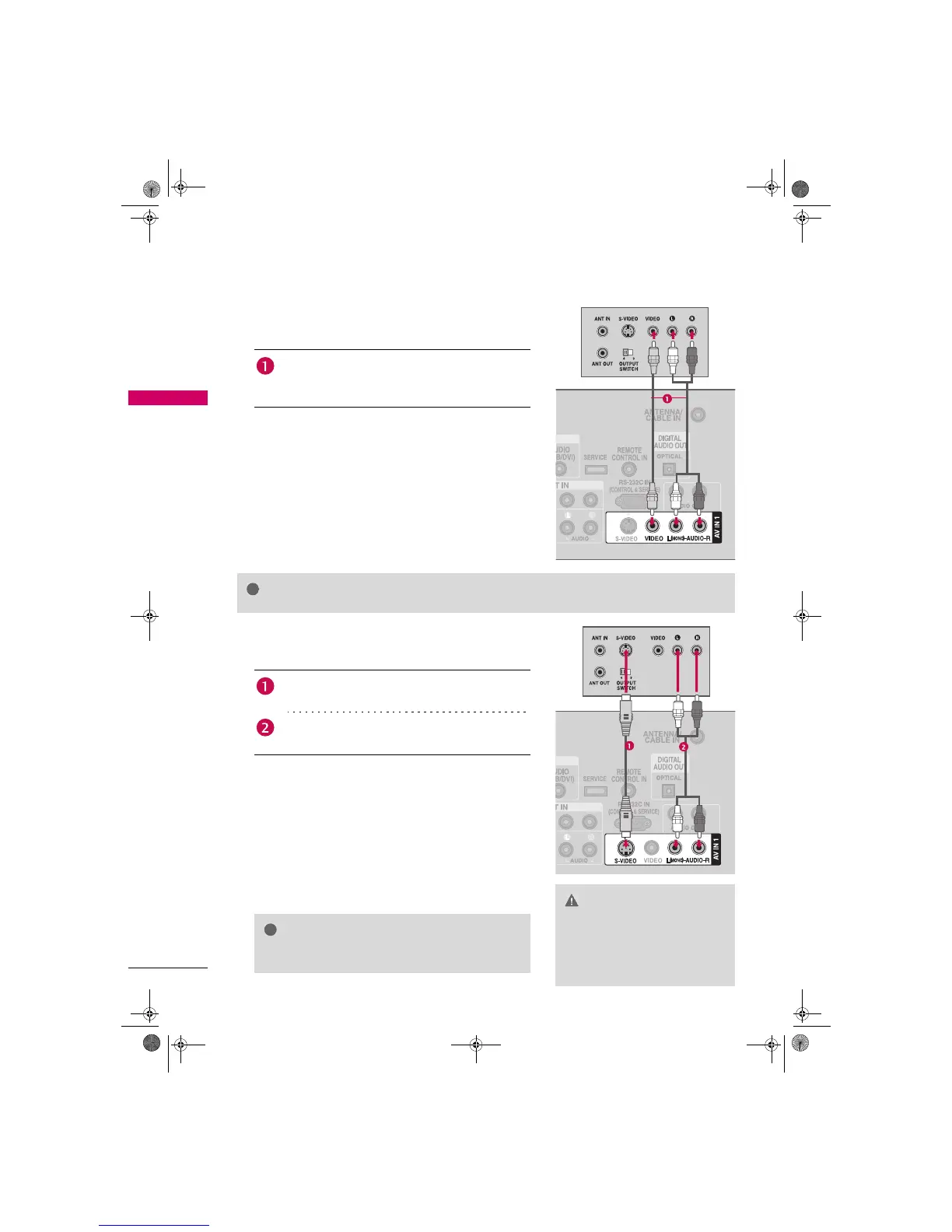
Connect the AUDIO/VIDEO jacks between TV and
VCR. Match the jack colors (Video = yellow, Audio Left
= white, and Audio Right = red)
onnection
1. How to connect
2. How to use
Insert a video tape into the VCR and press PLAY on the VCR.
(Refer to the VCR owner’s manual.)
Select the AV 1 input source on the TV using the INPUT
button on the remote control.
If connected to AV IN2, select AV 2 input source.
Connect the S-VIDEO output of the VCR to the
S -VIDEO input on the TV.
Connect the audio outputs of the VCR to the AUDIO
input jacks on the TV.
CAUTION
X Do not connect to both Video
and S-Video at the same time. In
the event that you connect both
Video and the S-Video cables,
only the S-Video will work.
NOTE
X S-Video provides better quality than composite. Use it
when available.



 To Next Page