30
WATCHING TV / CHANNEL CONTROL
WATCHING TV / CHANNEL CONTROL
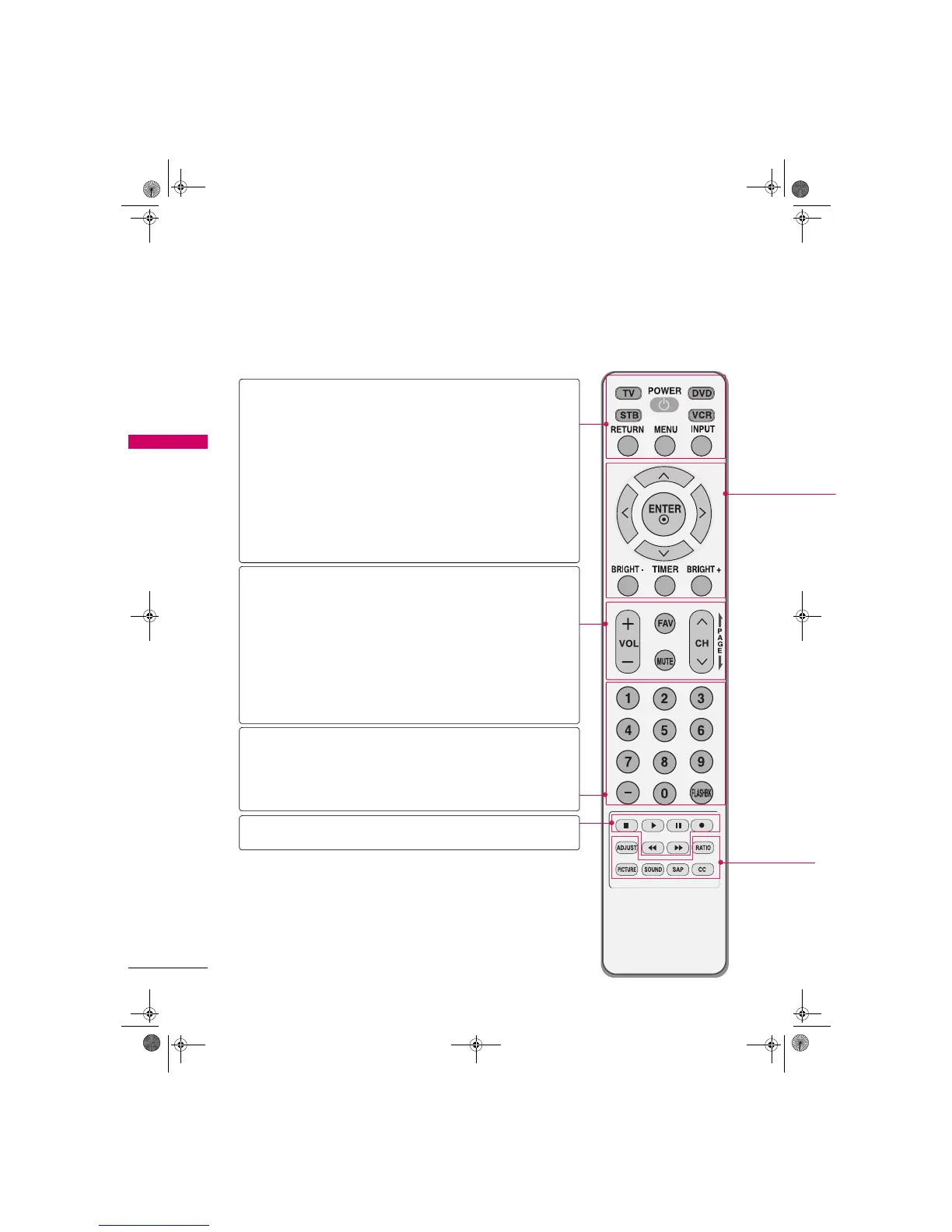
REMOTE CONTROL FUNCTIONS
When using the remote control, aim it at the remote control sensor on the TV.
TV/STB/DVD/
VCR
Select the remote operating mode: TV, STB, DVD, or VCR.
POWER Turns your TV or any other programmed equipment on or
off, depending on the mode.
RETURN Clear all on-screen displays and return to TV viewing from
any menu.
MENU Displays the main menu.
Clear all on-screen displays and return to TV viewing from
any menu.
INPUT External input modes rotate in regular sequence.
VOLUME
UP/DOWN
Increase/decrease the sound level.
FAV Scroll through the programmed Favorite channels.
Xp.36
MUTE Switch the sound on or off. Xp.32
CHANNEL
UP/DOWN
Select available channels.
PAGE
UP/DOWN
Move from one full set of screen information to the next
one.
NUMBER button
-
(DASH) Used to enter a program number for multiple program
channels such as 2-1, 2-2, etc.
FLASHBK Tune to the last channel viewed.
VCR/DVD
Control buttons
Control video cassette recorders or DVD players.
Zenith.book Page 30 Wednesday, April 2, 2008 11:46 AM



 To Next Page