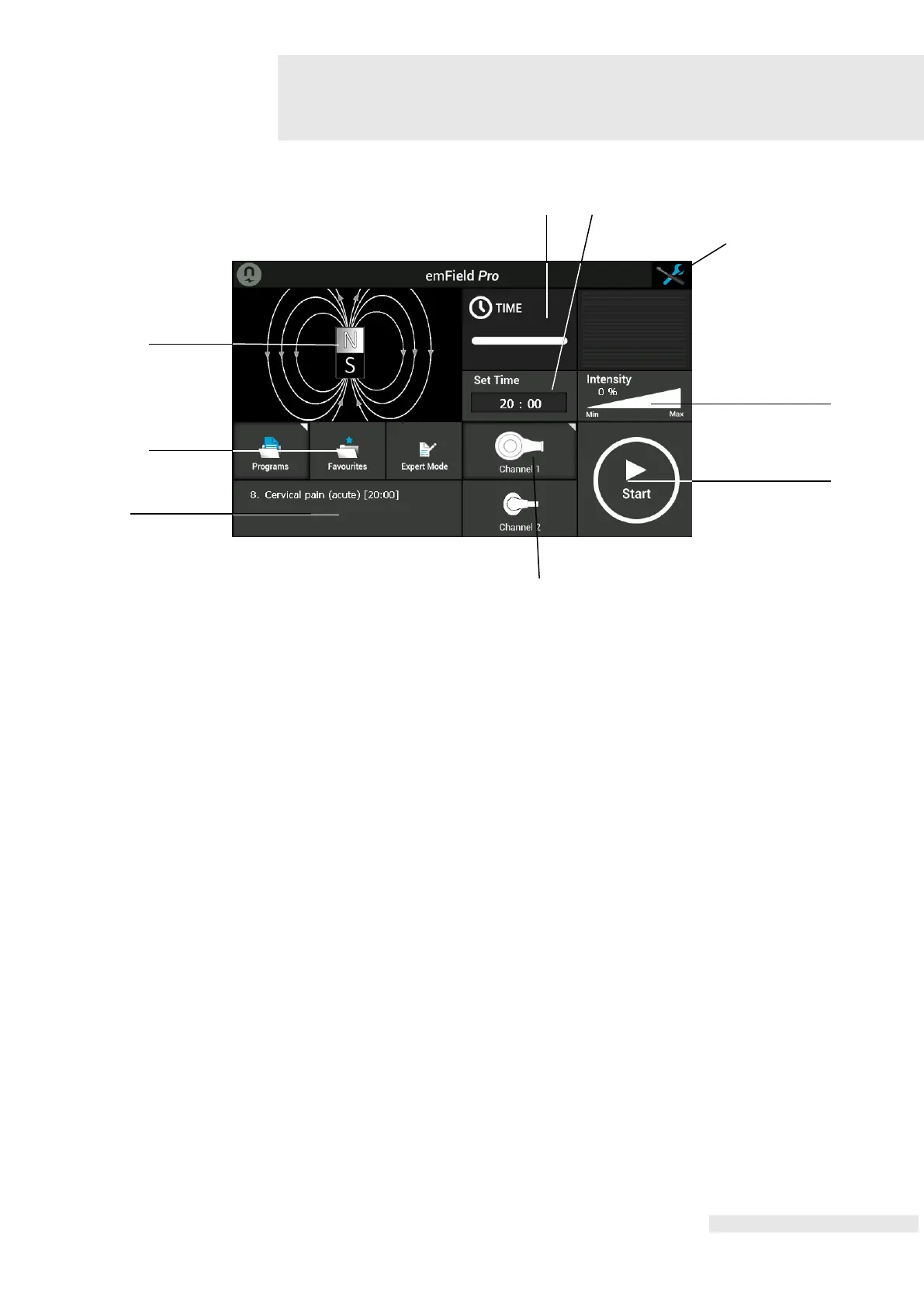
(H) Time remaining
(I) Total operation time
(J) Configuration icon
(K) Intensity in %
(L) Start/Stop
(M) Channel selector (CH1 Large or CH2 Medium)
(N) Applied program
(O) Mode selector (Programs / Favourites / Expert mode)
(P) Program information screen
Shows graphical the course of the treatment time.
At start: shows the total treatment time.
During operation: count down the treatment time.
Set (change) the time: click on button (2) and use the central control knob (6) to set
(change) the total operation time.
Refer to Chapter 7, Settings for setting possibilities.
After pressing the start button: shows graphical and in percentage (0 – 100%) the
applied intensity.
Set (change) the intensity by using the central control knob (6). Turn to the right to
increase intensity and/or turn to the left to decrease the intensity.
After pressing the Start button the applied program starts. The total treatment time
will count down to 0. The text on the Start button changes into STOP. Pressing this
button again stops the treatment, and reset the treatment time and applied energy.















 To Next Page