Page 14 TETHERED CONTROLLER MX32, RADIO CONTROLLER MX32FU
5. Simple Address & CV Programming
in SERV PROG (at the programming track; for first time users)
This chapter describes how a first time user can program a vehicle decoder (or more precise, a loco-
motive equipped with a DCC decoder) with a new address and how to program and read-out configu-
ration variables (CVs).
For information about accessory decoder programming, go to the chapter SERV PROG!
This section deals with programming in SERVICE MODE on the programming track, which is con-
nected to the command station output that can be switched over to the programming mode; on the
MX10 it is the output “Schiene-2” (on ZIMO command stations it also serves as another “main track“).
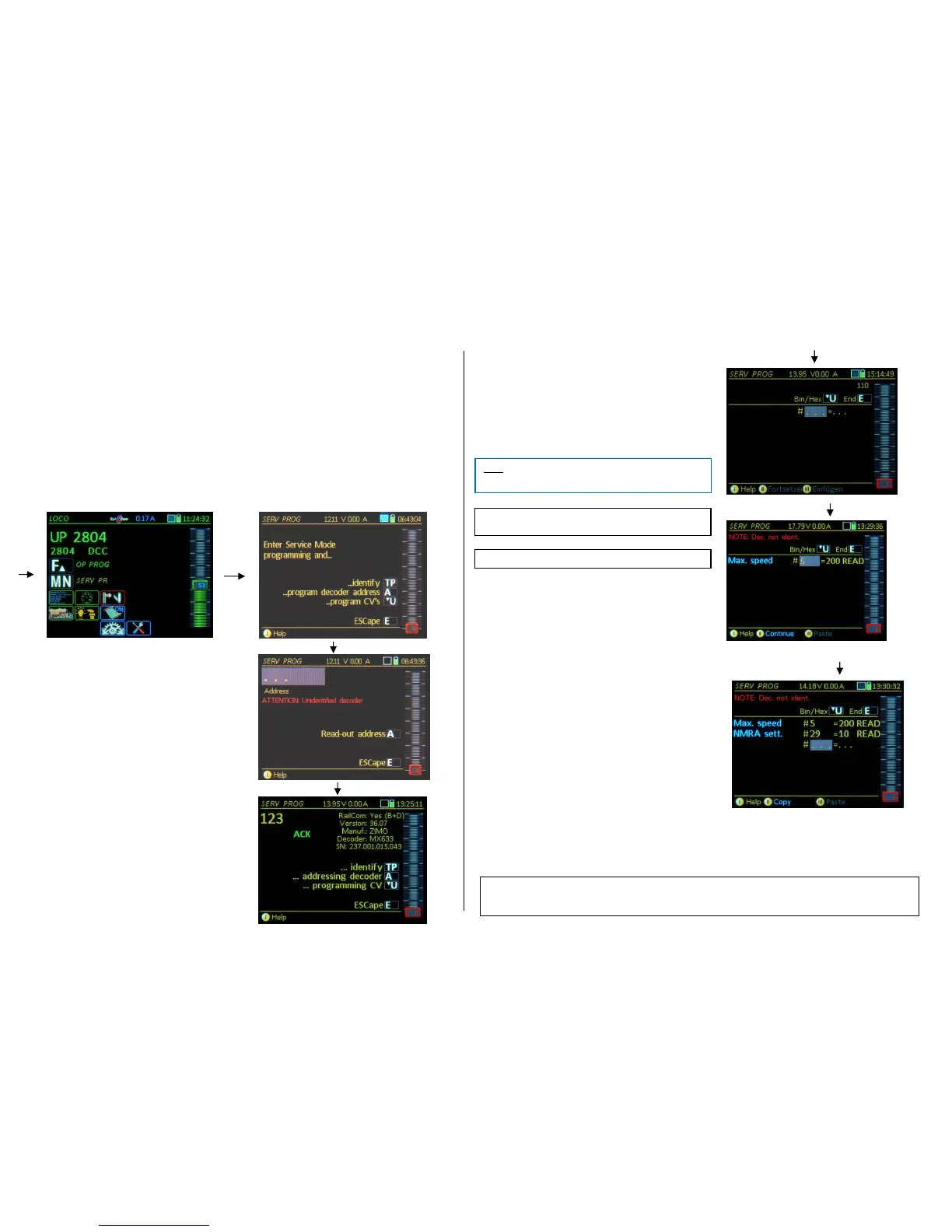
Start the programming procedure (usually from the LOCO screen) with the
E- Key followed by the MN- Key enters the operating mode SERV PROG
TP- Key “identifies” and displays important
decoder data such as address, type,
version, serial number…
“Identification” can be aborted with:
E-Key abort and return to Serv Prog menu
U-Key abort and switch to CV programming
A-Key starts address programming and read-out
procedure.
If the decoder identification is aborted by immediately jump-
ing into the addressing / programming process, the mes-
sage "ATTENTION decoder not identified" appears. This
only means that there is an uncertainty about the decoder
type and the addressing / programming operation is done at
one's own risk.
A- Key twice reads the current address
Reading out the address can be omitted (i.e. to enter a new
address immediately); without any problems if the decoder
was first “identified”; with a certain risk, if it was not.
The vehicle address is programmed by
typing a new address - F- Key
The system answers with:
ACK Address programmed and confirmed;
NACK Address sent but not confirmed.
The alert ”ATTENTION: Addressing not confirmed” means: the
decoder does not send acknowledgement pulses, but the address
MAY have been programmed successfully anyway, BUT: when
switching from a “small” (0…127) to a “large” address (>127) pre-
viously set values in CV #29 (e.g. analog operation) MAY have
been erased in the process.
Right after entering SERV PROG or after reading-
out/programming the decoder address or after decoder
“identification”:
U- Key to CV programming
CVs are programmed by
or read-out by
Programming and read-outs are confirmed by the system
and displayed in the corresponding line with
ACK after each successful CV programming
READ after reading out a CV value
NACK when programming w/o acknowledgement
NO-R when read-out was not successful
and various ERR messages
A read-out attempt (after 2 x A-Key) that causes the CV value
to “run” usually means that the read-out will likely fail (only a few
old decoders behave like that); it is recommended to abort the
read-out with the E-Key!
An automatic line feed occurs after each programming or
read-out step in order to immediately proceed with the
programming.
To modify a previously processed CV number or value
use the scrolling wheel to move up or down a line, even
past the visible area.
The MX32 shows the meaning of each CV, if known,
in the first column (blue font). If a decoder identification
was performed earlier (with the TP-Key) and the decoder
was therefore identified as a ZIMO decoder, more CV
numbers will have a description than third-party decoders or from unknown decoder manufacturers.
E- Key exit CV programming (also: Interrupting a running process) or
returning to the menu screen (TP, A, U).
E- Key (again) returns to operating mode (usually LOCO)



 To Next Page
 Loading...