Page 18 TETHERED CONTROLLER MX32, RADIO CONTROLLER MX32FU
Loading self-made vehicle images:
A “configuration file” (as a “.zsc” file; a sample is available from www.zimo.at, MX32 update page) must
be created first and then copied together with the images to a flash drive.
The configuration file must contain at least the red mandatory lines: [FileInfo], Content =Image.Loco, Ver-
sion=03.02.0002, [/FileInfo] , [Image], Id=... (the loco pictures) and the links File = 1|… and File = 2|… of the
pictures (which must also be on the stick). The Id=… (max. 4-digit 1-9999) should be unique, otherwise
a picture with the same ID would be replaced.
The "configuration file" is written in the Windows editor and saved as "…zsc" file (File / Save as / (file
type "All files") / "....zcs" / Encoding "ANSI" / Save.
8. THE “E-SCREEN”
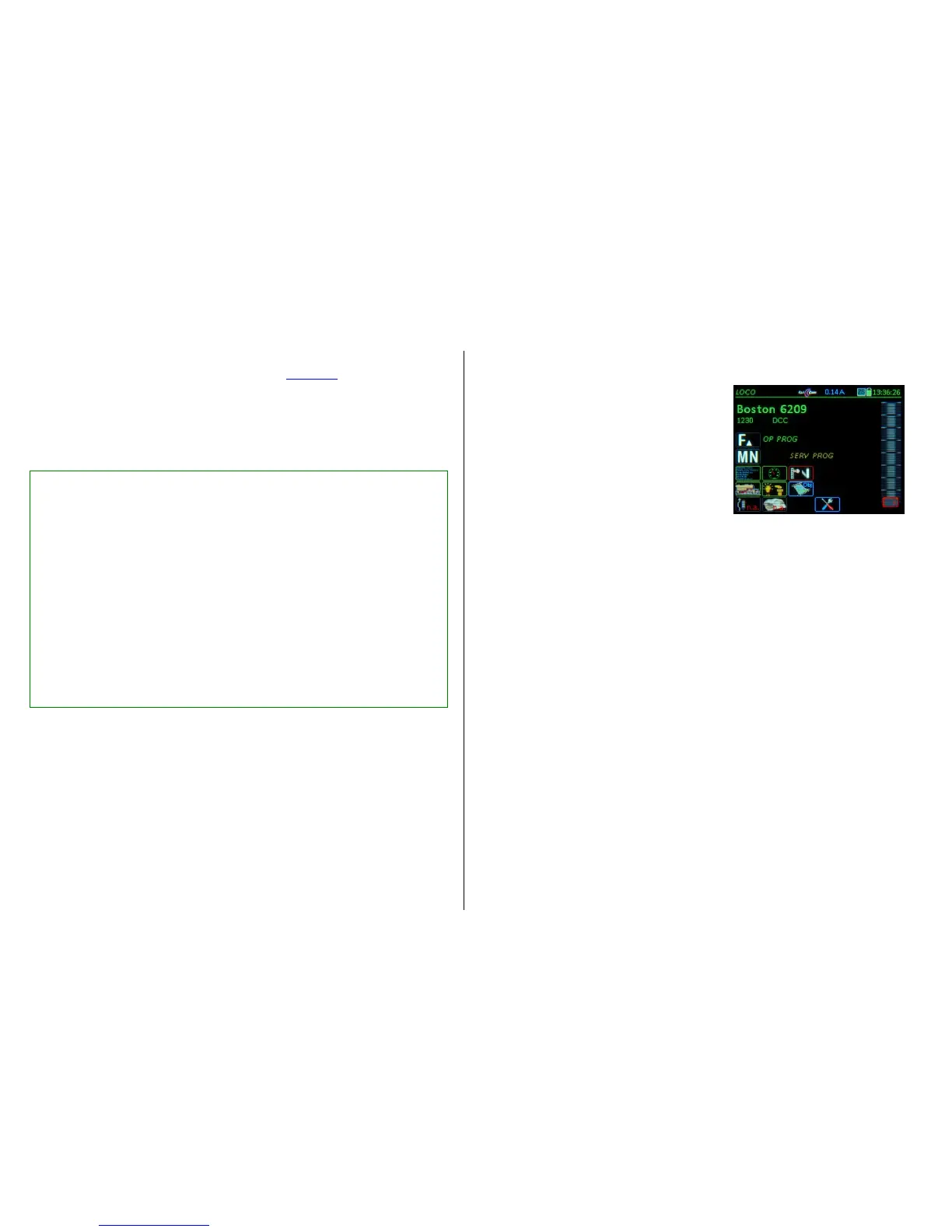
The "E-screen" is the menu page for different applications.
E-Key (from the LOCO or SWI mode)
E-Screen
The meaning of the E- Key in this instance is not for
“Escape” but for “Einstellungen”, which is the German
word for “Settings”.
The E-screen symbolically shows which "setting" each
key leads to (application, operating status).
The key sequences E + ... have the following meaning:
E + F OP PROG ,
Entry into Operational Mode programming for CV
and address programming on the main track. See chapter “OP PROG”.
E + MN SERV PROG,
Entry into Service Mode programming for CV and address programming on the programming
track. See chapter “SERV PROG”.
E + 1 ADDR FUMT,
Various settings for the GUI of each vehicle (this is NOT decoder programming), in particular
the number of function keys. See chapter “ADDR: FUMT…”.
E + 2 ADDR SPEEDO,
Settings for the display speedo (Design, Range etc.). See Chapter “ADDR: FUMT…“.
E + 3 ACC LIST,
Displays a list of accessory addresses where turnouts and signals, connected to accessory de-
coders, can be operated from. See chapter “ACC LIST”.
E + 4 ADDR IMAGE ,
Select or change a vehicle image. See chapter “ADDR: FUMT…“.
E + 5 ADDR FUSY,
Assignment of function symbols to the function keys, See chapter “ADDR: FUMT…“.
E + 7 ROUTES,
Setting of routes in connection with suitable dispatching programs (ESTWGJ, STP...).
No description in this manual.
E + 8 StEin LIST ,
Displays a list of existing StEin modules for monitoring and actuating their connections, i.e. track
sections (HLU, occupancy detection, short circuits), turnouts, inputs, signals…
See chapter “StEin LIST”.
E + 9 AOS‘s,
not yet implemented and therefore no description.
E + 0 CONFIG
SW-Version information, as well as viewing and changing of the command station settings and the
"own device" settings (i.e. the present controller): language, time & date, stop mode modifications,
operating details, statistics and much more. See chapter “CONFIG” (formerly “CAB CONF”).
For details go to chapter ADDR … FUMT, SPEED, IMAAGE, FUSY; OP PROG; SERV PROG; SWI
// Vehicle images * Optional commentary lines
//
[FileInfo]
Content=Image.Loco * * Content description of the following database
Version=03.02.0002 * Version of the loco data bank, 03.02.0002 requires SW 01.20.0150 in the MX32/FU
Date=2016.12.16 * Date the dataset was created
Name=My loco pictures * Name the loco database (all black entries are strings!)
[/FileInfo]
// ---------------------- P 8 * Optional comment line: Vehicle description
[Image] * Image opens
Id=1004 * Unique image number (.bmp file), which must also be included in the image name.
Name=P8 * Name (Type…) of the vehicle (is also shown in the MX32)
Engine=S * Attribute “Propulsion”, for display and as a filter for image selection in the MX32
(S=Steam, E=Electro, D=Diesel)
Country=DE * Attribute “Country“, for display and as a filter for image selection in the MX32
Company=KPEV * Attribute “RR-Company“, for display and as a filter for image selection in the MX32
Epoch=1 * Attribute “Era“, for display and as a filter for image selection in the MX32
Gauge=N * Attribute “Gauge”, for display and as a filter for image selection in the MX32
Author=Peter M. * Attribute “Author“, for display and as a filter for image selection in the MX32
PartNum=M37031 * Attribute “Manufacturer and article number” (M: Märklin, R: Roco ...)
File=1|Loco 1004.01 P8 [M37031].bmp * Link to small image (.bmp-File 150 x 50 px, 24 bit)
File=2|Loco 1004.02 P8 [M37031].bmp * Link to large image (.bmp-File 279 x 92 px, 24 bit)
[/Image] * Image is closed
//
[Image]…. * Weitere Bilder


 To Next Page
 Loading...