TETHERED CONTROLLER MX32, RADIO CONTROLLER MX32FU Page 19
9. CONFIG Info and Settings for Command Station and Controller
E-Key (to the E-Screen) + F0-Key (number key 0) Entry to CONF from the LOCO or SWI mode
Scrolling wheel Move to a specific line in the CONFIG menu
A-Key Enter the selected page
E- Key Return to the CONFIG menu page
E- Key Return to the operating mode LOCO or SWI
Switch between the detail pages with:
U- Key continuous to the next CONFIG screen
(Shift) + U- Key returns to the previous page
Within a page:
Scrolling wheel move the cursor to the desired CONFIG line,
Rocker switch Select from available options
Number keys Enter a value
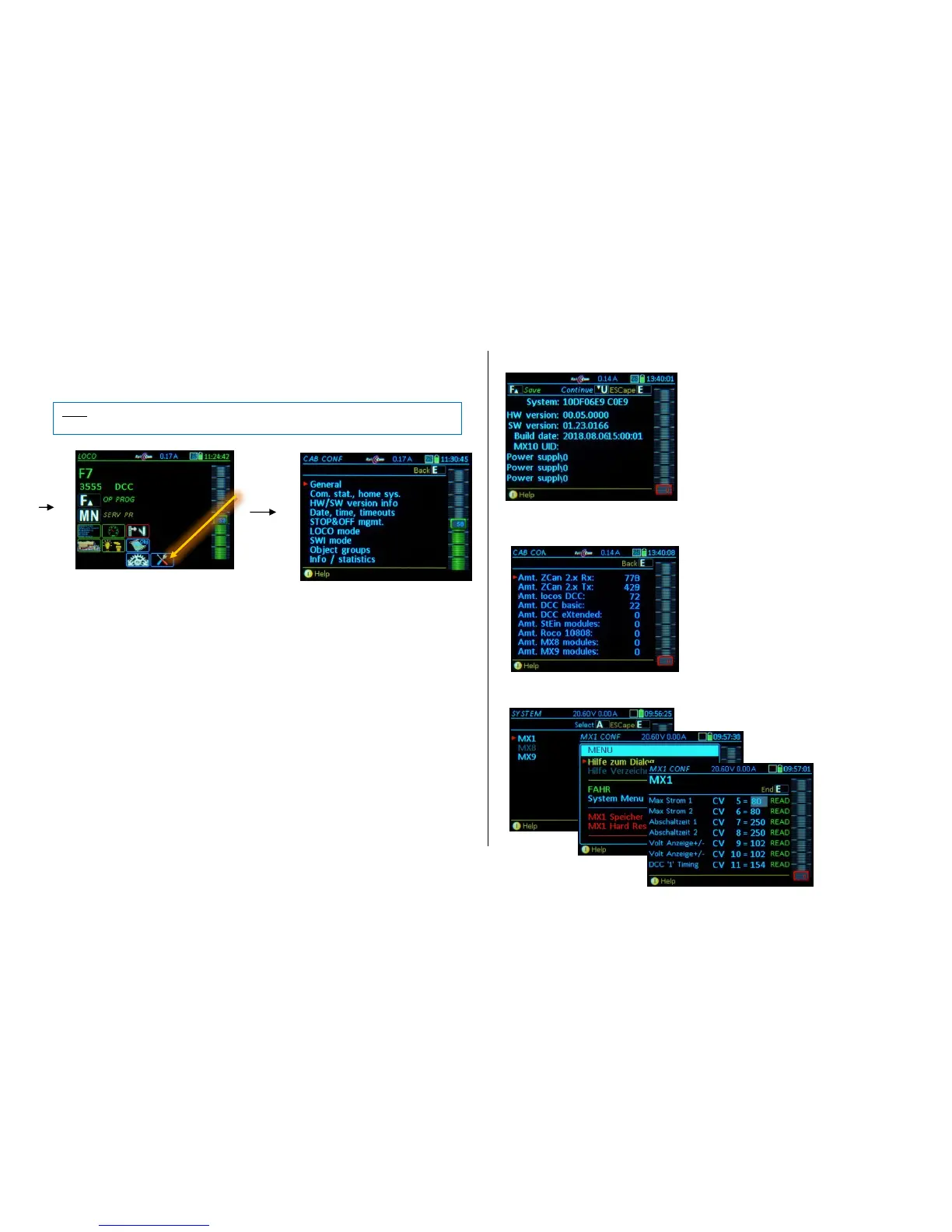
Command station – HW/SW Version Info
HW-Version: Version of the MX10 (MX10EC) board
SW-Version: Software Version installed
Build Date... Time: Software development date
MX10 UID: Factory serial number
Power supply ?????????????
.
Command station - Statistics
Various current data regarding
communication and devices con-
nected to the command station.
<<< Display of available devices
<<< via the menu (M-Key)
to total memory erase and
Hard Reset
<<< CV-programming of
command station MX1
.
The new value will be saved
as soon as you switch to
another line with the A-, E-,
U-Key or Scrolling wheel.



 To Next Page