Page 24 TETHERED CONTROLLER MX32, RADIO CONTROLLER MX32FU
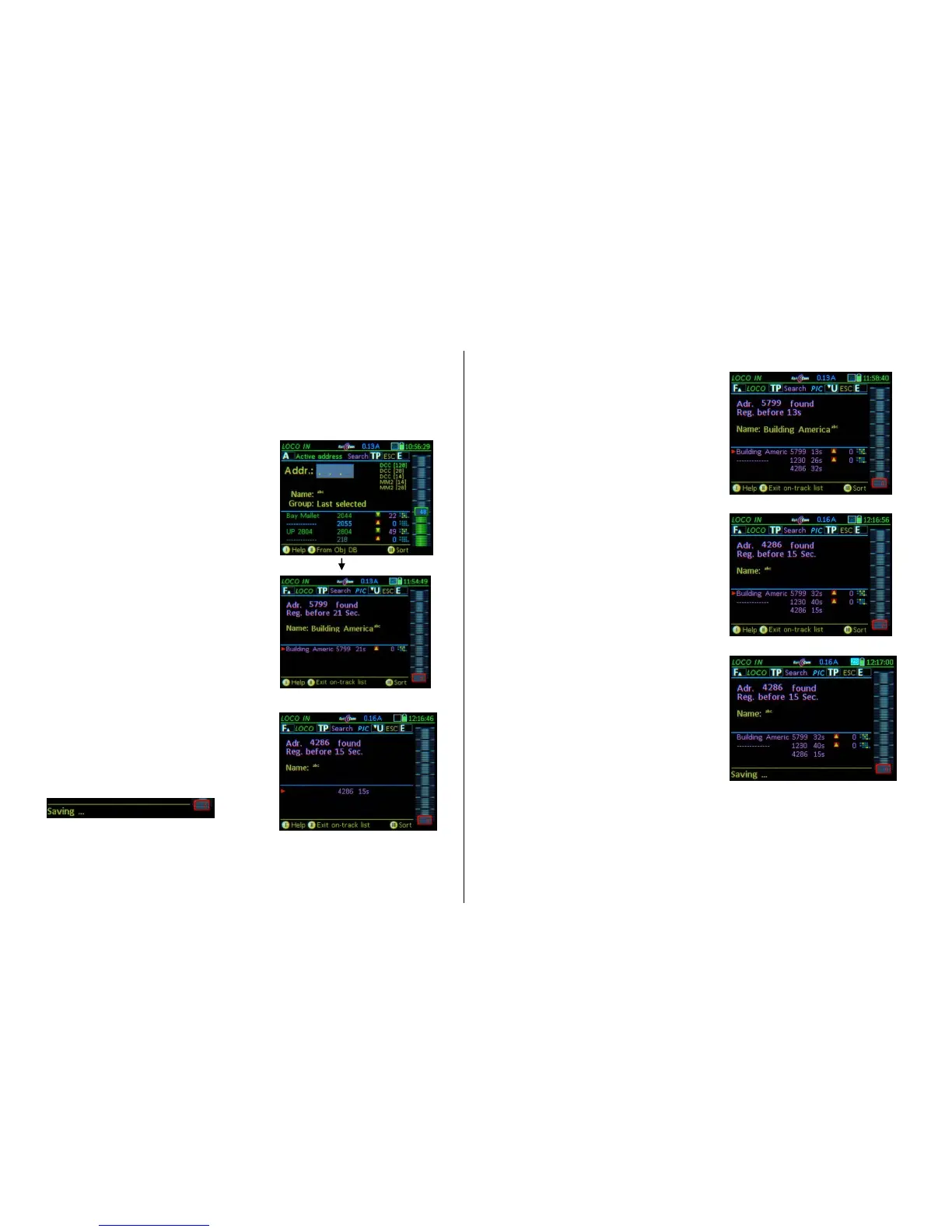
The “TRACK-ON SEARCH”
requires system SW 01.24.0001 and decoder SW 37.16 or higher
The "TRACK-ON SEARCH" is a procedure to determine a previously unknown address of a vehicle
placed on the layout track. Gradually, along with the feature "Load GUI from the decoder into the con-
troller" it is being developed into a comprehensive "Registration System".
Detect and operate a vehicle with unknown DCC address
- Remove power to the vehicle for about 2 seconds by
tilting it; or place a new vehicle on the track.
- A-Key (or, + A- Key with LoR open)
Switches to LOCO or LOCO IN,
The lower half of this screen displays the list of objects,
which will be replaced by the “Track-On Search” list
once the search is started.
- TP- Key (SEARCH) Searches for the address of
the new vehicle on the track; all decoders that were
placed on the track within the last minute (= power-up)
are prompted to send a message via Railcom (no mat-
ter if placed newly on the track or only briefly tipped),
which will be registered by the system.
- The address found will be displayed; if it is a known
address already in the object databank and has a name
attached to it, the name will be shown in the field below.
This address is also shown in the lower half of the
screen, as follows
- if the address is already in the system, it shows the
name (or alternatively ----), direction (arrow), speed step
and the first function table (all taken from the object da-
tabases).
- if it is a completely new address (neither in the object
database of the controller nor the command station), the
only info that can be shown is the address and the re-
porting time.
- F- Key Saves the new found address and switches
over to the LOCO mode.
If the search (TP key) shows several addresses at (almost) the same time…
- A- Key … as described before.
- TP- Key (SEARCH) … as described before.
- If several decoders power-up within the one minute search
time, and therefore all report themselves as “newly-
added”, they will all be displayed in the lower half of the
screen ("Track-On list");
This occurs:
when other decoders, than the one to be identified,
coincidentally lose contact and are therefore re-
garded as “newly added”, or…
when several vehicles are indeed placed on the layout
and all report at the same time, or…
when the “Track-On” search (TP-Key) is started within
one minute of applying track power (by powering up
the command station or cancelling a short circuit on
the track).
The “Track-On” list, which also holds the initially searched
address (displayed in the upper field), also contains data
such as speed and the first function table for vehicles al-
ready in the system.
Switch to the operating mode LOCO with the:
- F- Key Driving with the reported (“…found”) address.
or
- Scrolling wheel and A- Key Select another address
from the “Track-On” list; the selected address is moved to
the upper line (…found).
- F- Key Activates the selected address.



 To Next Page
 Loading...