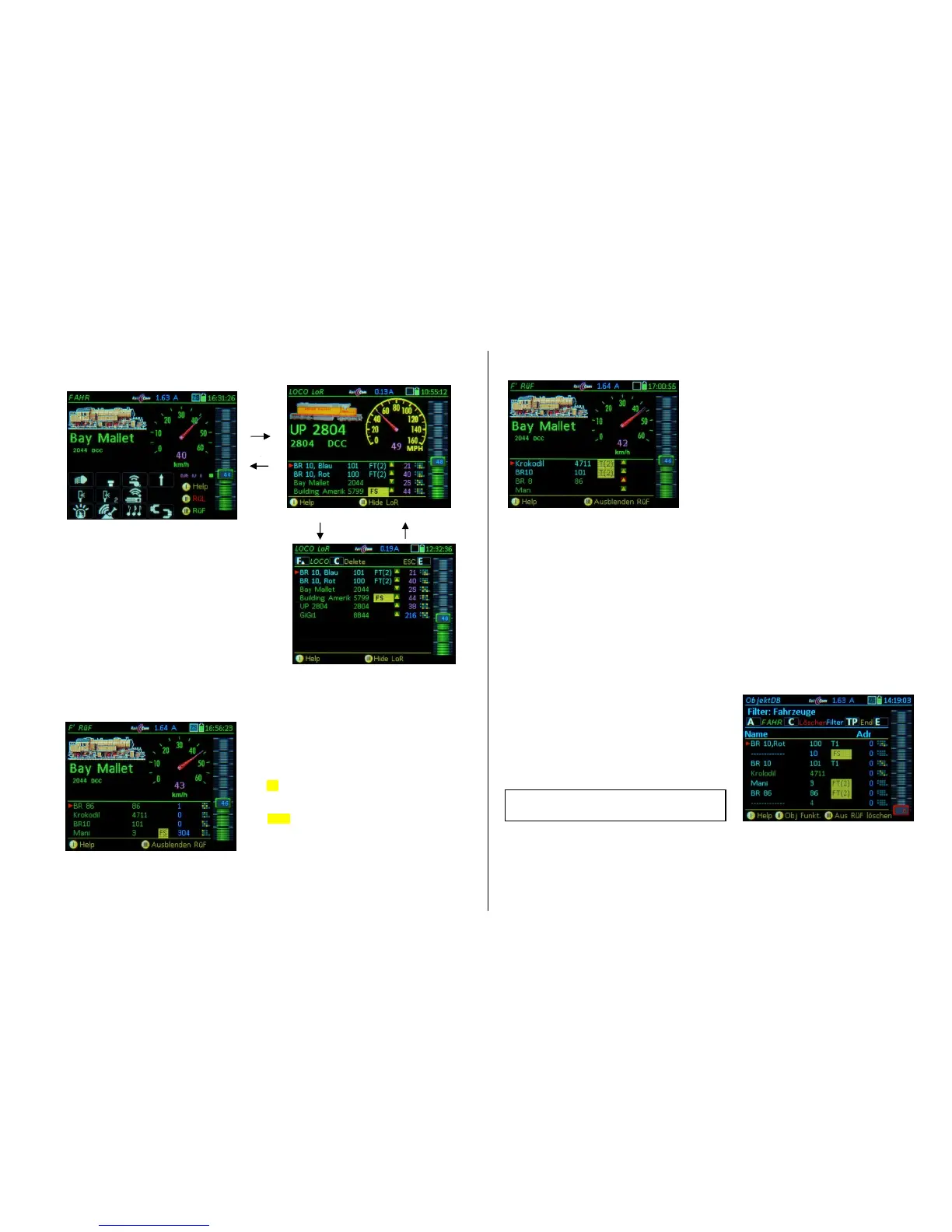
Softkey III LoR displays the
loco recall memory (LoR) instead
of the function keys.
TAP on the LoR - Full-screen display
The functions are the same as in the half-screen dis-
play but with a higher number of visible lines.
At the end of the LoR list is always the line >NEW<, for
an alternative way to get to the address input screen
(instead of using the A-Key or + A).
TAP the large LoR - field returns to the
Half-screen representation
The individual rows of the LoR contain in the first level (see below for second level):
* First column: Vehicle name (if one is given,
otherwise substitute-dashes)
green: “normal” single vehicle
turquoise: vehicle that is part of a consist
(see third column)
* Second column: Vehicle address (without further
identification, if it’s a DCC address)
* Third column: External control, (External) Consist *)
“FS”: Vehicle controlled by another controller
“T1, T2…: Vehicle is part of a consist
“FT(..)”: Consist belongs to another controller
“FS(..)”: Consist controlled by another controller
* Fourth column: Speed
magenta: km/h-value from RailCom feedback, or
blue: Speed in 1024 speed-step - scale (NOT in km/h)
* Fifth column: Direction (stand-still / driving)
* Sixth column: Small function table F0 ... F9 (to see which
functions are turned on, i.e. headlight, sound…).
Rocker switch to second level of the LoR display.
The individual rows of the second level contain:
* First column to fourth column: same as the first level.
* Fifth column: Group info (if available)
The arrangement of the symbols is not yet final,
depending on the development level of consisting!
Activating a vehicle from the LoR and other actuations
Softkey III Open or close the loco recall memory (also see above)
F- and U-Key switches directly to the next address in memory; ascending or descending,
regardless of whether the LoR is visible (open) or invisible,
Scrolling wheel Scrolling through the recall memory and marking with the cursor (regardless of
the scrolling wheel setting in CONFIG),
A-Key activation from the LoR (bringing the marked address to the foreground).
Softkey II Sort (Change the order of objects in the recall memory),
C-Key Delete marked object from the recall memory (remains in the Object Database!).
Activating a vehicle from the Object Database
E-Key (to the E-Screen) + 6-Key
switches to the ObjectDb
Scrolling wheel scroll through object database,
A-Key activates the selected objects
and returns to the operating
mode LOCO.


 To Next Page
 Loading...