19. ACC LIST
Address-oriented control of turnouts, signals …
…is an alternative to the SWI method of operating accessory articles, similar to the usual method of
earlier system generations.
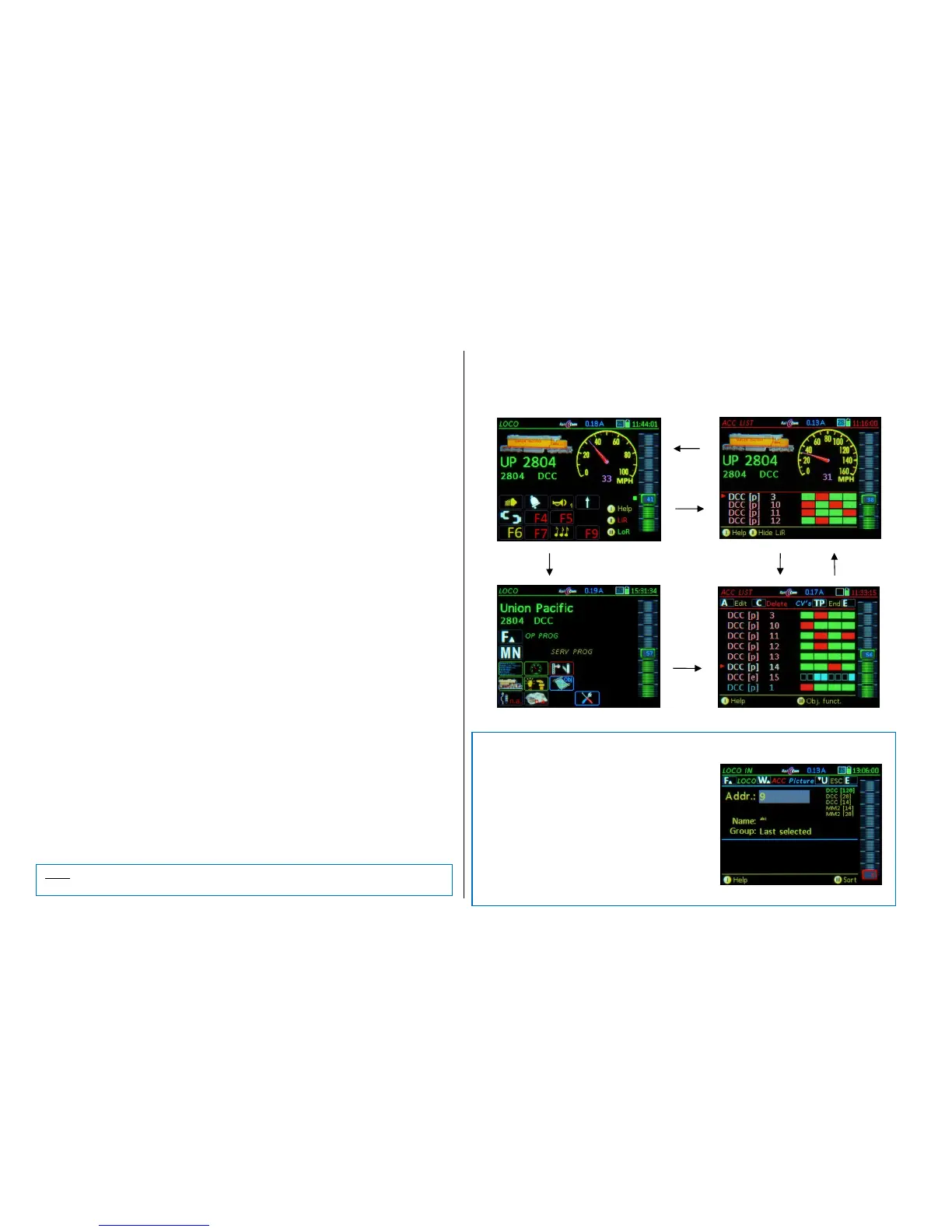
The ACC LIST can only be reached from the driving mode LOCO (NOT from the SWI mode) with
Soft-Key II = LiR * Opens the ACC LIST in the lower screen half,
or
E-Key + 3-Key ACC LIST
Accessory decoder addresses can be entered in the operating mode ACC LIST and associated turn-
outs and signals can be operated, or existing addresses (entered automatically, see below) monitored
and operated when needed.
The function keys do NOT operate loco functions as long as the ACC LIST is displayed. However, the
active vehicle in the upper screen half can still be controlled (Speed, direction…).
All addresses assigned to SWI panels are automatically added to the ACC LIST, but can be removed
from the list if they are not desired here without changing the functionality of the panel. If a MX8 is in
the system it also appears automatically and can be operated directly by using the function keys.
To add a new (additional) address it is necessary to scroll to the line >New<, then:
- Scrolling wheel: Move the cursor to the line >NEW<
- A-Key: “DCC [p]” (DCC with 4 paired functions per address (=p)) is the standard definition,
if changes are required such as single functions proceed with the
- Rocker switch to change to:
“DCC [e]” (8 single functions per address), often for double-slip switches
“DCC [x]” (extended)
“MM1 [e]” (Motorola; 8 single functions per address)
“MM1 [p]“ (Motorola; paired)
- A-Key: confirms and opens the accessory address input field, then use
- Numeric keys to enter the new address and confirm with the
- A-Key: saves the new entry (address) and adds it to the ACC LIST.
- TP-Taste CV programming
Already existing addresses can be edited the same way (scroll to line, A-Key…)
Operating accessories (only if ACC LIST is open):
- Scrolling wheel: scrolling up/down in the accessory list
- Numeric keys 1 – 4 or 1 – 8: operate 4 turnouts (or 8 single functions)…
DELETE entries and EXIT this operating mode:
- C-Key: deletes the highlighted line from the ACC LIST
- Soft-Key II: Closes the ACC LIST and returns to LOCO.
The following functions are still available even with the ACC LIST open:
U- / F- Key Scrolls among locomotives (within the LoR) without leaving this screen.
TP- Key Consist functions as in the LOCO mode (except where the LoR must be open)
(Shift) + A- Key LOCO IN (to enter a new vehicle address).
E- Key E-menu screen
Alternative, quick method of entering a new accessory address:
Directly from the operating screen LOCO:
A- Key LOCO IN
“Misuse” of the LOCO IN screen: After entering the
new address DO NOT press the F-Key, but rather the
W- Key confirms and jumps directly to the
address in the ACC LIST = operate the
accessory or use the
A- Key for editing (i.e. to change to “DCC
[e]” or change the address), then
Softkey II LOCO



 To Next Page
 Loading...