2. Turning the controller ON/OFF and rebooting it
Depending on the situation, a tethered MX32 or radio
controller MX32FU is turned on as follows:
Starting up the system (= connecting the power
supply to the command station or turning on the pow-
er supply), with the controller already connected.
Connecting the controller to the command sta-
tion using a CAN bus cable (with the command sta-
tion already running).
Radio controller: Press the A-Key for more than 1
sec turns on the controller and establishes radio com-
munication.
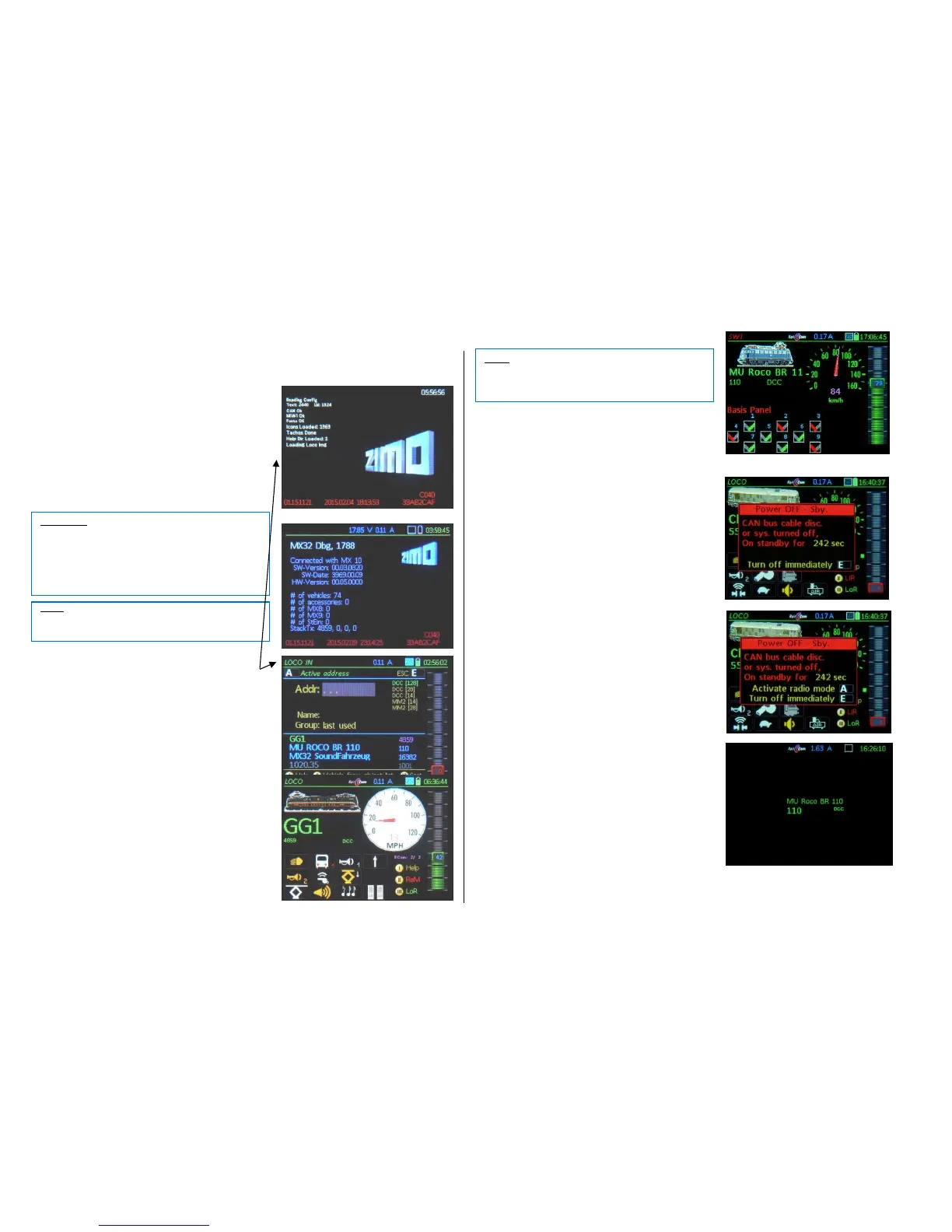
In all these cases, a boot-up sequence is performed
first (10 – 50 sec. depending on HW/SW version and
the amount of data). Also displayed is the currently
loaded software version and the info about the com-
mand station ("connected with ...")
The controller automatically enters operation after
finishing the boot-up sequence by switching to the…
… (if the controller is new or “empty”) LOCO IN
the address, data format and (if desired) the loco
name and group can be entered here. The vehicle
can then be activated with the F-key. See chapter
“Simple Driving Mode”.
Entries from the object database are displayed in the lower
half of the display (after address entry). Press Soft-Key II to
jump to the object database and use the scrolling wheel
and the A-key to make a selection.
…(if the controller is not empty because it was
used before without deletion) LOCO or SWI dis-
play,
showing the same vehicle and data that was active
before the last shut down. The vehicle shown can
now be operated immediately.
… (if the command station is set to “START WITH
CAB”) the “Stop balls” are displayed. Power to track-
1 or -2 remains OFF until the “ON” fields are tapped.
Turning the controller off by disconnecting the cable:
This does not turn the controller off immediately, but
thanks to the built-in battery *) remains on stand-by
and counts down the time until the controller automati-
cally turns itself off. This can take from 0 to 240 sec
depending on the settings in CAB CONF.
*) The tethered controller MX32 also contains a battery
(a smaller one than in the MX32FU). The built-in battery is al-
so used to power the clock while the controller (system) is
turned off, as well as to store data (such as the recall memo-
ries) for about ½ a year (longer on the MX32FU). This is true
as far as the battery has not been heavily depleted due to
several long stand-by sequences.
EXIT or Resume from Stand-by:
E-Key immediate power-down.
Reconnecting the controller during stand-by
restarts without delay (no boot-up sequence).
A- Key (radio controller only)
immediately switches to radio mode, without
going through the boot-up sequence.
Controller sits idle:
After the controller sits idle for some time (i.e. no but-
tons arr pressed), it switches to the screen saver.
Pressing any key resumes normal operation
The idle time required before the screen saver mode
engages can be set in CAB CONF.
Turning the system OFF:
Turning off the command station MX10 (i.e. pulling the
plug on the power supply) also turns off all connected
controllers without them going to stand-by.
Shut-down procedure for radio controllers:
Press and hold the E-key, meanwhile briefly press the A-
key the radio controller shuts down immediately.



 To Next Page
 Loading...