10.0 Batteries and charging
WARNING!
Please read the owner’s manual supplied with the charger
carefully.
WARNING!
Do not expose any part of the battery to direct heat (i.e.
naked flame, gas fire).
WARNING!
When charging always place your charger on a hard
surface in a room with good ventilation.
WARNING!
Do not charge your batteries in outdoor conditions.
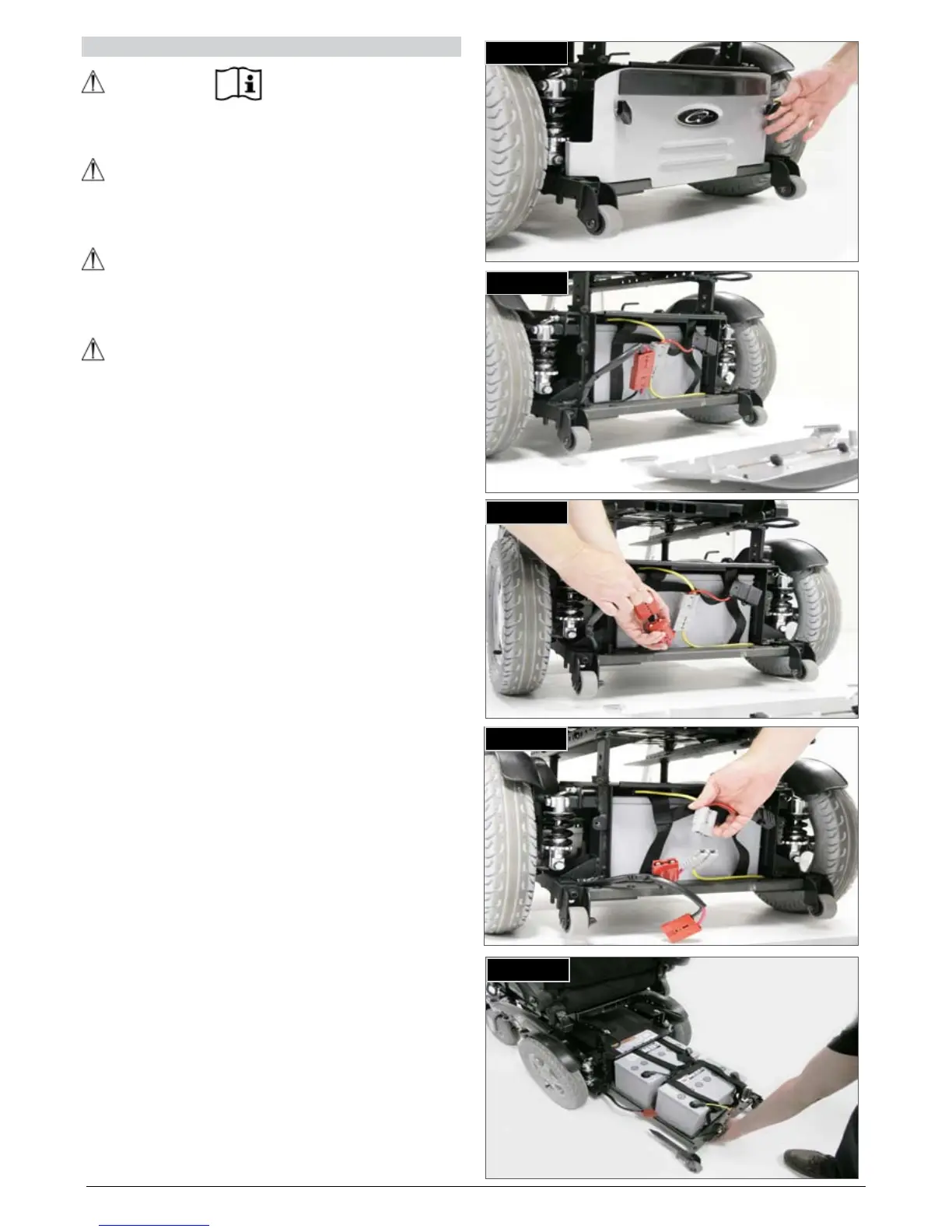
10.1 Zippie Salsa batteries (Fig. 10.1 - 10.5)
The batteries are contained within the drive unit located
under the battery shroud.
To remove the batteries, should they require changing or
maintenance:
Release the two handle screws at the rear of the drive •
base, which holds the rear cover plate.
Pull the plate off. •
Disconnect the RED 2 pin Anderson connector.•
Disconnect the GREY 2 pin Anderson connectors from •
each battery.
Pull the battery tray out backwards until it hits the •
mechanical stop. While pulling the tray out it falls
automatically onto the anti-tip wheel for support and
ease of operation.
There are straps available on each battery where they •
can be lifted out.
To fit the batteries please proceed in the opposite •
way.
Fig. 10.4
Fig. 10.1
Fig. 10.3
Fig. 10.2
Fig. 10.5


 To Next Page