EasyManua.ls Logo

ZKTeco TS2011 Pro - User Manual

ZKTeco TS2011 Pro
18 pages
Print Icon
To Next Page IconTo Next Page
Loading...
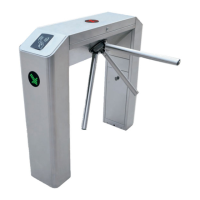
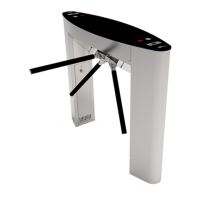
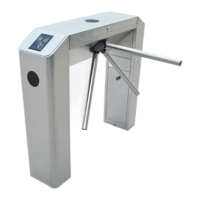
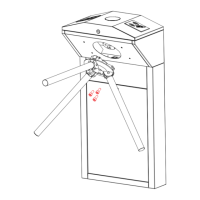
TS2000 Pro Series Tripod Turnstile User Manual
P a g e | 1 Copyright©2020 ZKTECO CO., LTD. All rights reserved.
Thank you for choosing our product. Please read the instructions carefully
before operation. Follow these instructions to ensure that the product is
functioning properly. The images shown in this manual are for illustrative
purposes only.
For further details, please visit our Company’s website
www.zkteco.com.

Questions and Answers

  • M
    Mrs. Anna YoungAug 17, 2025
    What to do if ZKTeco TS2011 Pro do not grant access after authentication?
    • B
      Brian MccarthyAug 17, 2025
      If a ZKTeco turnstile doesn't grant access after successful authentication, here's what to check: 1. Verify the user has the necessary permissions. 2. Use a multimeter to check the NO and COM ports of the access control system for a relay signal output. 3. Short-circuit the ports "K1, GND" and "K2, GND"; if the turnstile opens, inspect the access controller.
  • A
    Amy MeyerAug 19, 2025
    What to do if ZKTeco Turnstiles allows continuous one-way passing?
    • G
      Gloria DavisAug 20, 2025
      If ZKTeco turnstiles allow continuous passing on one side, you can try the following: 1. Check the turnstile-opening solenoid. 2. Ensure the access controller’s “Lock driving duration” is set to 1s. 3. Check the operation of the turnstile-opening solenoid and inspect for any obstructions.
  • A
    Alexander GillAug 22, 2025
    How to troubleshoot a ZKTeco Turnstiles indicator that is not lit?
    • S
      Shannon HillAug 22, 2025
      If the indicator on your ZKTeco turnstile isn't lit when powered on, the issue might stem from the power supply or circuit. Check the connection and power cables for any damage, and ensure all wiring is securely connected.
  • L
    Latoya DawsonAug 26, 2025
    Why arms of ZKTeco TS2011 Pro Turnstiles cannot be lifted manually after power on?
    • T
      Taylor DanielsAug 26, 2025
      If the arms of your ZKTeco tripod turnstile cannot be lifted manually after powering on, it could be due to related component issues or a problem with the drop-arm solenoid. Check if the drop-arm solenoid is operating correctly and inspect its working status.
  • B
    betty66Aug 27, 2025
    What to do if ZKTeco TS2011 Pro Turnstiles do not open after authentication?
    • D
      Drew Parker DDSAug 28, 2025
      If the ZKTeco Turnstile does not open after authentication, here are some things to check: 1. Verify the user has permission to open the turnstile. 2. Use a multimeter to see if the access control system's NO and COM ports output a relay signal. 3. Short-circuit the 'K1, GND' and 'K2, GND' ports. If the turnstile opens, the controller is the problem. Refer to Attachment 2 Connection Diagram of Control Board and Access Control Panel to check the controller's cable connection.
  • C
    Christopher JonesAug 30, 2025
    Why ZKTeco TS2011 Pro allow people to continue passing one-way side during use?
    • K
      kristen52Aug 30, 2025
      If ZKTeco Turnstiles allow continuous one-way passage, consider these checks: 1. Examine the turnstile-opening solenoid. 2. Ensure the access controller's ‘Lock driving duration’ is set to 1 second. 3. Confirm the turnstile-opening solenoid is functioning correctly and not stuck. See Figure 5-2 for reference.
  • D
    dawnhollandSep 2, 2025
    How to troubleshoot ZKTeco TS2011 Pro arms that cannot be lifted manually after powering on?
    • J
      James JohnsonSep 2, 2025
      If the arms of the ZKTeco tripod turnstile cannot be lifted manually after powering on, it might be due to a problem with relative components or the drop-arm solenoid. Check if the drop-arm solenoid is operating correctly. Refer to Figure 5-2 to check the solenoid's work status.
  • J
    John Farley DDSSep 5, 2025
    What to do if the indicator is not lighted on ZKTeco TS2011 Pro?
    • B
      Benjamin WalkerSep 5, 2025
      If the indicator light isn't on when your ZKTeco Turnstiles are powered on, it could be a power supply or circuit issue. Check the connection cable and power cable for damage, and ensure the wiring isn't loose.
  • M
    Megan PowellSep 8, 2025
    Why do ZKTeco Turnstiles allow continuous one-way passage?
    • S
      Sally ConleySep 8, 2025
      If the ZKTeco Turnstiles allow continuous one-way passage, you should first examine the turnstile-opening solenoid. Also, verify that the access controller's 'Lock driving duration' is set to 1 second. Finally, check the operation of the turnstile-opening solenoid, ensuring it isn't stuck, as illustrated in Figure 5- 2.
  • C
    Chris LivingstonSep 12, 2025
    How to fix ZKTeco Turnstiles arms if they cannot be lifted manually?
    • B
      Brian McdowellSep 12, 2025
      If the arms of the ZKTeco tripod turnstile cannot be lifted manually after powering on, check if the drop-arm solenoid is working correctly. Refer to Figure 5-2 to assess the solenoid's operational status and check for any issues with related components.

Summary

Technical Specifications

Arm Installation and Equipment Testing

Arm Installation Method

Details the procedure for installing the turnstile's arms to prevent transportation damage.

Power-on Test Before Installation

Provides steps for performing a power-on test and verifying device functionality.

Equipment Installation

Installation Conditions

Specifies requirements for installing the turnstile on concrete ground and forming a passageway.

Cabling

Guides on routing power and communication wires through inlets and using cable protection.

Installation Procedure

Outlines steps for drilling holes, fixing the mounting plate, and securing the turnstile.

Cable Diagram and DIP Switch Configuration

Equipment Precautions and Maintenance

Troubleshooting

Attachment 1: Default Factory Settings

Attachment 2: Connection Diagram

ZKTeco TS2011 Pro Specifications

General IconGeneral
TypeTripod Turnstile
LED IndicatorYes
Lane Width550 mm
Working EnvironmentIndoor/Outdoor
Ingress Protection GradeIP54
Power Consumption60W
Unlocking Time0.2s
MaterialStainless Steel
Power SupplyAC 100-240V, 50/60Hz
Working Temperature-28°C to 60°C
Input InterfaceDry contact signal
Throughput Rate30 people/minute
Communication InterfaceRS485

Related product manuals