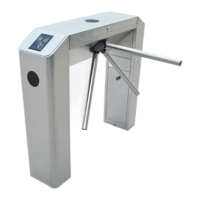
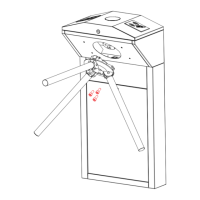
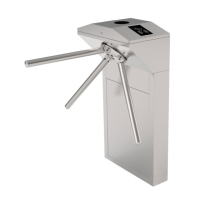
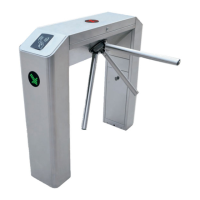
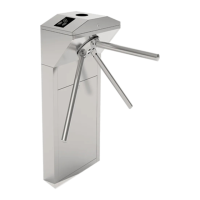
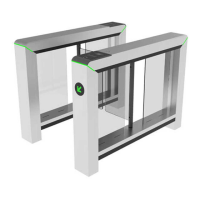
The TS5000A Tripod Turnstile is a security access control device designed to manage pedestrian flow. It is part of the TS5000A series of products manufactured by ZKTeco, a global leader in RFID and biometric verification technologies. This manual provides comprehensive information on its operation, maintenance, and technical specifications.
Function Description
The TS5000A Tripod Turnstile is designed to grant legal access to authorized persons and restrict illegal access. It operates as an automatic tripod turnstile, composed of a cabinet and a movement mechanism. The cabinet houses a direction indicator and a reader sensor, while the movement primarily consists of a motor, frame, and brake lever turntable.
The electric control system is central to its operation, comprising a card reader, an access controller, a master control panel, a direction indicator, and a speaker.
- Card reader: Reads card or fingerprint information and transmits it to the access controller for validation.
- Access controller: Determines the legality of the card/fingerprint and sends the result to the master control panel.
- Master control panel: Processes the verification signal, controls the direction indicator, motor, and other components to execute corresponding actions. It is the control center of the system.
- Direction indicator: Displays the current passage status and guides pedestrians.
- Speaker: Emits an alarm if an unauthorized pedestrian attempts to enter.
When the device is powered on, it performs a self-check to ensure normal operation. Upon successful validation of a card or fingerprint by the card reader, the buzzer sounds, and the signal is sent to the access controller. The master control panel then receives and processes this signal, activating the direction indicator to display a green arrow, signaling permission to pass. Pedestrians can then push the arm to proceed. If an invalid card is swiped or no card is presented, the system prohibits passage and triggers an alarm until the pedestrian exits the passage.
The system supports multiple working modes to meet diverse user needs, including:
- Two-way Swipe
- In Free & Out Swipe
- In Swipe & Out Free
- Two-way Free
- Test mode
The TS5000A can be configured for single-passage management (using two single-core channel gates) or multi-passage management (using multiple single-core channel gates).
Important Technical Specifications
The TS5000A series products are constructed from international standard SUS304 stainless steel, featuring a glass panel on top for aesthetics and corrosion resistance.
- Input Voltage: AC 100~120V/200~240V, 50Hz/60Hz
- Rated Power: 60 W
- Drive Mode: Motorized
- Operating Environment: Indoor and Outdoor (shelter)
- Operating Temperature: -28°C ~ 60°C
- Operating Humidity: 5% ~ 80%
- Flow Rate: Max 30 passages / minute
- Input Control Signal: Dry contact
- Max. Tolerance of Arms: Center: 80 kg, End: 40 kg
- Arm Length: 500 mm
- Net Weight: 60kg
- Gross Weight: 90kg
- Dimension (L x W x H): 1200 mm x 300 mm x 1010 mm
- Package Size (L x W x H): 1330 mm x 420 mm x 1110 mm
Different models within the TS5000A series offer varying access control options:
- TS5000A/TS5200A: Basic Tripod Turnstile (No access control)
- TS5011A/TS5211A: Tripod Turnstile with C3-200 Controller and two RFID readers
- TS5022A/TS5222A: Tripod Turnstile with inBIO260 Controller and two Fingerprint readers with RFID function
Usage Features
The turnstile features a control board with an LCD screen and four buttons: UP, DOWN, ENT (Enter), and ESC (Escape).
- UP: Moves upwards or increases a value in menu settings.
- DOWN: Moves downwards or decreases a value.
- ENT: Enters a menu item or confirms a modified value.
- ESC: Returns to the previous menu or cancels an operation.
To access the menu, users must press ENT and enter a default password (UP, UP, DOWN, DOWN, DOWN, DOWN). The menu offers several configurable options:
- Position adjustment of the swing barrier: Allows setting the barrier to zero (default), left limit, or right limit.
- Passing mode: Configures various opening modes, including two-way swipe (default), left swipe/right free, left free/right swipe, two-way free, left swipe/right prohibit, left prohibit/right swipe, left free/right prohibit, left prohibit/right free, and two-way prohibit.
- Opening duration: Sets the time (5 to 60 seconds, default 10 seconds) after which the gate automatically closes if no one passes.
- Volume setting: Adjusts the buzzer volume from 1 to 16 (default 5) or disables it.
- Exchange voice of door opening: Enables or disables voice prompts (default No).
- Entrance and exit direction setting: Defines which side is the exit and which is the entrance (default: left exit, right entrance).
- Reset counter: Resets the exit counter (default), entry counter, or both.
- System working mode: Allows selection of working mode (default), test mode, or factory reset.
- Version: Displays the current software version (e.g., V3.0.2).
Installation Notes:
- Installation on a horizontal solid platform (50mm to 100mm high) is recommended.
- Avoid corrosive environments.
- Ensure the protective ground wire is reliably connected.
- Maintain a 100mm distance from walls for maintenance access.
- Concealed PVC conduits for cables should be laid 100mm under the ground, with exposed parts not exceeding 100mm and outlets bent to prevent water ingress.
- After installation, a warning line on the ground is recommended to guide pedestrians to stand behind it when swiping cards.
Maintenance Features
Regular maintenance is crucial for the longevity and proper functioning of the TS5000A Tripod Turnstile. Maintenance should only be performed by professional personnel, with the power supply cut off to ensure safety.
-
Chassis maintenance:
- The SUS304 stainless steel chassis may develop rust stains over time.
- Regularly sand the surface gently along the grain and apply anti-rust oil.
- Wipe dust with a soft, smooth fabric; avoid hard objects or water rinsing.
- Repair scratches with matching paint.
-
Movement maintenance:
- Cut off power supply.
- Open the door, clean surface dust, and apply butter to the transmission mechanism.
- Check for smooth movement and tighten any loose screws in connecting parts.
-
Power maintenance:
- Cut off power supply.
- Check for loose plugs and tighten them. Do not randomly change connection positions.
- Ensure external power supply is not exposed; wrap it if necessary.
- Address any leakage issues promptly.
- Verify technical parameters of interfaces and replace aged electronic components as needed.
To access internal components for maintenance (movement, LED light bar, backlight), turn the door lock and lift the upper cover.


 To Next Page
 General