13
MINUTES
The minutes start to ash
Select the minutes with
or
(every 1/4 hour)
Press to conrm,
Exit the menu by pressing
or
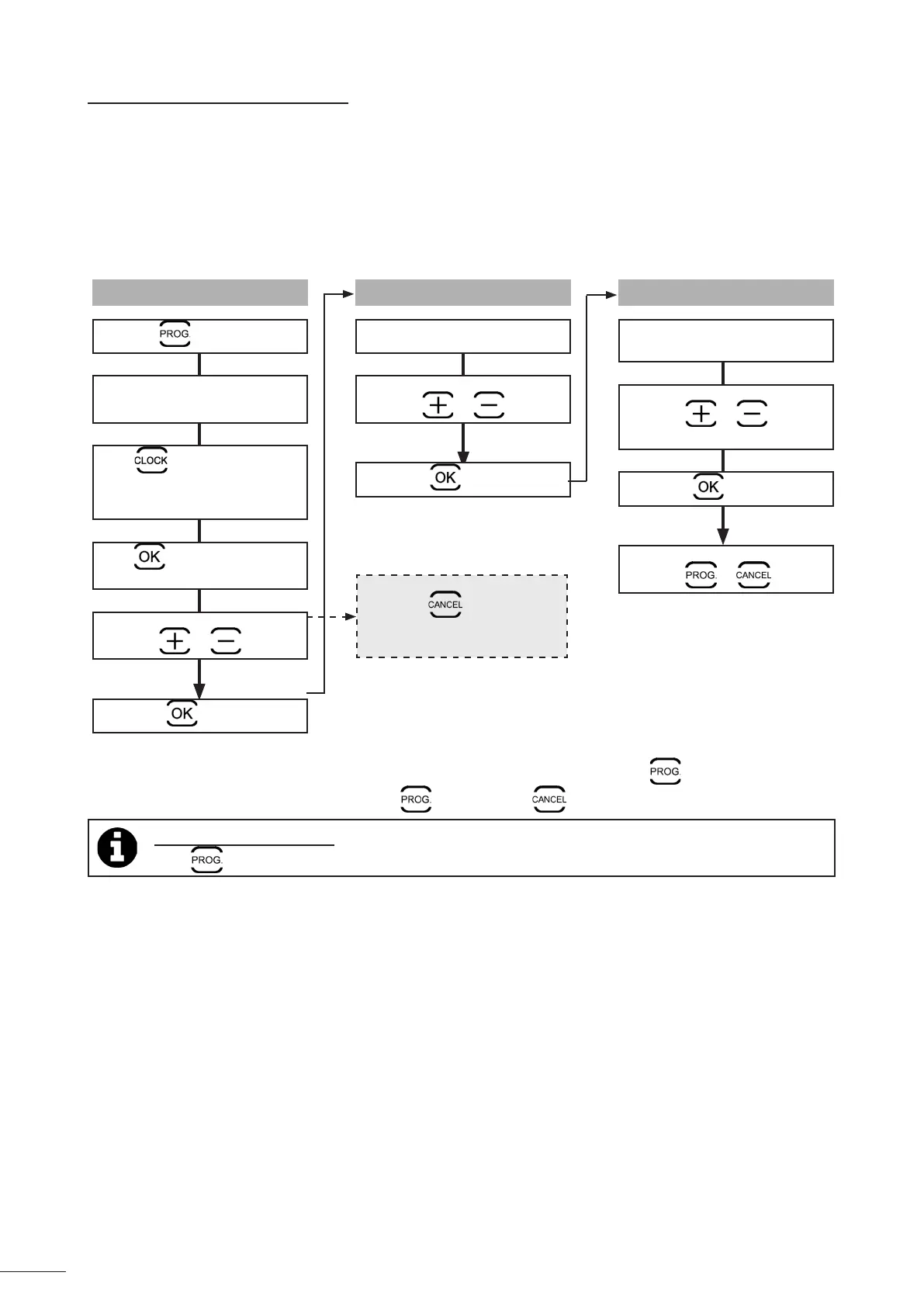
3.7.2 Programming cleaning cycles
Program up to 7 cleaning cycles (for example, 2 days per week: Wednesdays and Saturdays over 4 weeks).
• You must set the me before you program the cleaning cycles, see § “3.7.1 Seng the me”.
• Start by selecng the cleaning cycle on the control box, see § «“3.5.1 Cleaning cycle selecon (depending on model)”.
• Then program the days, hours and minutes.
HOURS
The hours start to ash
Select the hour with
or
Press to conrm,
To cancel a day's programming,
hold down
unl the display
changes.
• The programming stops automacally at the end of the 7th cleaning cycle and the LED switches o.
• To cancel ALL the programming, exit the menu and hold down unl the display changes.
Tip: check the programming
Press
. Each programming is displayed for 3 seconds.
DAY
Press for 3 seconds
The days of the week ash twice.
The LED and the current
date and me ash to remind
you.
Press to start programming
Select the day with
or
Press to conrm,




 To Next Page