FON
DSL
FON
LAN 1
LAN 2
LAN 3
LAN 4
Power
DSL/TEL
FON 1
FON 2
LAN 1
LAN 2
LAN 3
LAN 4
Power
FON S
0
W
LAN
WPS
DECT
FON 1
1&1 HomeServer
Info
WLAN
Festnetz
Internet
Power/DSLL
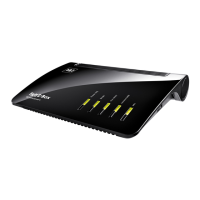
ISDN telephone
Plug the telephone cable (RJ11) into the
port labeled „FON S
0
“ on the 1&1 Home-
Server.
Make sure that you plug the cable into the
socket precisely as shown.
4. Connect telephone
The telephone number, that you gave to or received from 1&1 when placing your order, will be set up for
1&1 telephone calls once you have entered the 1&1 Start-Code.
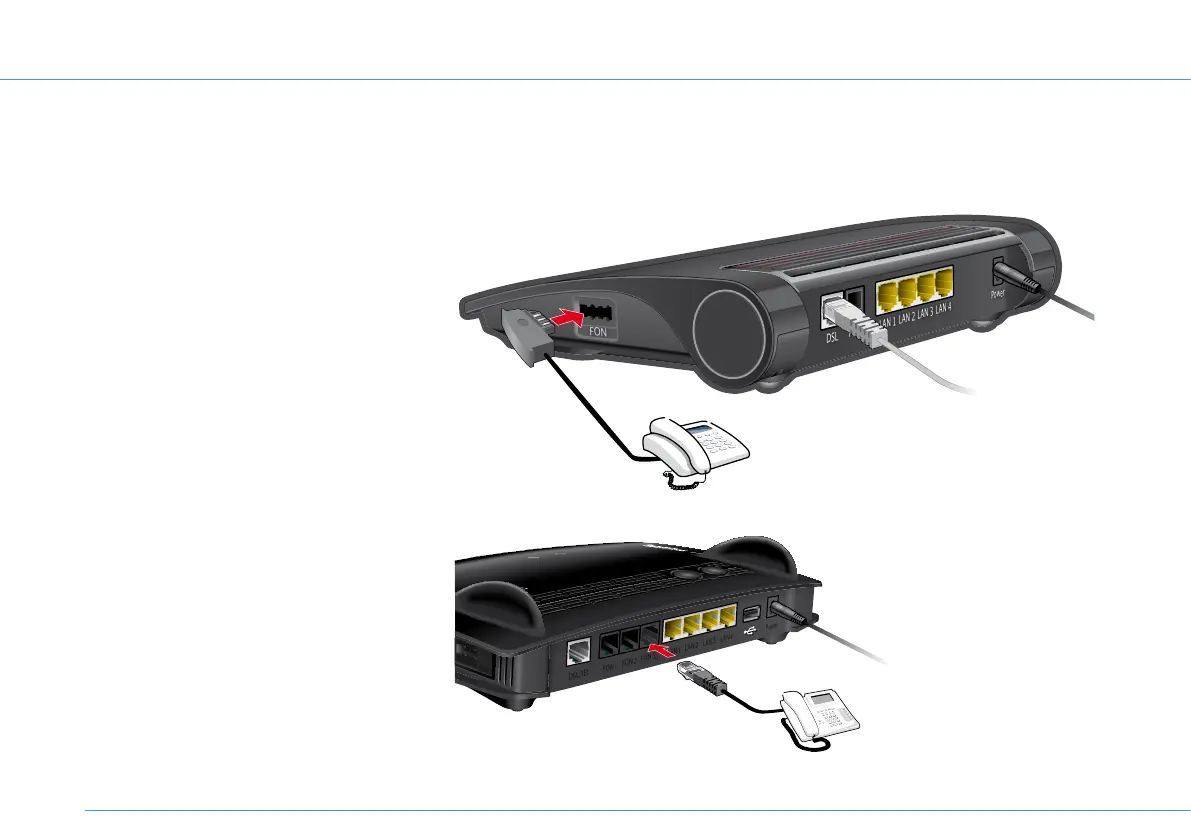
Analogue telephone
Plug the telephone cable (TAE) into the
port labelled “FON” on the side of the
1&1HomeServer. Make sure that you plug
the cable into the port precisely as shown.
18


 To Next Page