Out-of-date firmware
Out-of-date firmware (operating system on
the 1&1 HomeServer) can cause problems.
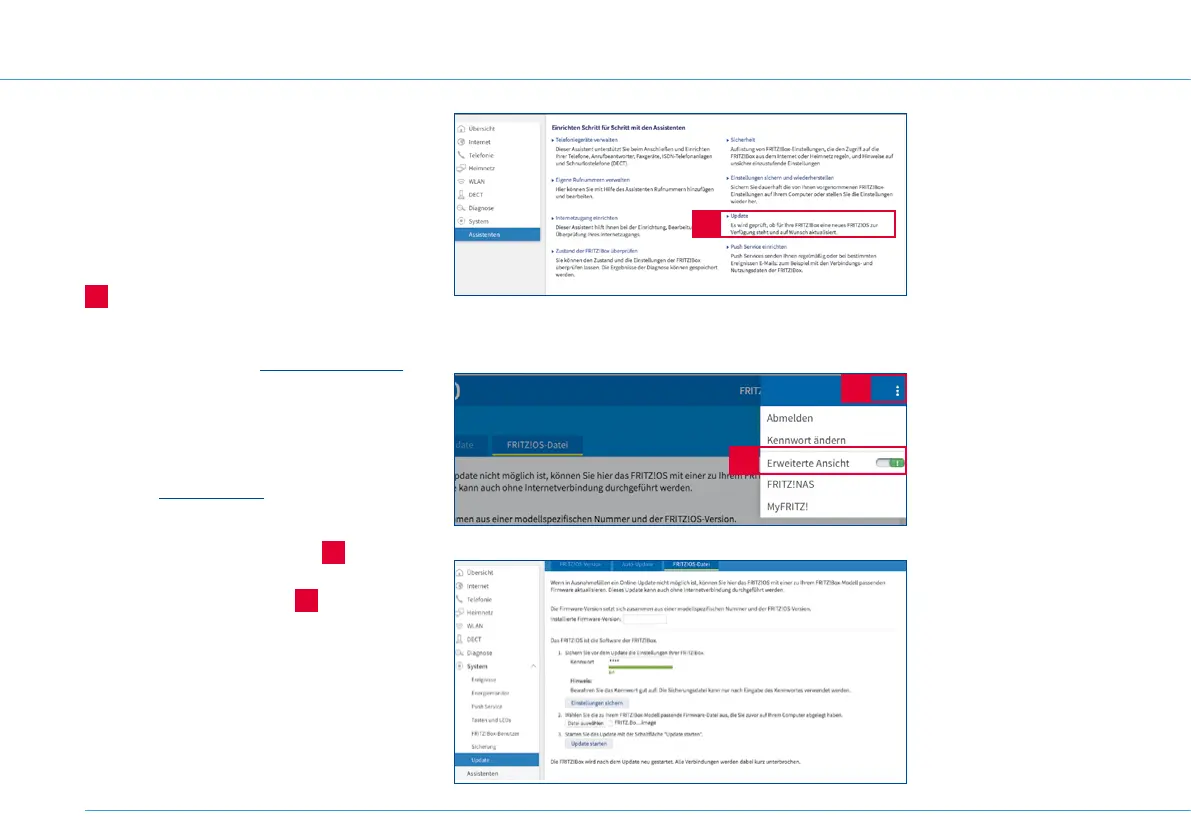
To update the firmware, use the auto-update
tool on your FRITZ!Box, available under
Assistenten > Update (Tools > Update)
A
.
Or download the firmware from the
manufacturer’s website http://www.avm.de
under > Service > Downloads.
1. Select your hardware model and click on
the link to download the latest firmware.
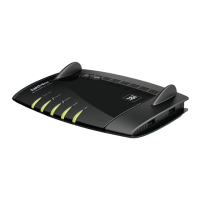
2. Go to http://fritz.box and click on
System > Update.
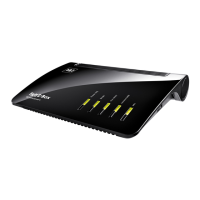
3. Click on the menu symbol
B
on the
top right and activate the Erweiterte
Ansicht (Detailed view)
C
.
4. Click on the FRITZ!OS file.
5. Enter your password and click on
Einstellungen sichern (Save settings).
Update from data
storage device
If you don’t have an
internet connection, you
can download the update
using a different internet
connection, save it onto
a CD or USB drive and
then select the file on your
computer.
Hardware model
You can find the hardware
model on the base of your
1&1 HomeServer.
24
A
B
C


 To Next Page