333D Systems, Inc.
6
CALIBRATING THE OFFSET JETS
WARNING: CALIBRATING THE OFFSET JETS IS NECESSARY WHENEVER A PRINT JET OR AN EXTRUDER
ASSEMBLY HAS BEEN REPLACED. BEFORE PERFORMING THIS PROCEDURE, THE LEVEL GAP PROCEDURE
MUST BE PERFORMED.
NOTE: Calibrating the Offset Jets is only applicable for printers with more than one (1) print jet installed.
Calibration les can be downloaded from http://cubify.com/en/CubePro/Activate. These les are printed like any other .cubepro
le. There are four les available. The les are specic for the model printer (CubePro Duo or CubePro Trio) and for the material type
(ABS or PLA) currently installed in the printer. All cartridges installed must be same material type (ABS or PLA) and each print jet will
be used. Two Level Gap calibration les will also download with the Offset Jet Calibration les. These should be ignored during this
procedure.
Calibration Overview
Depending on your printer model, you may have up to three (3) print jets installed. Calibrating the offset jets becomes necessary
when multi-color or multi-material prints are not aligned properly. If the print jets are not positioned properly, supports may not print as
intended and print geometries may be altered.
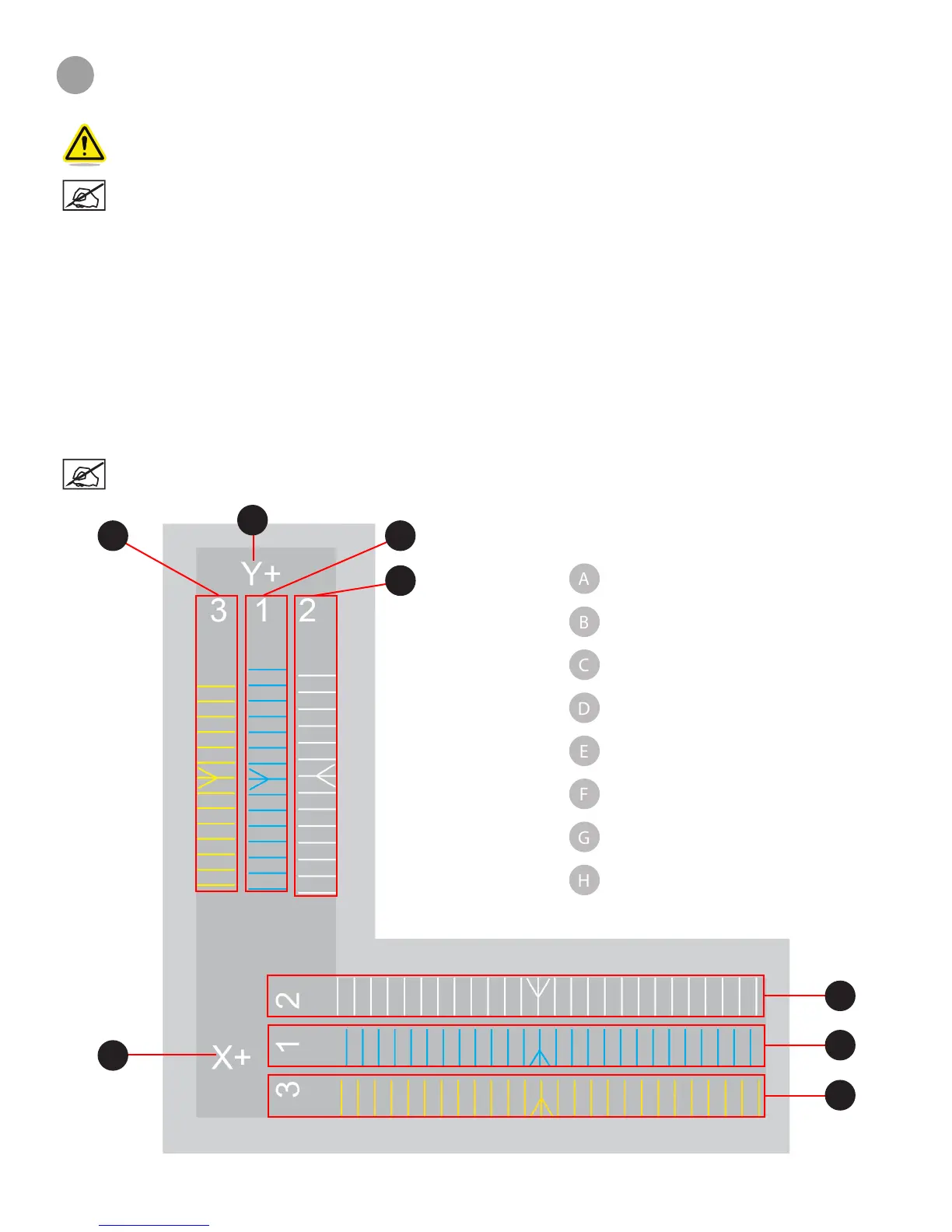
When it becomes necessary to calibrate the offset jets, each print jet will be tested for proper alignment. When printing the test le, a
scale will be printed by all print jets and the scales printed by print jets 2 and 3 will be compared to the scale printed by print jet 1.
NOTE: It is very important to compare the scales printed by print jet 2 and print jet 3 to the scale printed by print
jet 1. Print jet one should not be adjusted.
Print Scale Illustration
A
B
C
D
E
F
G
H
Y-Axis Scale
Print Jet 3 Y-Axis Scale
Print Jet 1 Y-Axis Scale
Print Jet 2 Y-Axis Scale
X-Axis Scale
Print Jet 2 X-Axis Scale
Print Jet 1 X-Axis Scale
Print Jet 3 X-Axis Scale












 To Next Page