Power on/off
Power on/off
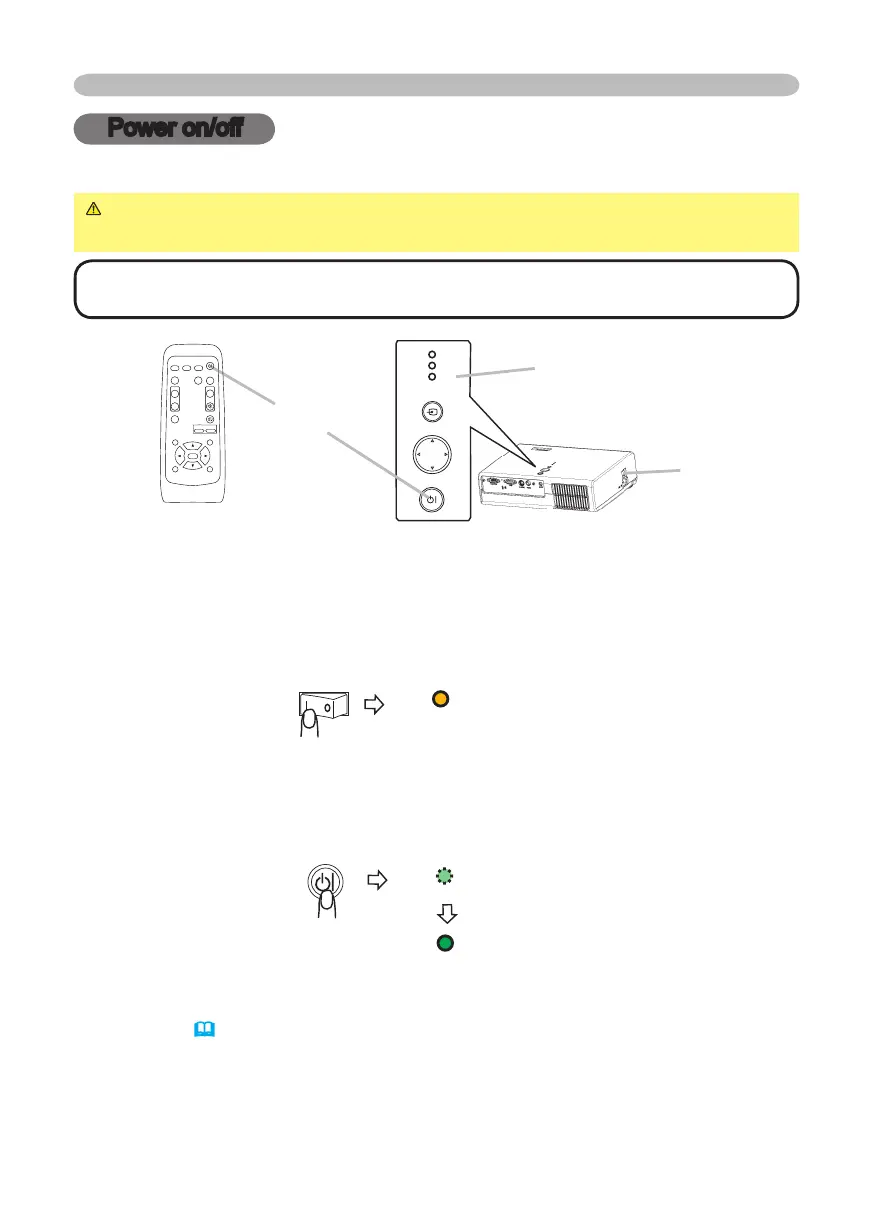
Turning on the power
WARNING
►
When the power is on, a strong light is emitted. Do not look
into the lens or vents of the projector.
NOTE • Turn the power on in right order. Please power on the projector before
the connected devices.
STANDBY/ON
button
1.
Make sure that the power cord is firmly and correctly connected to the
projector and outlet.
2.
Open the lens cover, and set the power switch to the ON position.
The power indicator will light to solid orange. Then wait several seconds
because buttons may not function for these several seconds.
3.
Press the STANDBY/ON button on the projector or remote control.
The projector lamp will light up and the POWER indicator will begin blinking
green. When the power is completely on, the indicator will stop blinking and
light green.
To display the picture, select an input signal according to the section "Selecting an
input signal"
(
18)
.
POWER
(Solid orange)
POWER
(Blinking green)
POWER
(Solid green)
VIDEO
RG
B
SEARC
H
FREEZE
OF
F
ON
MAGNIF
Y
ASPEC
T
STANDBY/O
N
AUTO
BLAN
K
MUTE
VOLUME
KEYST
ON
E
POSITION
ES
C
ENTE
R
MENU
RESE
T
ZOO
M
+
-
POWER indicator
Power switch
STAN DBY /O
N
IN PU
T
ME NU
LA M
P
TE M P
PO W E R
© 3M 2005. 3M™ Digital Projector S15/X15



 To Next Page