Operating
Operating
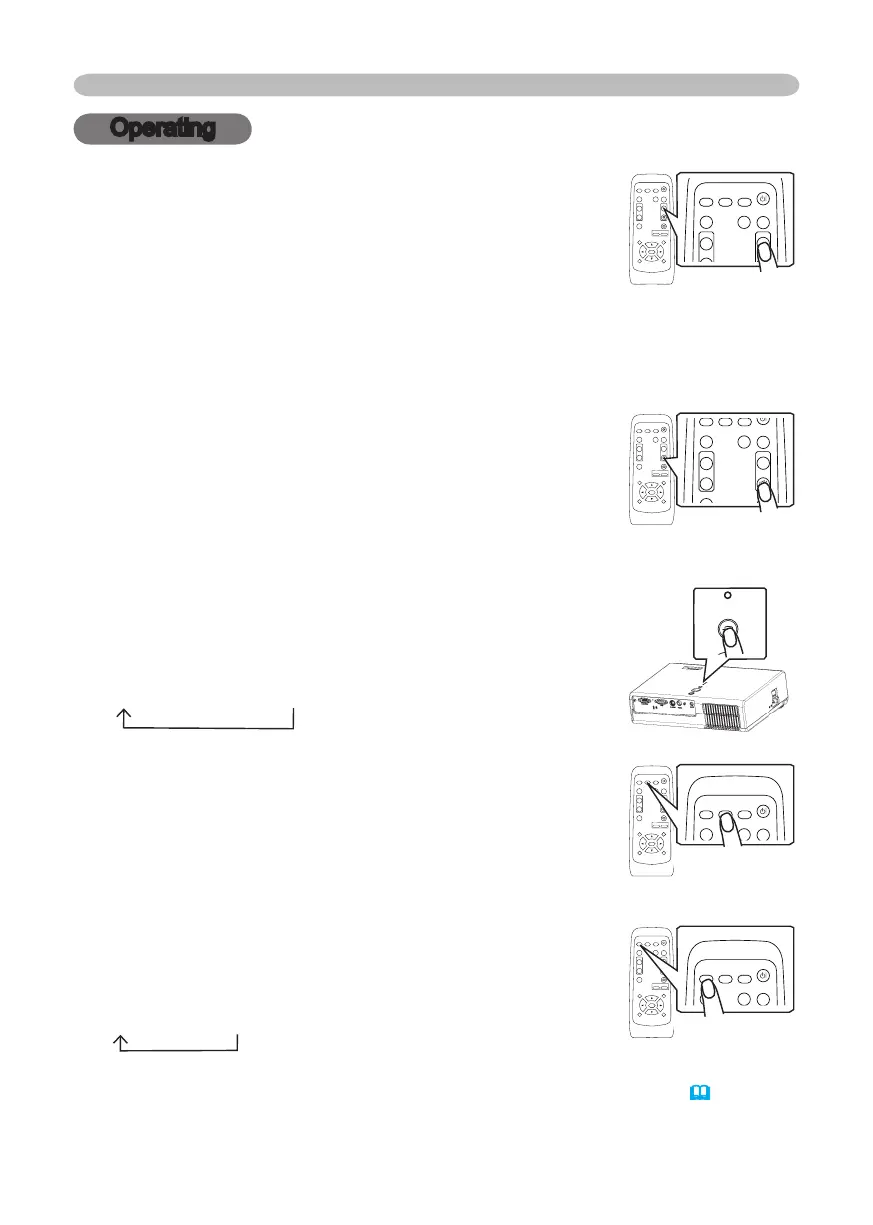
Adjusting the volume
1.
Press the VOLUME button on the remote control.
A dialog will appear on the screen to aid you in adjusting
the volume.
2.
Use the cursor buttons ▲/▼ to adjust the volume.
To close the dialog and complete the operation, press the VOLUME button
again. Even if you don’t do anything, the dialog will automatically disappear
after a few seconds.
Temporarily muting the sound
1.
Press the MUTE button on the remote control.
A dialog will appear on the screen indicating that you
have muted the sound.
To restore the sound, press the MUTE button or
VOLUME button. Even if you don’t do anything, the
dialog will automatically disappear after a few seconds.
Selecting an input signal
1.
Press the INPUT button on the projector.
Each time you press the button, the projector switches
its input port as below.
RGB
S-VIDEO
VIDEO
1.
Press the RGB button on the remote control to select
the RGB port.
1.
Press the VIDEO button on the remote control to select
an input port for video signal.
Each time you press the button, the projector switches
its video input port as below.
S-VIDEO
VIDEO
●
If the VIDEO button is pushed (when switching from RGB to VIDEO signals) when
TURN ON is selected for the AUTO SEARCH item in the OPTION menu
(
38)
the
projector will check the S-VIDEO port first. If no input is detected at the S-VIDEO port,
projector will check the VIDEO port automatically.
VIDEO
RG
B
SEARC
H
FREEZE
OFF
ON
MAGNIFY
ASPECT
STANDBY/ON
AUTO
BLAN
K
MUTE
VOLUME
KEYSTONE
POSITION
ES
C
ENTE
R
MENU
RESE
T
ZOOM
+
-
VIDEO
RG
B
SEARC
H
FREEZE
OFF
ON
MAGNIFY
ASPECT
STANDBY/ON
AUTO
BLAN
K
MUTE
VOLUME
KEYSTONE
POSITION
ES
C
ENTE
R
MENU
RESE
T
ZOOM
+
-
VIDEO
RG
B
SEARC
H
FREEZE
OFF
ON
MAGNIFY
ASPECT
STANDBY/ON
AUTO
BLAN
K
MUTE
VOLUME
KEYSTONE
POSITION
ES
C
ENTE
R
MENU
RESE
T
ZOOM
+
-
VIDEO
RG
B
SEARC
H
FREEZE
OFF
ON
MAGNIFY
ASPECT
STANDBY/ON
AUTO
BLAN
K
MUTE
VOLUME
KEYSTONE
POSITION
ES
C
ENTE
R
MENU
RESE
T
ZOOM
+
-
STAN DBY /O
N
IN PU
T
ME NU
LA M
P
TE M P
PO W E R
VIDEO
RG
B
SEARC
H
FREEZE
OF
F
ON
MAGNIF
Y
ASPEC
T
STANDBY/O
N
AUTO
BLAN
K
MUTE
VOLUME
KEYST
ON
E
POSITION
ES
C
ENTE
R
MENU
RESE
T
ZOO
M
+
-
VIDEO
RG
B
SEARC
H
FREEZE
OF
F
ON
MAGNIF
Y
ASPEC
T
STANDBY/O
N
AUTO
BLAN
K
MUTE
VOLUME
KEYST
ON
E
POSITION
ES
C
ENTE
R
MENU
RESE
T
ZOO
M
+
-
VIDEO
RG
B
SEARC
H
FREEZE
OF
F
ON
MAGNIF
Y
ASPEC
T
STANDBY/O
N
AUTO
BLAN
K
MUTE
VOLUME
KEYST
ON
E
POSITION
ES
C
ENTE
R
MENU
RESE
T
ZOO
M
+
-
VIDEO
RG
B
SEARC
H
FREEZE
OF
F
ON
MAGNIF
Y
ASPEC
T
STANDBY/O
N
AUTO
BLAN
K
MUTE
VOLUME
KEYST
ON
E
POSITION
ES
C
ENTE
R
MENU
RESE
T
ZOO
M
+
-
© 3M 2005. 3M™ Digital Projector S15/X15



 To Next Page