Copyright © 2017, 4ipnet, Inc. All rights reserved. All other trademarks mentioned are the property of their respective owners.
3.5.2 To Managed by WLAN Controller with Complete Tunnel
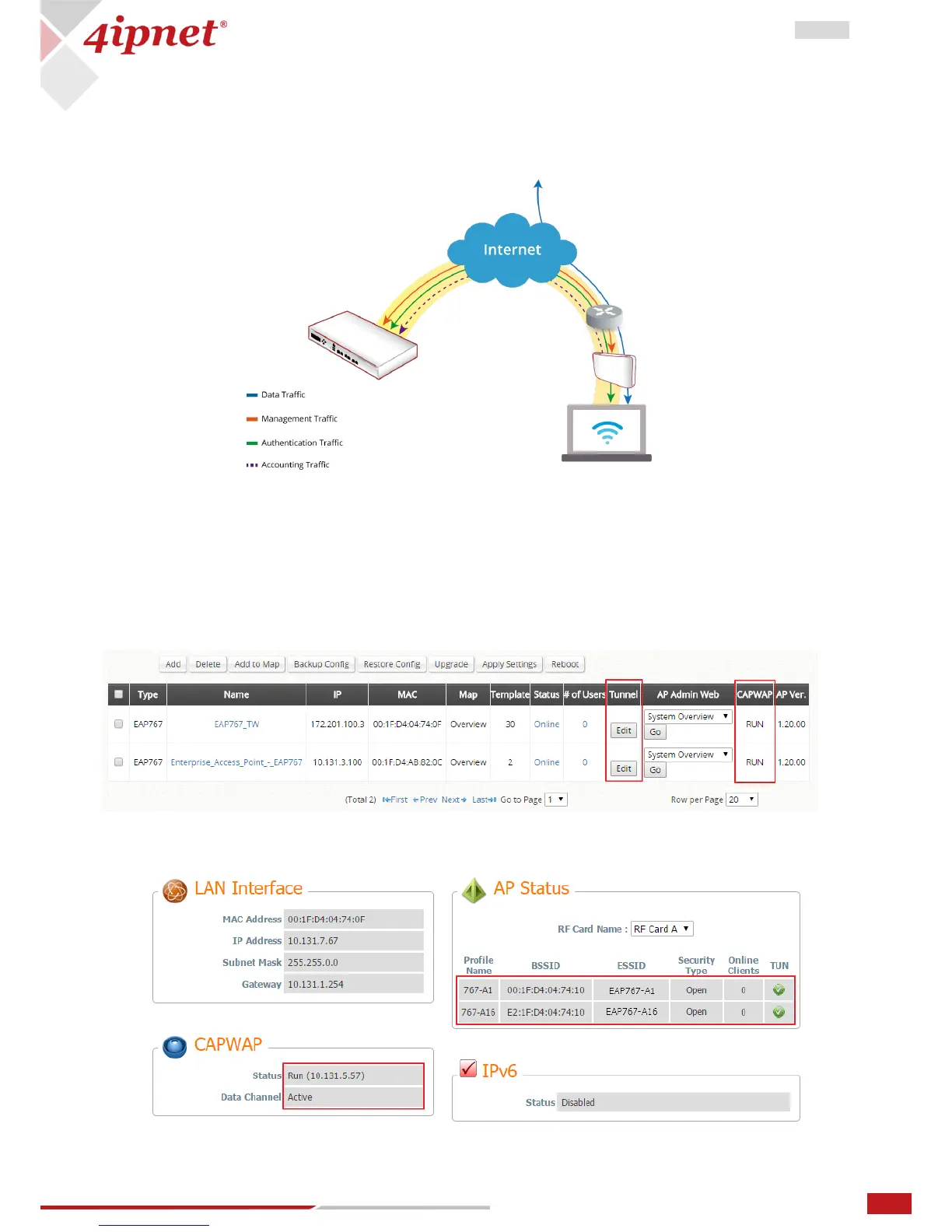
For Split tunnel, only user authentication related traffic will be directed back to the controller. For
authenticated users, data traffic will go to the Internet through the local network directly. The user data
can be transmitted with a shorter path and the network load of the controller can also be reduced.
The following procedures may be helpful
1. On AP: to type the IP address for Static Discovery, and wait until the CAPWAP column displays a “RUN”
status.
2. On WHG: to prepare Template of the VAP configuration with CAPWAP Tunnel Interface – “Split Tunnel”
3. On WHG: to apply the prepared Template to the CAPWAP-establish AP and the Tunnel status will
show a clickable “Edit” button in black if a VAP is configured to be tunneled back to the controller.
4. On AP: to check the AP WMI showing Data Channel is “Active” with the VAP tunnel status in “Green”
light on the System Overview page



 To Next Page