Page 16 AD-4405A Weighing Indicator
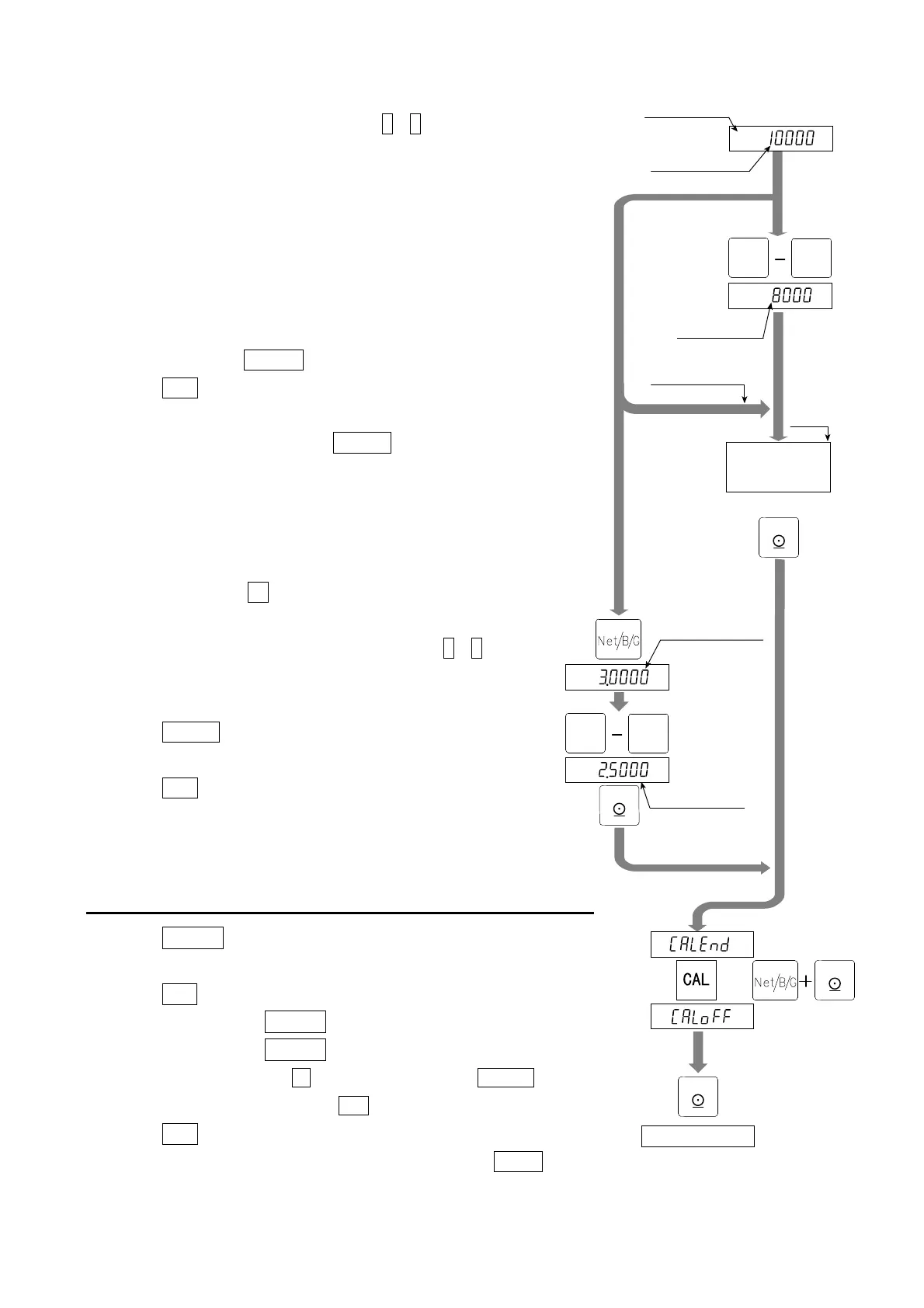
Turn on STABLE mark
Maximum
To step 14, step 16
To step 12
New mass value
Mass of
maximum capacity
To step 14
To step 16
Place the
displayed
mass on the
step 13
ste
14
Stored input voltage
New input voltage
mV/V
mV/V
Turn display off
9
0
9
0
-
NET
GROS
PRINT
ENTE
PRINT
ENTE
PRINT
ENTE
-
NET
GROS
PRINT
ENTE
o
Span
Weighing a Mass less than the Maximum Capacity
Step12 Set a mass value using the
0 - 9 keys.
Step13 Place a mass equivalent to the displayed value
on the weighing unit. Proceed to step 15.
Weighing a Maximum Capacity Mass
Step14 Place a mass equivalent to the maximum
capacity on the weighing unit.
Step15 Wait for the STABLE mark to turn on and
press the ENTER key. Proceed to step17.
ESC key .......... The key to proceed to step17
without changing the parameter.
Caution: Do not press the ENTER key while the
STABLE mark is off (detecting motion).
Arrange the condition using the F00 filter
function.
Digital Input
Step16 Press the +/- key to display the input voltage
parameter of the span in the unit of mV/V.
Adjust the input voltage using the 0 - 9 keys.
(It is possible to store a greater value than
the capacity.)
ENTER key ..... The key to store the parameter
and proceed to step 17.
ESC key .......... The key to proceed to step 17
without changing the parameter.
5.2.5. Exiting the Calibration Mode
Step17 Calend is displayed.
Use the following keys.
CAL key ..... To store the parameters and display
Caloff. Proceed to the next step.
Caloff can be displayed by pressing
the +/- key while pressing the ON/OFF key
instead of CAL key.
ESC key ..... The key to store the parameters
temporarily. Proceed to the Cal 0
display.
5.2. Calibration Procedure


 To Next Page