Page 50 AD-4405A Weighing Indicator
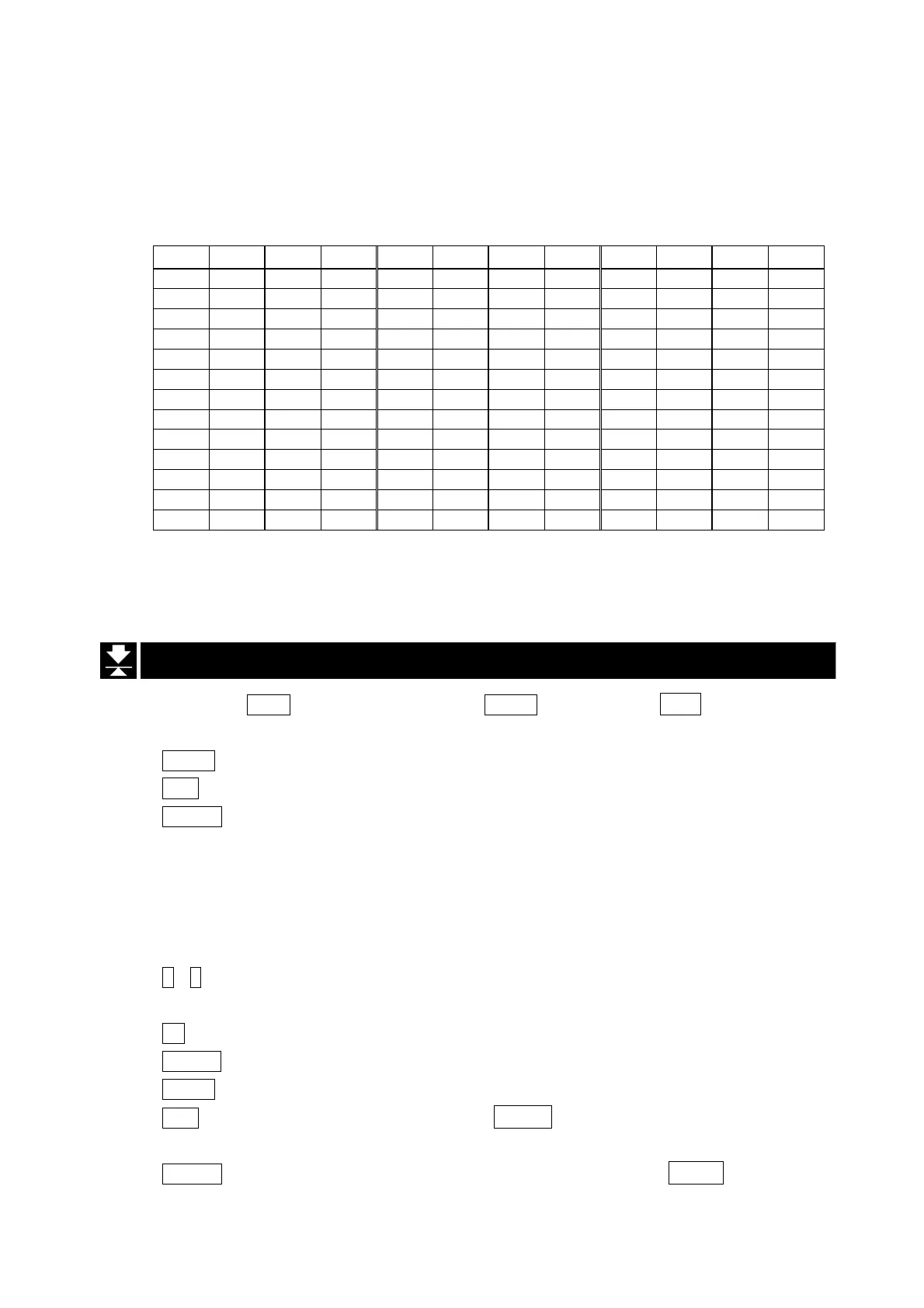
f53=2 Add 2 alphabetical characters including space or dot. Three formats are
available: “an alphabet and a space”, “an alphabet and a dot”, and “one
space and an alphabet”. Specify the characters to be added at f54, referring
to the table below.
Output characters and f54 setting (f53=2) (_ : space)
Out
f54
Out
f54
Out
f54
Out
f54
Out
f54
Out
f54
A_
01
N_
14
A.
31
N.
44
_A
61
_N
74
B_
02
O_
15
B.
32
O.
45
_B
62
_O
75
C_
03
P_
16
C.
33
P.
46
_C
63
_P
76
D_
04
Q_
17
D.
34
Q.
47
_D
64
_Q
77
E_
05
R_
18
E.
35
R.
48
_E
65
_R
78
F_
06
S_
19
F.
36
S.
49
_F
66
_S
79
G_
07
T_
20
G.
37
T.
50
_G
67
_T
80
H_
08
U_
21
H.
38
U.
51
_H
68
_U
81
I_
09
V_
22
I.
39
V.
52
_I
69
_V
82
J_
10
W_
23
J.
40
W.
53
_J
70
_W
83
K_
11
X_
24
K.
41
X.
54
_K
71
_X
84
L_
12
Y_
25
L.
42
Y.
55
_L
72
_Y
85
M_
13
Z_
26
M.
43
Z.
56
_M
73
_Z
86
Example: f54=38, internal year (after f52 calculation) = 17, then
output year = H.17
13.2. Setting Time and Date
Step 1 Press the PT(4) key while pressing the PRINT key to display time.
Use the following keys.
MODE key........The key to select time ( time ) or date( date ) to set.
ESC key...........The key to return to the weight display.
ENTER key ......The key to proceed to step 2 ( time ) or step 3 ( date ).
Step 2 The current time is displayed in the format specified at f50 and is updated. A
triangle indicates AM (triangle 2) or PM (triangle 3) and no triangle is displayed in
24 hour setting. Set the time using the following keys. Once an effective key is
entered, the time update stops.
0 - 9 key ..........The key to set the value at the blinking digit. Once set, the
blinking digit shifts to the right.
+/- key..............The key to shift the blinking digit to the right (including the triangle).
CLEAR key.......The key to reset the setting and displays the current time.
MODE key........The key to switch between AM and PM when triangle 2 or 3 is blinking.
ESC key...........The key to return to the time display without changing the
time setting.
ENTER key ......The key to store the time setting and return to the time display.
13. Calendar / Clock


 To Next Page